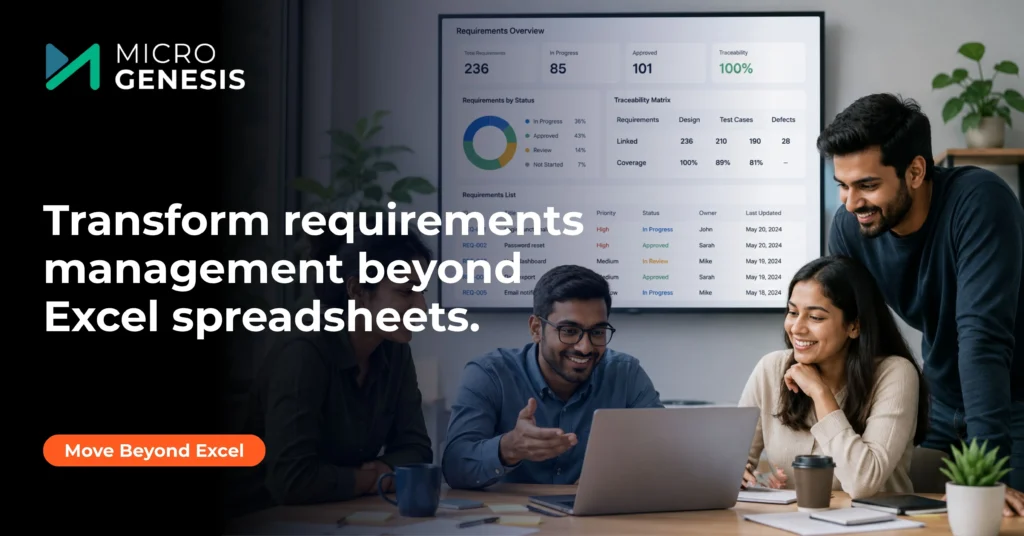
Organizations invest significant time, effort, and money in Application Lifecycle Management (ALM) tools with the expectation that they will streamline product development, improve collaboration, strengthen traceability, and ensure compliance. Yet, despite these investments, many organizations still manage requirements in Excel spreadsheets.
Sound familiar?
Your organization purchased an ALM platform to create a centralized source of truth. However, business analysts continue sharing spreadsheets, project managers track requirement changes in Excel, and stakeholders review requirements through email attachments rather than within the ALM system itself.
This situation is more common than many organizations realize. In fact, one of the biggest reasons ALM implementations fail to deliver their expected value is because requirements never truly leave Excel.
The problem isn’t usually the ALM tool. Most modern ALM platforms provide robust capabilities for requirements management, traceability, testing, change control, and compliance. The real challenge lies in how organizations approach requirements management, user adoption, governance, and process maturity.
In this article, we’ll explore why requirements continue to live in Excel even after purchasing an ALM solution, the hidden costs associated with spreadsheet-based requirements management, and practical strategies for maximizing the return on your ALM investment.
The Comfort of Excel: Why Teams Continue Using It
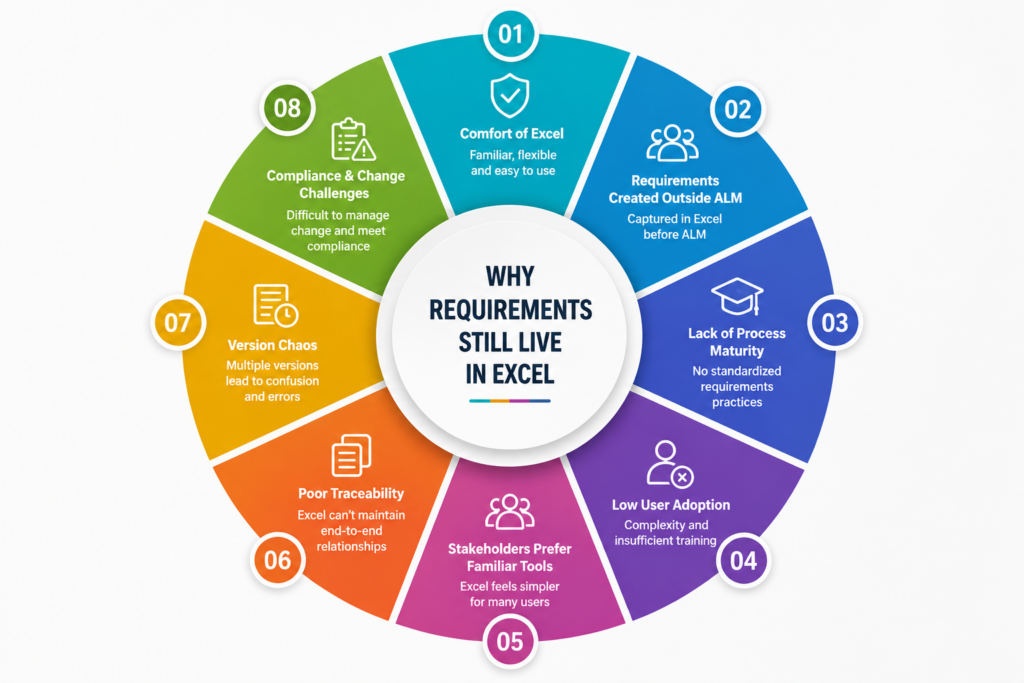
Excel has been part of business operations for decades. Long before modern ALM platforms emerged, organizations relied on spreadsheets to capture, organize, prioritize, and track requirements.
For many teams, Excel remains attractive because it is:
- Familiar
- Flexible
- Easy to modify
- Widely accessible
- Quick to learn
Business analysts can create requirement lists in minutes. Project managers can sort, filter, and categorize data without specialized training. Stakeholders can review requirements without logging into another system.
Because Excel feels easy and accessible, many users continue relying on it even after a sophisticated ALM platform has been implemented.
However, convenience often masks significant limitations. What works for a small project becomes increasingly problematic as organizations scale, teams grow, and products become more complex.
Buying an ALM Tool Doesn’t Automatically Fix Requirements Problems
One of the biggest misconceptions in product development is assuming that purchasing an ALM platform automatically improves requirements management.
Technology alone does not solve process challenges.
Many organizations invest in ALM solutions expecting immediate improvements in:
- Requirements quality
- Traceability
- Compliance
- Collaboration
- Change management
Yet they fail to establish:
- Standardized workflows
- Governance models
- Stakeholder responsibilities
- Review processes
- Adoption strategies
As a result, teams continue using Excel because the underlying process issues remain unresolved.
Successful requirements management requires a combination of people, processes, and technology. Organizations that achieve the best outcomes often establish structured governance and workflows before implementing technology. This is why many businesses turn to Requirement Management Services to help define best practices, streamline processes, and ensure long-term adoption of ALM platforms.
Requirements Are Often Created Outside the ALM Environment
One of the most common reasons requirements stay in Excel is because requirements gathering begins outside the ALM system.
A typical workflow looks like this:
- Stakeholders discuss business needs.
- Analysts document requirements in Excel.
- Reviews occur through email.
- Multiple spreadsheet versions are created.
- Final requirements are uploaded into ALM.
By the time requirements enter the ALM platform, valuable context has already been lost.
Important information such as:
- Stakeholder discussions
- Business rationale
- Review comments
- Assumptions
- Risk assessments
often remains trapped in emails and spreadsheets.
Modern ALM platforms are designed to manage requirements throughout the entire lifecycle—not simply store finalized documentation. Capturing requirements directly within the ALM environment creates greater visibility, accountability, and collaboration from the beginning.
Lack of Requirements Engineering Maturity
Another major reason organizations continue using Excel is the absence of structured requirements engineering practices.
Requirements management is much more than documenting needs in a spreadsheet.
Effective requirements engineering includes:
- Requirements elicitation
- Analysis
- Validation
- Prioritization
- Documentation
- Verification
- Change management
Without a disciplined approach, organizations frequently struggle with:
- Ambiguous requirements
- Missing requirements
- Conflicting stakeholder expectations
- Scope creep
- Project delays
Strong requirements engineering establishes the foundation for successful software and product development initiatives by ensuring requirements are complete, consistent, and aligned with business objectives.
Organizations seeking to improve project outcomes should understand how requirements engineering shapes successful software projects and supports long-term delivery success.
User Adoption Is Usually the Biggest Challenge
Many ALM implementations focus heavily on technology deployment while overlooking user adoption.
Organizations often dedicate substantial effort to:
- Installation
- Configuration
- Integrations
- Infrastructure
But invest far less in:
- User training
- Process education
- Change management
- Stakeholder engagement
When users are not adequately trained, they frequently perceive the ALM platform as:
- Complex
- Difficult to navigate
- Time-consuming
- Administrative overhead
As a result, Excel becomes the preferred alternative.
Teams continue managing requirements in spreadsheets and later upload information into the ALM system for reporting or compliance purposes.
This creates duplicate work, reduces data quality, and limits the organization’s ability to realize the full benefits of ALM.
Successful ALM adoption requires ongoing training, leadership support, and clearly defined workflows that make the platform easier to use than spreadsheets.
Stakeholders Prefer Familiar Tools
Requirements management involves a diverse group of stakeholders, including:
- Customers
- Product managers
- Business analysts
- Developers
- Test engineers
- Compliance teams
- Executives
Many stakeholders interact with requirements only periodically.
For occasional users, Excel often feels simpler than learning a new platform.
This creates fragmented workflows where:
- Business teams use Excel.
- Engineering teams use ALM.
- Information becomes disconnected.
Organizations must simplify stakeholder engagement through intuitive interfaces, role-based dashboards, collaboration features, and streamlined review processes.
The goal should be to make the ALM platform the easiest place to create, review, and manage requirements.
Excel Cannot Deliver True Requirements Traceability
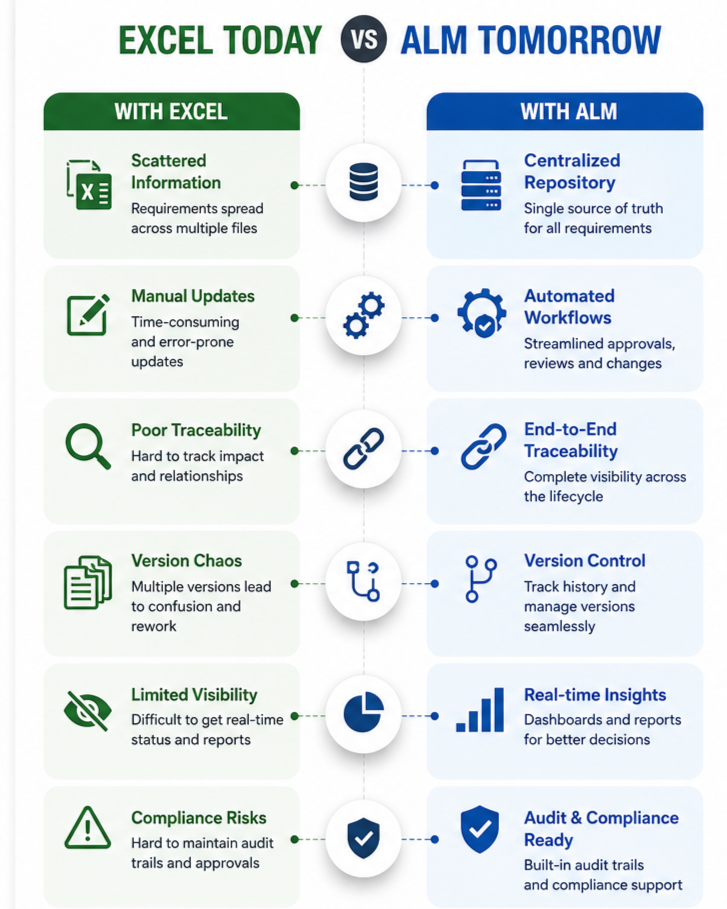
One of the most valuable capabilities of an ALM platform is end-to-end traceability.
Requirements should be linked to:
- Business objectives
- System requirements
- Design artifacts
- Development tasks
- Source code
- Test cases
- Defects
- Releases
Excel struggles to maintain these relationships effectively.
As projects evolve, manual updates become increasingly difficult and prone to errors.
Without traceability, organizations face challenges answering critical questions:
- Which requirements changed?
- What systems are affected?
- Have all requirements been tested?
- Which defects impact specific requirements?
Strong traceability provides visibility across the entire development lifecycle and significantly improves quality, compliance, and project control.
Understanding the importance of requirements traceability is essential for organizations looking to maximize the value of their ALM investment.
Version Control Quickly Becomes Unmanageable
Most organizations that rely heavily on Excel eventually experience version control chaos.
You may recognize file names such as:
- Requirements_v4.xlsx
- Requirements_v4_Final.xlsx
- Requirements_v4_Final_Approved.xlsx
- Requirements_v4_Final_Approved_Updated.xlsx
As projects become more complex, teams struggle to determine:
- Which version is current
- Who approved changes
- What modifications were made
- Whether stakeholders reviewed the latest version
ALM platforms eliminate these challenges through centralized repositories, revision histories, workflow automation, and audit trails.
However, these benefits are only realized when requirements are managed directly within the platform rather than maintained in parallel spreadsheets.
Compliance Requirements Demand More Than Spreadsheets
Organizations operating in regulated industries face increasingly strict compliance requirements.
Industries such as:
- Automotive
- Aerospace
- Medical devices
- Defense
- Financial services
must demonstrate complete lifecycle traceability and documentation.
Auditors frequently require evidence showing:
- Requirement origins
- Review history
- Approval records
- Verification results
- Validation activities
- Change histories
Producing this information from spreadsheets is time-consuming and error-prone.
ALM platforms simplify compliance by providing:
- Audit trails
- Electronic approvals
- Traceability matrices
- Impact analysis
- Reporting capabilities
Organizations that rely heavily on Excel often spend significantly more time preparing for audits and responding to compliance requests.
Change Management Is Extremely Difficult in Excel
Requirements rarely remain static.
They evolve because of:
- Customer feedback
- Regulatory updates
- Market changes
- Technical constraints
- Business priorities
Managing these changes through spreadsheets creates significant challenges.
Teams must manually:
- Update multiple files
- Notify stakeholders
- Assess impacts
- Track approvals
- Maintain records
This process introduces risk and increases the likelihood of inconsistencies.
Modern ALM solutions automate much of this effort through integrated workflows, notifications, approvals, and impact analysis capabilities.
The Hidden Costs of Spreadsheet-Based Requirements Management
Many organizations underestimate the true cost of continuing to use Excel.
These costs include:
Increased Rework
Incomplete or misunderstood requirements lead to defects and redevelopment efforts.
Project Delays
Version conflicts and manual coordination slow decision-making.
Reduced Quality
Poor traceability increases the likelihood of missed requirements.
Compliance Risks
Insufficient documentation creates audit challenges.
Lower Productivity
Teams spend excessive time maintaining spreadsheets instead of delivering value.
Over time, these hidden costs can significantly exceed the investment required to fully adopt and optimize an ALM platform.
Signs Your ALM Investment Is Underperforming
Your ALM implementation may not be delivering expected results if:
- Requirements originate in Excel.
- Stakeholders avoid the platform.
- Traceability is incomplete.
- Reports require manual consolidation.
- Reviews occur through email.
- Multiple repositories exist.
- Audit preparation is highly manual.
These symptoms often indicate gaps in process maturity rather than shortcomings in technology.
How to Move Requirements Out of Excel and Into ALM
Successfully transitioning away from spreadsheets requires more than importing files.
Establish Clear Processes
Organizations should define:
- Ownership
- Governance
- Approval workflows
- Change management procedures
Following proven best practices for requirements management in ALM can significantly improve adoption and consistency across teams.
Strengthen Traceability
Connect requirements directly to business objectives, design artifacts, development activities, testing processes, and validation efforts.
Organizations that prioritize traceability gain greater visibility, improved compliance readiness, and reduced project risk.
Improve Stakeholder Engagement
Provide role-based views, intuitive dashboards, collaboration capabilities, and streamlined workflows.
Invest in Ongoing Training
Adoption is not a one-time activity. Continuous education ensures users understand both the platform and the processes supporting it.
Measure Adoption and Success
Track metrics such as:
- Requirements managed in ALM
- Traceability coverage
- Review completion rates
- Change management efficiency
- Compliance readiness
Successful Organizations Focus on Requirements Management Excellence
The organizations that maximize ALM value recognize that technology is only part of the solution.
They invest in:
- Governance
- Collaboration
- Traceability
- Change control
- Process standardization
- Continuous improvement
These principles align closely with the 9 success factors for effective requirements management, which help organizations improve project outcomes while reducing risk and complexity.
How MicroGenesis Can Help You Move Beyond Excel
If your organization is still managing requirements in spreadsheets despite investing in an ALM platform, the challenge may not be the technology itself. More often, it stems from process gaps, low adoption, fragmented workflows, and insufficient traceability.
Through comprehensive ALM Services, MicroGenesis helps organizations establish structured requirements management frameworks, improve stakeholder collaboration, strengthen traceability, and maximize the value of their ALM investments.
Organizations using IBM’s engineering ecosystem can leverage MicroGenesis expertise in IBM Engineering Lifecycle Management (IBM ELM) to create a connected environment where requirements, testing, development, and change management activities remain fully integrated and traceable throughout the product lifecycle.
For businesses seeking a modern ALM platform to replace spreadsheet-driven processes, Codebeamer ALM provides advanced capabilities for requirements management, risk management, compliance, and end-to-end traceability across complex engineering environments. MicroGenesis helps organizations implement and optimize Codebeamer to accelerate digital engineering transformation while maintaining regulatory compliance.
Whether your goal is to improve requirements quality, eliminate spreadsheet silos, achieve compliance readiness, or establish complete lifecycle visibility, MicroGenesis helps build mature ALM ecosystems that support innovation, quality, and long-term business success.
Conclusion
Buying an ALM platform should be the beginning of your requirements management transformation—not the end.
If your requirements still live in Excel, the underlying issue is rarely the software itself. More often, it reflects challenges related to process maturity, governance, stakeholder engagement, requirements engineering, and user adoption.
While Excel remains familiar and convenient, it cannot provide the traceability, collaboration, compliance support, and lifecycle visibility that modern engineering organizations require.
Organizations that successfully transition from spreadsheets to integrated ALM environments gain a single source of truth for requirements, enabling better decision-making, improved quality, reduced rework, stronger compliance, and faster product delivery.
The real value of ALM is realized when requirements are captured, managed, traced, validated, and optimized throughout the entire lifecycle. Once that happens, organizations finally unlock the return on investment they expected when they purchased their ALM platform in the first place.