PTC Codebeamer Plugins for Enterprise Agility & Seamless Integrations

Overview

Extend the Power of Codebeamer with Our Plugins

Transform your ALM experience with our powerful plugin ecosystem. From automated workflows and advanced reporting to seamless Windchill integration, our solutions are designed to eliminate manual effort, enhance visibility, and accelerate your product development lifecycle. 

While PTC Codebeamer offers robust Application Lifecycle Management (ALM), complex enterprise environments often benefit from specialized functionality. Our suite of custom plugins extends and enhances Codebeamer’s native capabilities and your unique business needs.

Key Advantages of Our Plugins

Our objective is to extend and enhance Codebeamer’s capabilities – automating tedious tasks, providing deep visibility, and enabling seamless integration with enterprise systems like Windchill.

What you gain

Time savings

Automate state transitions, test result updates, and data propagation across items. 

Accuracy & consistency

Eliminate manual errors in documentation, traceability, and field updates. 

Actionable visibility 

See team capacity, release timelines, and requirement dependencies at a glance. 

Seamless integrations 

Connect Codebeamer with Windchill and other tools without breaking workflows. 

Configurable, customizable & reusable

Every plugin is built to adapt to your specific project needs, can be tailored to client requirements, and reused across teams. 

Ready to Unlock the Full Potential of PTC Codebeamer?

Our Codebeamer Plugins

Our objective is to bridge the gaps in native Codebeamer functionality—automating tedious tasks, providing deep visibility, and enabling seamless integration with enterprise systems like Windchill. 

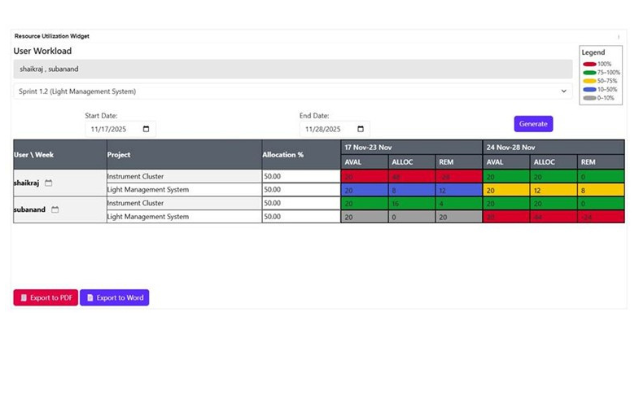
Capacity Planning Dashboard

Category: Reporting 

Description
Key Benefits
  • A dynamic widget for Wiki Dashboards that visualizes team availability.
  • Provides a consolidated weekly view of allocations, absences, and utilization.
  • Allows managers to adjust allocation percentages and mark unavailability directly within the dashboard.
PTC Codebeamer Plugins for Enterprise Agility & Seamless Integrations
  • Adds resource availability reporting to complement Codebeamer’s existing reporting suite.
  • Enables accurate work allocation before projects start.
  • Empowers Project Managers and Team Leads with real-time utilization data.
PTC Codebeamer Plugins for Enterprise Agility & Seamless Integrations

Codebeamer - Windchill Integration

Category: Integration 

Description
Key Benefits
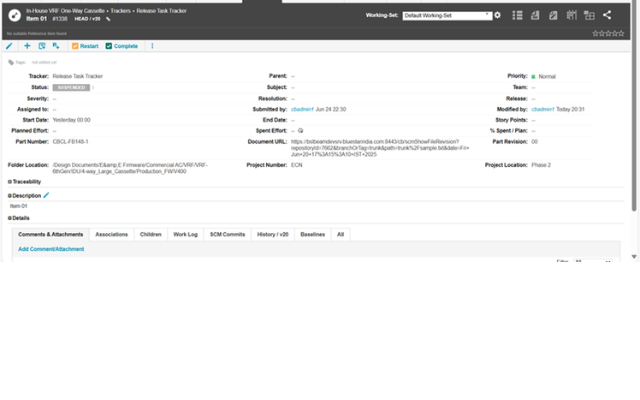
  • Automated bi-directional synchronization between Codebeamer and Windchill.
  • Triggered by state transitions, the Groovy script automates document creation in Windchill using hex files from Codebeamer.
  • Automatically links created documents to the correct Part Number using the "Described By" relationship.
PTC Codebeamer Plugins for Enterprise Agility & Seamless Integrations
  • Eliminates the manual effort of creating documents and linking them in Windchill.
  • Ensures 100% traceability between software artifacts and mechanical/electrical parts.
  • Reduces risk of errors and improves compliance.
PTC Codebeamer Plugins for Enterprise Agility & Seamless Integrations

Advanced Gantt Chart

Category: Extension

Description
Key Benefits
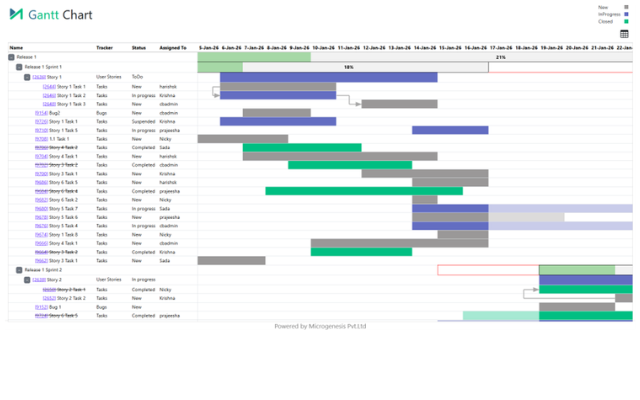
  • A custom JavaScript extension that provides a superior Gantt view for validation.
  • Displays a complete hierarchy: Releases → Sprints → Associated Items.
  • Flags items estimated outside their sprint/release timeline for quick corrective action.
PTC Codebeamer Plugins for Enterprise Agility & Seamless Integrations
  • Enhances native Gantt views with additional hierarchy and validation features.
  • Provides stakeholders a single view to validate project health and timelines.
  • Clear visual indicators differentiate between open and completed items.
PTC Codebeamer Plugins for Enterprise Agility & Seamless Integrations

Auto-Field Updater

Category: Automation

Description
Key Benefits
  • Automates data propagation between parent and child items using Groovy scripts.
  • On state transition, pulls attribute data from the parent into a child’s table.
  • On a separate transition, pushes updated values from the child back to the parent.
PTC Codebeamer Plugins for Enterprise Agility & Seamless Integrations
  • Eliminates manual copying and pasting of data across items.
  • Ensures data consistency across the project hierarchy.
  • Saves significant time during change management processes.
PTC Codebeamer Plugins for Enterprise Agility & Seamless Integrations

Auto Workflow Transition

Category: Automation

Description
Key Benefits
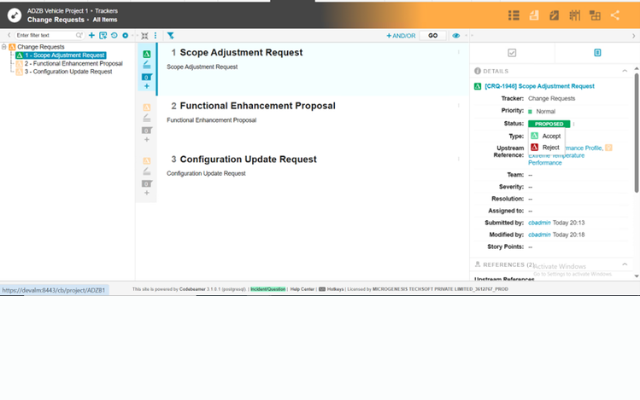
  • A Codebeamer Listener that monitors Change Request workflow states.
  • Automatically synchronizes the workflow states of all associated requirements (upstream and downstream) when a Change Request is accepted.
PTC Codebeamer Plugins for Enterprise Agility & Seamless Integrations
  • Ensures that all linked items move through the workflow correctly.
  • Improves process consistency and reduces manual overhead for engineers.
  • Enhances traceability by linking state changes to the initiating CR.
PTC Codebeamer Plugins for Enterprise Agility & Seamless Integrations

Auto Table Creation

Category: Usability Enhancement

Description
Key Benefits
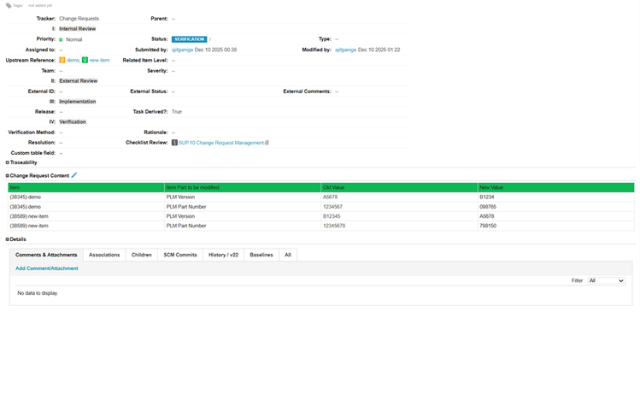
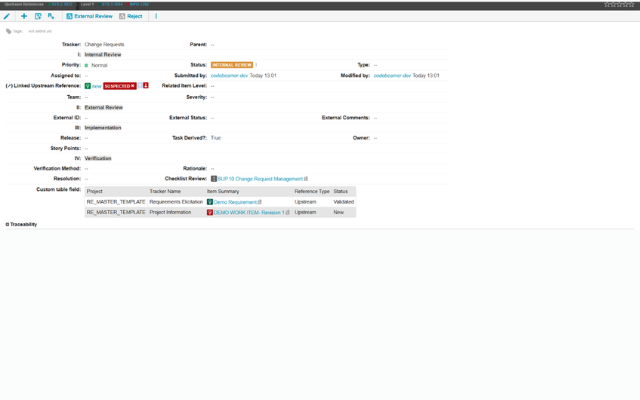
  • A Groovy script that triggers during Change Request state transitions.
  • Dynamically populates a custom attribute with a structured table detailing all associated requirements (state, project, tracker type).
PTC Codebeamer Plugins for Enterprise Agility & Seamless Integrations
  • Provides instant visibility into the status of associated requirements.
  • Eliminates the need for manual cross-referencing across different trackers.
  • Improves decision-making by presenting a consolidated view of impact.
PTC Codebeamer Plugins for Enterprise Agility & Seamless Integrations

Auto Update Test Result

Category: Automation

Description
Key Benefits
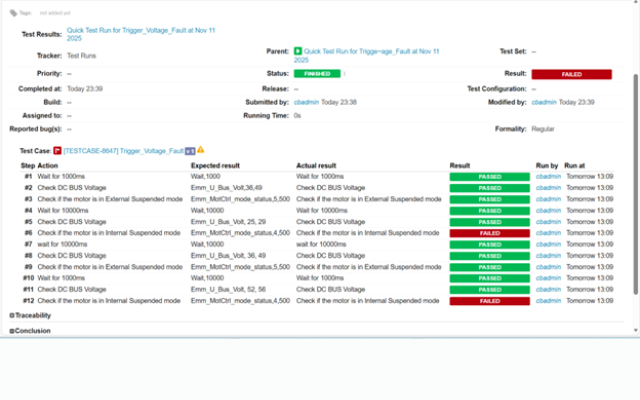
  • A Python script executed via Jenkins that automates test result updates.
  • Consumes JSON output from the CANoe adapter and updates both parent and child test runs.
PTC Codebeamer Plugins for Enterprise Agility & Seamless Integrations
  • Eliminates manual intervention in test result reporting.
  • Ensures 100% accuracy and consistency between CANoe output and Codebeamer.
  • Streamlines the testing process, saving hours of manual update time per sprint.
PTC Codebeamer Plugins for Enterprise Agility & Seamless Integrations

XML Formatter

Category: Automation

Description
Key Benefits
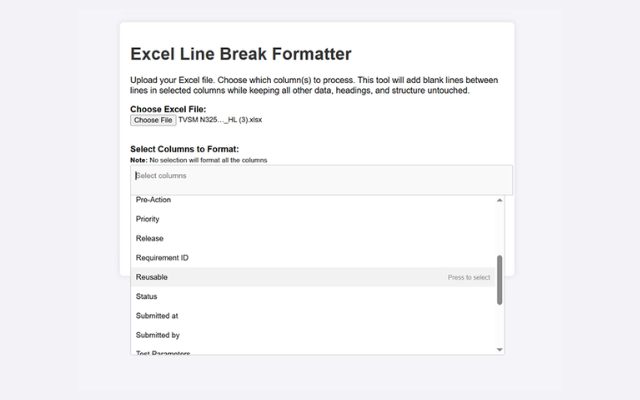
  • An extension within Codebeamer that reformats uploaded XML test case files.
  • Preserves spacing and structure lost during standard uploads.
  • Allows users to select specific columns/fields to format for optimal readability.
PTC Codebeamer Plugins for Enterprise Agility & Seamless Integrations
  • Resolves readability issues caused by standard XML uploads.
  • Ensures data clarity for reviewers and auditors.
  • Prevents data distortion during import/export cycles.
PTC Codebeamer Plugins for Enterprise Agility & Seamless Integrations

Our Codebeamer Plugins

Our objective is to bridge the gaps in native Codebeamer functionality—automating tedious tasks, providing deep visibility, and enabling seamless integration with enterprise systems like Windchill. 

Unlock Seamless ALM Automation

Reach Out & Let’s Begin

Unlock the Full Potential of Codebeamer

Stop struggling with manual processes and visibility gaps. Let our plugin ecosystem streamline your ALM processes today. Let’s discuss which plugins are right for your team.

PTC Codebeamer Plugins for Enterprise Agility & Seamless Integrations

Dhananjaya K

Vice President – Global Markets


PTC Codebeamer Plugins for Enterprise Agility & Seamless Integrations

Nicky Chris John

Senior Technical Manager – Software & Systems Engineering

Salesforce Implementation Partner

From strategy to go-live — and beyond

As your dedicated Salesforce implementation partner, MicroGenesis delivers full-lifecycle implementations using a structured, low-risk methodology designed to get you to value quickly and keep you there through every phase of growth.

1. Discovery & Advisory

Workshops with your Salesforce consulting team to map processes, define goals, and shape a clear CRM roadmap.

2. Solution Design

Architecture, data model, and configuration blueprint crafted by certified Salesforce consultants aligned to your requirements.

3. Build & Configure

Declarative setup plus custom development across Sales, Service & Experience Cloud — built to Salesforce best practices.

4. Data & Integration

Secure data migration and Salesforce integration with your existing enterprise systems, delivered by our Salesforce integration partners team.

5. Testing & QA

Functional, integration, and user acceptance testing for a reliable, low-risk rollout of your Salesforce environment.

6. Deployment & Go-Live

Controlled release with cutover planning and hypercare support during the critical first days post-launch.

7. Training & Adoption

Enablement and change management from your Salesforce consulting firm to drive confident, lasting user adoption.

8. Managed Support

Ongoing 24×7 L1–L3 Salesforce managed support and continuous improvement for your live org.

Salesforce Managed Support

24X7 L1, L2 & L3 Salesforce support

Keep your Salesforce environment healthy, secure, and continuously improving with always-on managed support across all three tiers – delivered by our Salesforce partner team under clear SLAs.

24 X 7 X 365 Salesforce support coverage with defined SLAs and escalation paths

L1 : First Line

Day-to-day user support & monitoring
  • Ticket logging, triage & tracking
  • User access, login & password assistance
  • Basic how-to and navigation support
  • System monitoring and known issue resolution
  • Escalation to L2/L3 teams when required

L2: Functional

Configuration & Advanced Troubleshooting
  • Configuration changes and administrative tasks
  • Flow, validation rule, and automation troubleshooting
  • Reports, dashboards, and data issue resolution
  • Salesforce integration and synchronization diagnostics
  • Root cause analysis and issue resolution

L3: Engineering

Custom Development & Deep Expertise
  • Apex, Lightning Web Components (LWC), and custom code troubleshooting
  • Complex Salesforce integration engineering and support
  • Performance optimization and scalability tuning
  • Enhancements and new feature development
  • Vendor escalation management and coordination