Microsoft PowerApps offers a powerful solution to simplify and automate the app approval process, providing organizations with a flexible and user-friendly platform. One powerful feature within PowerApps is the ability to implement in-app approval workflows, allowing users to manage and authorize requests seamlessly within the PowerApps environment, eliminating the need for external tools like Power Automate. In this article, we will explore how PowerApps can be leveraged to streamline In-app approval processes, saving time and increasing overall productivity.
Understanding PowerApps In-App Approval:
PowerApps In-App Approval refers to the capability of embedding approval workflows directly within custom applications developed using PowerApps. This feature facilitates a more integrated and user-friendly approach to approvals, eliminating the need for users to switch between different applications or platforms. Whether it’s a request for leave, a purchase order, or any other approval-based process, PowerApps In-App Approval can be tailored to meet the unique needs of each organization.
Key Benefits of PowerApps In-App Approval:
With in-app approval workflows, users can perform approval tasks without leaving the PowerApps environment. This seamless integration provides a unified user experience, reducing the need for context-switching and improving overall usability. In-app approval streamlines decision-making processes, significantly reducing the time it takes to get approvals. This efficiency translates to cost savings and allows employees to focus on more value-added tasks rather than administrative overhead.
PowerApps allows organizations to design custom applications tailored to their specific approval processes. Whether it’s a multi-step project approval or a simple expense report, PowerApps In-App Approval can be adapted to meet the unique requirements of different business processes.
Implementation Steps for In-App Approvals in PowerApps:
Identify Approval Processes:
Clearly define the approval processes that can benefit from in-app approvals within your organization. Whether it’s leave requests, expense approvals or project signoffs, identify the workflows that could be streamlined.
Design the PowerApps:
Utilize the PowerApps platform to design a custom application that includes forms, fields, and user interfaces for submitting and managing approval requests. Ensure that the app aligns with the specific requirements of your approval processes.

Implement Approval Logic:
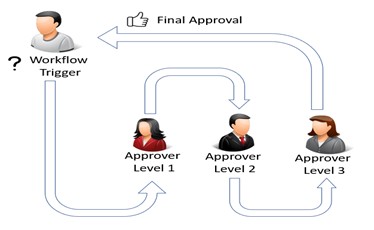
Within PowerApps, incorporate the logic for the approval process. This may include defining approvers, setting conditions for approval, and configuring any additional steps required for decision-making.
Create User-Friendly Interfaces:
Design intuitive and user-friendly interfaces for both request submitters and approvers. Make sure that the process is easy to understand and navigate within the PowerApps environment.
Testing and Feedback:
Conduct thorough testing of the in-app approval workflows. Gather feedback from users to identify any potential issues or areas for improvement.
Deployment and User Training:
Once testing is successful, deploy the PowerApps with in-app approvals to your organization. Provide comprehensive training to users, ensuring they are familiar with the new process and comfortable navigating within the PowerApps environment.
Dig Deeper: A Comprehensive Overview on PowerApps
How MicroGenesis Facilitates Seamless In-App Approvals with PowerApps
MicroGenesis specializes in optimizing PowerApps to streamline and enhance in-app approval processes for organizations. Leveraging our expertise, we guide clients through the following steps to ensure a smooth and efficient implementation:
Strategic Consultation:
MicroGenesis conducts a thorough analysis to identify approval processes that can benefit from in-app approvals. We collaborate with clients to understand their unique workflow requirements.
Custom PowerApps Development:
Our team utilizes the PowerApps platform to design and develop tailored applications that align with specific approval processes. We create user-friendly interfaces, forms, and logic to facilitate seamless in-app approvals.
Logic Integration:
MicroGenesis integrates approval logic within PowerApps, defining approvers, setting approval conditions, and configuring necessary decision-making steps. This ensures that the in-app approval workflows meet the precise needs of each process.
User-Centric Design:
We prioritize user experience by designing intuitive interfaces for both request submitters and approvers. Our goal is to make the in-app approval process easy to understand and navigate within the PowerApps environment.
Testing and Feedback Loop:
Rigorous testing is conducted to identify and address any potential issues. We actively seek feedback from users, incorporating valuable insights to refine and improve the in-app approval workflows.
Deployment and Training:
Upon successful testing, MicroGenesis facilitates the deployment of PowerApps with in-app approvals across the organization. Comprehensive user training is provided to ensure a smooth transition and user comfort within the PowerApps environment.
MicroGenesis is committed to empowering organizations with efficient and user-friendly in-app approval solutions using Microsoft PowerApps.