Moving from on-premises infrastructure to the cloud is no longer simply an infrastructure upgrade. For many organizations, it is part of a broader modernization strategy designed to improve scalability, resilience, accessibility, security, and operational efficiency.
But cloud migration should not be approached as:
Move everything → switch DNS → shut down the data center.
A successful migration requires decisions about which workloads should move, how they should move, what should be modernized, what should remain on-premises, and how success will be measured.
Microsoft’s Cloud Adoption Framework, for example, organizes cloud adoption around strategy, planning, readiness, adoption, governance, security, and ongoing management.
For enterprises, that broader perspective is important because the migration itself is only one stage of the cloud journey.
In this guide, we explain how to approach an on-premises to cloud migration, from initial assessment and provider selection through migration execution, validation, optimization, and long-term operations.
If you are planning an Atlassian environment migration specifically, MicroGenesis can help you assess the current environment, plan the migration, manage dependencies, and execute the transition through its Atlassian Cloud Migration Services.
Why Migrate from On-Premises to the Cloud?
Organizations typically consider cloud migration for a combination of business and technical reasons.
Scalability
Cloud infrastructure allows organizations to scale resources based on workload requirements instead of relying entirely on fixed on-premises capacity.
Accessibility
Cloud-based applications can provide easier access for distributed and hybrid teams when appropriately secured.
Operational flexibility
Managed cloud services can reduce the amount of infrastructure maintenance handled directly by internal teams.
Resilience
Cloud architectures can provide additional options for backup, disaster recovery, redundancy, and geographically distributed workloads.
Modernization
Cloud migration can create an opportunity to modernize applications, databases, integrations, and infrastructure instead of simply moving existing systems unchanged.
Cost visibility
Cloud platforms provide detailed consumption data, although cloud adoption does not automatically guarantee lower costs. Effective governance and optimization are essential.
That last point is particularly important. A workload that is inefficient on-premises can remain inefficient in the cloud if its architecture and resource usage are not addressed.
On-Premises vs Cloud: What Actually Changes?
|
Area |
On-Premises |
Cloud |
|
Infrastructure |
Organization-owned |
Provider-managed or shared responsibility |
|
Capacity |
Planned in advance |
Can scale dynamically |
|
Hardware |
Purchased and maintained |
Abstracted through cloud services |
|
Provisioning |
Often slower |
Can be automated |
|
Disaster recovery |
Requires dedicated planning |
Multiple architecture options |
|
Maintenance |
Internal responsibility |
Shared with cloud provider |
|
Cost model |
Capital + operational |
Primarily consumption-based |
|
Governance |
Organization-controlled |
Requires cloud governance model |
|
Security |
Organization-managed |
Shared responsibility |
|
Access |
Often network-dependent |
Designed for secure remote access |
The important word in the security row is shared.
Moving to a cloud provider does not mean security becomes someone else’s problem.
Your organization still needs appropriate identity, access, data protection, configuration, monitoring, and governance controls.
Step 1: Assess Your Current On-Premises Infrastructure
The first step should be discovery.
Do not start migration by selecting a cloud service.
Start by understanding what you already have.
Build a Complete IT Asset Inventory
Document:
- Applications
- Servers
- Databases
- Storage
- Networks
- Integrations
- Middleware
- Virtual machines
- Security systems
- Dependencies
- Business owners
For each workload, capture information such as:
|
Attribute |
Example |
|
Application |
Customer Portal |
|
Owner |
Digital Business |
|
Criticality |
High |
|
Database |
PostgreSQL |
|
Dependencies |
CRM, Identity |
|
Current Hosting |
On-prem VM |
|
Users |
10,000 |
|
Compliance |
Required |
|
Target Cloud |
AWS/Azure/GCP |
|
Migration Strategy |
Replatform |
This inventory becomes the foundation for migration planning.
Microsoft’s current guidance similarly recommends maintaining a complete workload inventory that includes ownership, business criticality, dependencies, migration strategy, success metrics, and cost estimates.
Identify Dependencies
Dependency mapping is one of the most important parts of migration planning.
For example:
Customer Portal
→ Authentication Server
→ Database
→ Payment Gateway
→ Internal API
→ Reporting System
Moving the portal without understanding those dependencies can create unexpected failures.
Ask:
- Which applications communicate?
- Which databases are shared?
- Which APIs are internal?
- Which systems require low latency?
- Which workloads must move together?
- Which systems can remain on-premises temporarily?
Classify Workloads by Business Criticality
Not every application deserves the same migration strategy.
A practical classification might be:
Tier 1: Mission-critical
Failure could significantly affect revenue, customers, safety, or operations.
Tier 2: Business-critical
Important to business operations but with more recovery flexibility.
Tier 3: Supporting
Useful applications with lower business impact.
Tier 4: Legacy or low-value
Applications that may be candidates for retirement or replacement.
This classification helps determine migration sequencing.
Step 2: Evaluate Cloud Readiness
Once your infrastructure is understood, evaluate whether each workload is ready for cloud migration.
Assess:
Application compatibility
- Operating system
- Runtime
- Database
- Middleware
- Dependencies
Architecture
- Monolithic architecture
- Microservices
- Stateful applications
- External dependencies
Performance
- CPU requirements
- Memory
- Storage
- Network latency
- Throughput
Security
- Identity
- Authentication
- Encryption
- Network controls
- Data protection
Compliance
Consider applicable requirements such as:
- GDPR
- HIPAA
- Industry-specific regulations
- Data residency requirements
- Internal security policies
Microsoft’s cloud migration guidance emphasizes validating compatibility, security, network connectivity, authentication flows, and performance before production cutover.
Step 3: Define Your Cloud Migration Goals
A migration should have measurable business objectives.
Instead of saying:
“We want to move to Azure.”
define the reason.
For example:
Goal 1: Reduce provisioning time
Current: 2 days
Target: 2 hours
Goal 2: Improve disaster recovery
Current: Recovery process requires manual intervention
Target: Automated recovery procedures
Goal 3: Improve scalability
Current: Capacity planning requires hardware procurement
Target: Automated scaling based on workload demand
Goal 4: Reduce infrastructure management
Current: Internal teams maintain physical infrastructure
Target: Shift appropriate workloads to managed cloud services
The migration should be judged against these outcomes, not simply against the percentage of workloads moved.
Step 4: Choose the Right Cloud Provider
Common enterprise cloud platforms include:
- Amazon Web Services
- Microsoft Azure
- Google Cloud
- IBM Cloud
- Oracle Cloud
There is no universally “best” provider.
The right choice depends on:
- Existing technology
- Application architecture
- Data requirements
- Compliance
- Skills
- Integration
- Geographic availability
- Managed services
- Cost model
- Long-term strategy
For example, Azure’s current Cloud Adoption Framework emphasizes establishing strategy, planning, a ready environment, governance, security, and management around workload migration.
Questions to ask before choosing
Can the provider support our workloads?
Does it meet our security requirements?
Where will our data reside?
What managed services can reduce operational effort?
Do we have the skills to operate the environment?
How will we manage cloud costs?
The provider decision should be based on your workload portfolio rather than brand preference.
Step 5: Select a Migration Strategy for Each Workload
One of the biggest mistakes in cloud migration is using the same migration method for every application.
Different workloads require different approaches.
Microsoft currently describes an expanded 8 Rs model:
Retire
Retain
Rehost
Replatform
Refactor
Rearchitect
Rebuild
Replace
Let’s look at the most common approaches.
Rehost: Move as-is
Often called lift and shift.
The application is moved with minimal changes.
Best when:
- The application is stable
- Migration speed is important
- Modernization is not immediately required
- The workload is compatible with the target environment
Limitation
You may carry existing technical debt into the cloud.
Replatform: Optimize With Limited Changes
The application is modified enough to take advantage of selected cloud services.
For example:
Moving from a self-managed database to a managed database service.
Best when:
- You want improved reliability
- You want less infrastructure administration
- You need moderate modernization
- You want to avoid a full application rewrite
Refactor: Modernize the Application
The internal application structure is improved without necessarily changing its core business functionality.
This can help:
- Reduce technical debt
- Improve maintainability
- Improve performance
- Enable cloud-native services
Rearchitect: Redesign for Cloud
The architecture is substantially redesigned.
For example:
Monolithic application
↓
Containerized services
↓
Cloud-native architecture
This approach can provide significant long-term benefits but requires more planning, engineering effort, testing, and risk management.
Rebuild
Instead of migrating the existing application, you build a new cloud-native implementation.
This can make sense when the existing system is too outdated or restrictive to modernize economically.
Replace
Sometimes the best migration strategy is not migration at all.
An organization may replace an internally hosted application with a SaaS solution.
Retire
If an application no longer provides sufficient business value, decommissioning it may be the better option.
Retain
Some workloads should remain where they are.
Reasons may include:
- Regulatory restrictions
- Technical constraints
- Business requirements
- Low migration value
- Existing architecture
This is why cloud migration should not be measured by:
“How much did we move?”
Instead ask:
“Did we put each workload in the environment that best supports its business and technical requirements?”
Step 6: Build a Migration Roadmap
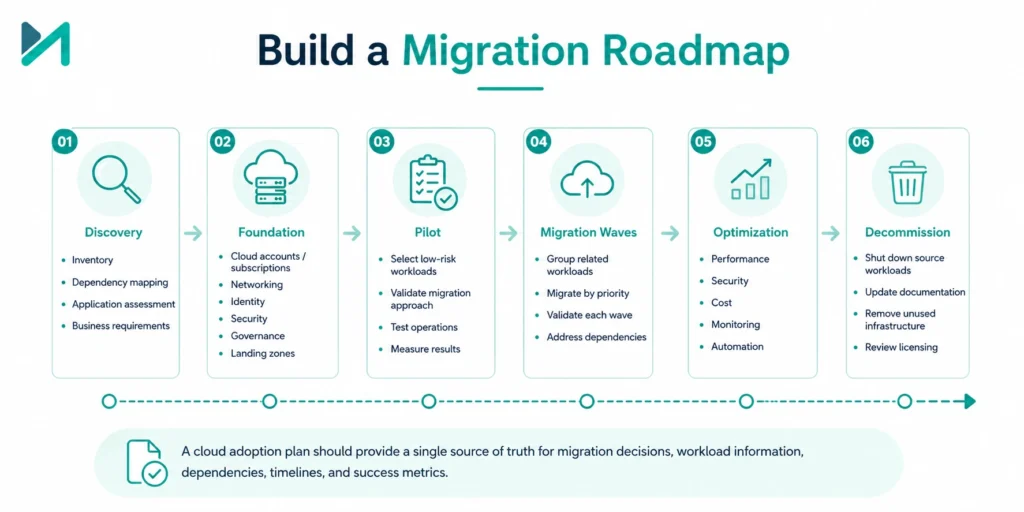
Once migration strategies are selected, create a roadmap.
A practical roadmap can contain:
Phase 1: Discovery
- Inventory
- Dependency mapping
- Application assessment
- Business requirements
Phase 2: Foundation
- Cloud accounts/subscriptions
- Networking
- Identity
- Security
- Governance
- Landing zones
Phase 3: Pilot
- Select low-risk workloads
- Validate migration approach
- Test operations
- Measure results
Phase 4: Migration Waves
- Group related workloads
- Migrate by priority
- Validate each wave
- Address dependencies
Phase 5: Optimization
- Performance
- Security
- Cost
- Monitoring
- Automation
Phase 6: Decommission
- Shut down source workloads
- Update documentation
- Remove unused infrastructure
- Review licensing
A cloud adoption plan should provide a single source of truth for migration decisions, workload information, dependencies, timelines, and success metrics.
Step 7: Prepare the Cloud Environment Before Migration
Do not move production workloads into an unstructured cloud environment.
Establish the foundation first.
Identity and Access
Implement:
- Role-based access
- Least privilege
- MFA
- Privileged access controls
Network
Define:
- Virtual networks
- Subnets
- Routing
- Firewalls
- Connectivity to on-premises systems
Security
Implement:
- Encryption
- Logging
- Security monitoring
- Vulnerability management
- Backup controls
Governance
Establish:
- Naming standards
- Tagging
- Resource policies
- Access policies
- Cost controls
- Compliance controls
A landing-zone approach can provide this foundation before workloads are onboarded. Microsoft’s Cloud Adoption Framework specifically recommends establishing the environment and governance foundation before migrating workloads.
Step 8: Back Up and Protect Your Data
Data migration deserves special attention.
Before migration:
- Back up critical data
- Validate backups
- Test restoration
- Identify retention requirements
- Define rollback procedures
- Verify data integrity
Do not assume that having a backup means you have a recovery strategy.
Ask:
Can we actually restore the data within the required recovery window?
For critical workloads, consider replication and carefully planned synchronization before cutover.
Step 9: Perform a Pilot Migration
Do not begin with your most critical production application.
Select a workload that is:
- Important enough to provide meaningful learning
- Not so critical that failure creates major business disruption
- Representative of your environment
A pilot can validate:
- Network connectivity
- Authentication
- Data migration
- Application performance
- Security
- Monitoring
- Backup
- Operational procedures
The goal is not simply to prove:
“We can move an application.”
The goal is to prove:
“We can move an application safely using a repeatable process.”
Step 10: Execute Migration in Controlled Waves
After the pilot, organize workloads into migration waves.
For example:
Wave 1
Low-risk internal applications
Wave 2
Supporting business applications
Wave 3
Customer-facing workloads
Wave 4
Mission-critical systems
Each wave should have:
- Defined scope
- Dependencies
- Owners
- Migration method
- Test plan
- Cutover plan
- Rollback plan
- Success criteria
Microsoft’s current migration guidance recommends iterative testing and cutover followed by validation against functional, performance, security, and cost baselines.
Step 11: Validate Before and After Cutover
Migration is not complete when the workload starts running in the cloud.
Validate:
Functionality
Does the application behave correctly?
Performance
Is response time acceptable?
Connectivity
Can dependent systems communicate?
Security
Are access and security controls working?
Data
Is the migrated data accurate and complete?
Monitoring
Are logs, metrics, and alerts functioning?
Cost
Is resource consumption within expectations?
Create a baseline before migration so you can compare the post-migration environment objectively.
Step 12: Optimize After Migration
The first cloud configuration is rarely the final configuration.
After migration, review:
Performance
- CPU
- Memory
- Storage
- Network
- Application response time
Cost
- Unused resources
- Oversized instances
- Storage consumption
- Idle environments
- Licensing
Security
- Permissions
- Exposed services
- Vulnerabilities
- Configuration
Reliability
- Backup
- Disaster recovery
- Monitoring
- Availability
Microsoft’s current migration guidance includes post-migration optimization covering performance tuning, cost management, monitoring validation, and backup verification.
How to Avoid Cloud Migration Cost Surprises
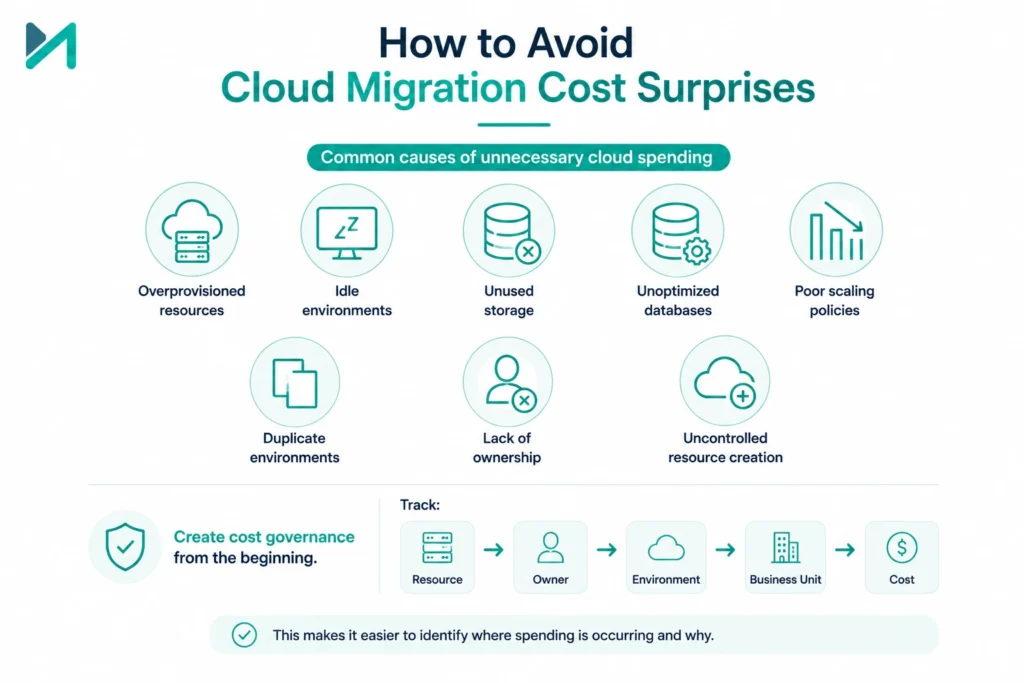
Cloud migration can improve cost efficiency, but only when the environment is actively managed.
Common causes of unnecessary cloud spending include:
- Overprovisioned resources
- Idle environments
- Unused storage
- Unoptimized databases
- Poor scaling policies
- Duplicate environments
- Lack of ownership
- Uncontrolled resource creation
Create cost governance from the beginning.
Track:
Resource → Owner → Environment → Business Unit → Cost
This makes it easier to identify where spending is occurring and why.
Security Considerations During Cloud Migration
Security should be designed into the migration rather than added after workloads are moved.
Evaluate:
Identity
Who can access what?
Network
Which systems can communicate?
Data
Where is sensitive information stored?
Encryption
Is data protected at rest and in transit?
Monitoring
Can suspicious activity be detected?
Compliance
Can the environment meet regulatory and organizational requirements?
Recovery
Can systems and data be restored after an incident?
A secure migration requires attention to both the cloud provider’s responsibilities and your organization’s responsibilities.
Common Cloud Migration Challenges and How to Solve Them
|
Challenge |
Recommended Approach |
|
Incomplete asset inventory |
Build and validate a workload inventory |
|
Unknown dependencies |
Perform dependency mapping |
|
Data loss risk |
Back up, replicate, validate and test recovery |
|
Downtime |
Use phased migration and controlled cutover |
|
Compatibility problems |
Conduct workload readiness assessment |
|
Performance degradation |
Establish a baseline and test before cutover |
|
Security gaps |
Establish identity, network and security controls early |
|
Cost overruns |
Implement cloud governance and cost monitoring |
|
User resistance |
Provide training and change management |
|
Operational confusion |
Define cloud ownership and operating model |
The important point is that migration challenges should be addressed before they become production incidents.
Cloud Migration for Atlassian Environments
Cloud migration becomes particularly specialized when the environment includes Atlassian applications such as:
- Jira
- Confluence
- Jira Service Management
- Bitbucket
- Marketplace apps
- Custom integrations
An Atlassian migration requires more than moving application data.
Teams also need to consider:
- User and group migration
- Data volume
- Marketplace app compatibility
- Integrations
- Authentication
- Permissions
- Automation
- Custom configurations
- Downtime
- Data validation
If Atlassian is part of your migration scope, our guide on migrating to Atlassian Cloud: steps, challenges and benefits provides a more focused view of that process.
And before starting an Atlassian Cloud migration, it is worth reviewing Jira Cloud migration risks so potential issues can be identified during planning rather than during cutover.
How to Make an Atlassian Cloud Migration Safer
For organizations migrating Jira or other Atlassian workloads, a successful approach typically includes:
Assess
↓
Plan
↓
Prepare
↓
Pilot
↓
Migrate
↓
Validate
↓
Optimize
This is where specialist migration expertise can make a meaningful difference.
If your team is unsure about app compatibility, migration sequencing, data dependencies, user migration, or cutover planning, MicroGenesis Atlassian Cloud Migration Services can help you build a migration plan around your existing environment rather than forcing a generic migration template.
7 Metrics to Measure Cloud Migration Success
Migration success should be measurable.
Track at least these seven areas:
Migration completion
Percentage of planned workloads successfully migrated.
Downtime
Actual downtime versus the approved migration window.
Data integrity
Number of data validation issues after migration.
Application performance
Compare response time and throughput against the pre-migration baseline.
Security
Track security findings before and after migration.
Cloud cost
Compare actual consumption against the approved business case.
User experience
Monitor incidents, support requests, and user feedback after migration.
These metrics provide a more meaningful picture than simply saying:
“The migration is complete.”
When Should You Use a Cloud Migration Partner?
Not every organization needs external migration expertise.
However, specialist support becomes valuable when you have:
- Hundreds of applications
- Complex dependencies
- Multiple cloud platforms
- Large data volumes
- Strict compliance requirements
- Limited internal cloud skills
- Mission-critical applications
- Complex Atlassian environments
- Tight migration timelines
- Significant integration requirements
A migration partner can help with:
- Discovery
- Readiness assessment
- Migration strategy
- Architecture
- Dependency mapping
- Security
- Data migration
- Pilot planning
- Cutover
- Validation
- Post-migration optimization
The goal should not be to permanently outsource your cloud knowledge.
A good partner should also help your internal teams understand the new environment.
How MicroGenesis Can Help With Cloud Migration
Cloud migration is one of those initiatives where planning quality directly affects execution risk.
MicroGenesis can help organizations move from an on-premises environment toward a cloud operating model through structured assessment, migration planning, execution, validation, and optimization.
For Atlassian environments specifically, our Atlassian Cloud Migration Services can support organizations through the migration lifecycle.
Our approach can include:
Migration Assessment
Understand your existing environment, workloads, dependencies, users, data, applications, and integrations.
Migration Strategy
Determine whether each workload should be rehosted, replatformed, refactored, rearchitected, replaced, retired, retained, or rebuilt.
Migration Planning
Create migration waves, dependencies, timelines, ownership, testing requirements, and rollback procedures.
Security and Governance
Help establish appropriate access, security, compliance, and governance controls before workloads move.
Migration Execution
Support controlled migration, data movement, configuration, integrations, and cutover.
Validation
Verify functionality, performance, data integrity, security, and user access after migration.
Optimization
Identify opportunities to improve performance, operational efficiency, reliability, and cloud resource utilization.
For Atlassian teams, this can include assessing Marketplace apps and integrations before migration rather than discovering compatibility issues during the final cutover.
If you are still evaluating whether your Atlassian environment is ready for Cloud, you can also review why Atlassian users choose Cloud to understand the broader business and operational drivers behind cloud adoption.
Frequently Asked Questions
What is on-premises to cloud migration?
On-premises to cloud migration is the process of moving applications, data, infrastructure, and related workloads from organization-managed infrastructure into a cloud environment.
What are the main steps in cloud migration?
The major steps include assessment, cloud readiness analysis, migration strategy selection, planning, cloud environment preparation, pilot migration, migration waves, validation, optimization, and eventual decommissioning of the source environment.
What is the best cloud migration strategy?
There is no single best strategy. Each workload should be evaluated individually. Options include rehost, replatform, refactor, rearchitect, rebuild, replace, retire, and retain. Microsoft’s current Cloud Adoption Framework uses these eight strategies to help organizations align workload treatment with business drivers.
Is lift-and-shift always the best approach?
No. Rehosting can be appropriate when speed and minimal disruption are priorities, but it can also carry existing technical debt into the cloud. Workloads with significant architectural or performance limitations may benefit from modernization instead.
How can I reduce cloud migration risk?
Start with discovery, dependency mapping, workload assessment, backups, security preparation, pilot migration, testing, controlled cutover, rollback planning, and post-migration validation.
Should every application move to the cloud?
No. Some workloads may be better retained temporarily or permanently because of compliance, technical, business, or economic considerations. Others may be candidates for retirement or replacement.
How long does cloud migration take?
There is no universal timeline. Duration depends on the number of workloads, dependencies, data volumes, architecture complexity, compliance requirements, migration strategy, and available resources.
Cloud Migration Checklist
Before starting your migration, make sure you have:
- Complete workload inventory
- Application owners identified
- Business criticality documented
- Dependencies mapped
- Cloud readiness assessed
- Migration strategy selected for each workload
- Cloud landing zone prepared
- Identity and access controls established
- Security requirements documented
- Data backup and recovery validated
- Pilot workload selected
- Migration waves defined
- Testing plan created
- Cutover plan prepared
- Rollback plan documented
- Success metrics established
- Post-migration optimization plan defined
Final Takeaway
Moving from on-premises infrastructure to the cloud is not simply a technology migration.
It is an opportunity to reconsider how your organization operates applications, manages infrastructure, protects data, supports users, and scales technology.
The strongest migrations begin with understanding the current environment.
Then they move through:
Assess → Strategize → Prepare → Pilot → Migrate → Validate → Optimize
The key is to avoid treating every workload identically.
One application may be suitable for rehosting.
Another may benefit from replatforming.
A legacy system may need to be rebuilt.
An obsolete application may be better retired.
And some workloads may have a legitimate reason to remain where they are.
That workload-by-workload decision-making is what turns cloud migration from a large infrastructure project into a business-led modernization program.
If you are planning an Atlassian migration, moving Jira or Confluence from Data Center or Server to Cloud, or need help assessing migration risks and dependencies, MicroGenesis can help you plan and execute the transition.
Explore MicroGenesis Atlassian Cloud Migration Services
Move with a plan. Validate before you cut over. Optimize after you migrate