Jira Sync Adapter for
IBM ELM (ERM)
Automated Traceability

Automate the creation and synchronization of Jira Issues with IBM ELM Artifacts. Eliminate manual effort, ensure data consistency, and achieve end-to-end traceability across your engineering lifecycle.

In regulated and complex engineering environments, maintaining alignment between requirements and development is critical. While IBM ELM (ERM/DOORS Next) serves as the single source of truth for requirements and Atlassian Jira is the go-to platform for development tracking, the lack of synchronization between these two systems creates significant bottlenecks.

Teams are forced to manually create corresponding Jira issues for every requirement created in ERM, manually link them, and manually update Jira whenever changes occur in ERM artifacts. This process is not only time-consuming but also introduces inconsistencies, errors, and broken traceability.

The MicroGenesis Jira Sync Adapter delivers a smarter way—automating the entire synchronization workflow so your teams can focus on building, not bridging.

What Sets Us Apart

Traditional Manual Approach

Jira Sync Adapter

Manual creation of Jira issues for ERM artifacts

Create Jira issues directly from ERM artifacts with a single click

Manually link ERM artifacts with their respective Jira issues for traceability

Automatically establish traceability between ERM artifacts and Jira issues for improved collaboration and end-to-end visibility

Manual updates when requirements change

Automated synchronization of changes from ERM to Jira

Prone to missing, duplicate, or inconsistent data

Ensures data consistency and eliminates human errors

High maintenance overhead and operational inefficiency

Streamlined workflows with reduced manual effort

What Sets Us Apart

Traditional Manual Approach

Manual creation of Jira issues for ERM artifacts

Manually link ERM artifacts with their respective Jira issues for traceability

No native traceability between systems

Manual updates when requirements change

Prone to missing, duplicate, or inconsistent data

High maintenance overhead and operational inefficiency

Jira Sync Adapter

Create Jira issues directly from ERM artifacts with a single click

Automatically establish traceability between ERM artifacts and Jira issues for improved collaboration

Automated linking with end-to-end visibility

Automated synchronization of changes from ERM to Jira

Ensures data consistency and eliminates human errors

Streamlined workflows with reduced manual effort

Core Capabilities

Automated Issue Creation

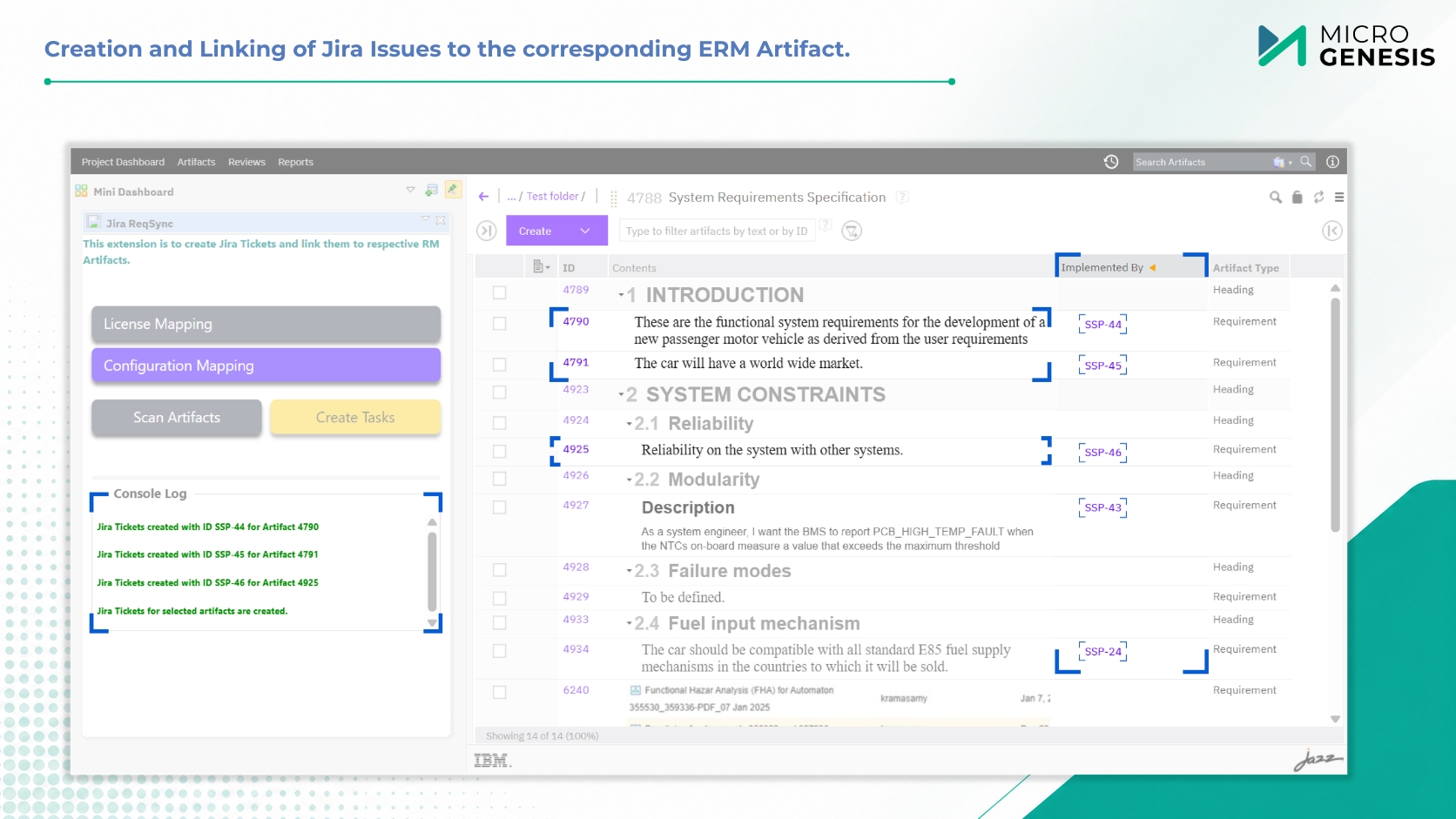
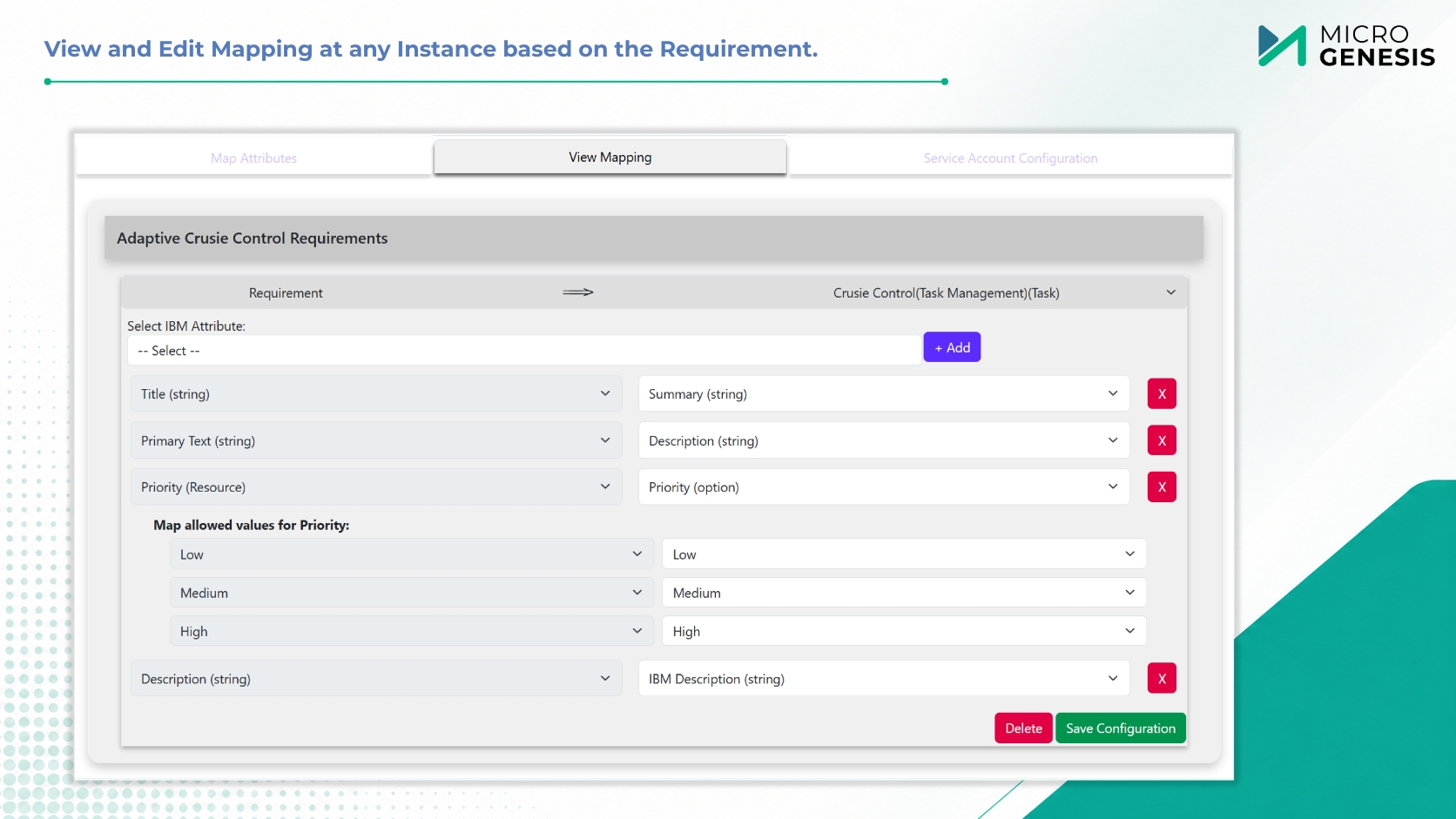
Create Jira issues directly from IBM ELM (ERM) artifacts with a single click. The adapter automatically maps attribute values from ERM artifacts to corresponding Jira fields based on your configured mappings—eliminating manual data entry and ensuring consistency from the start.

Configurable Project & Attribute Mapping

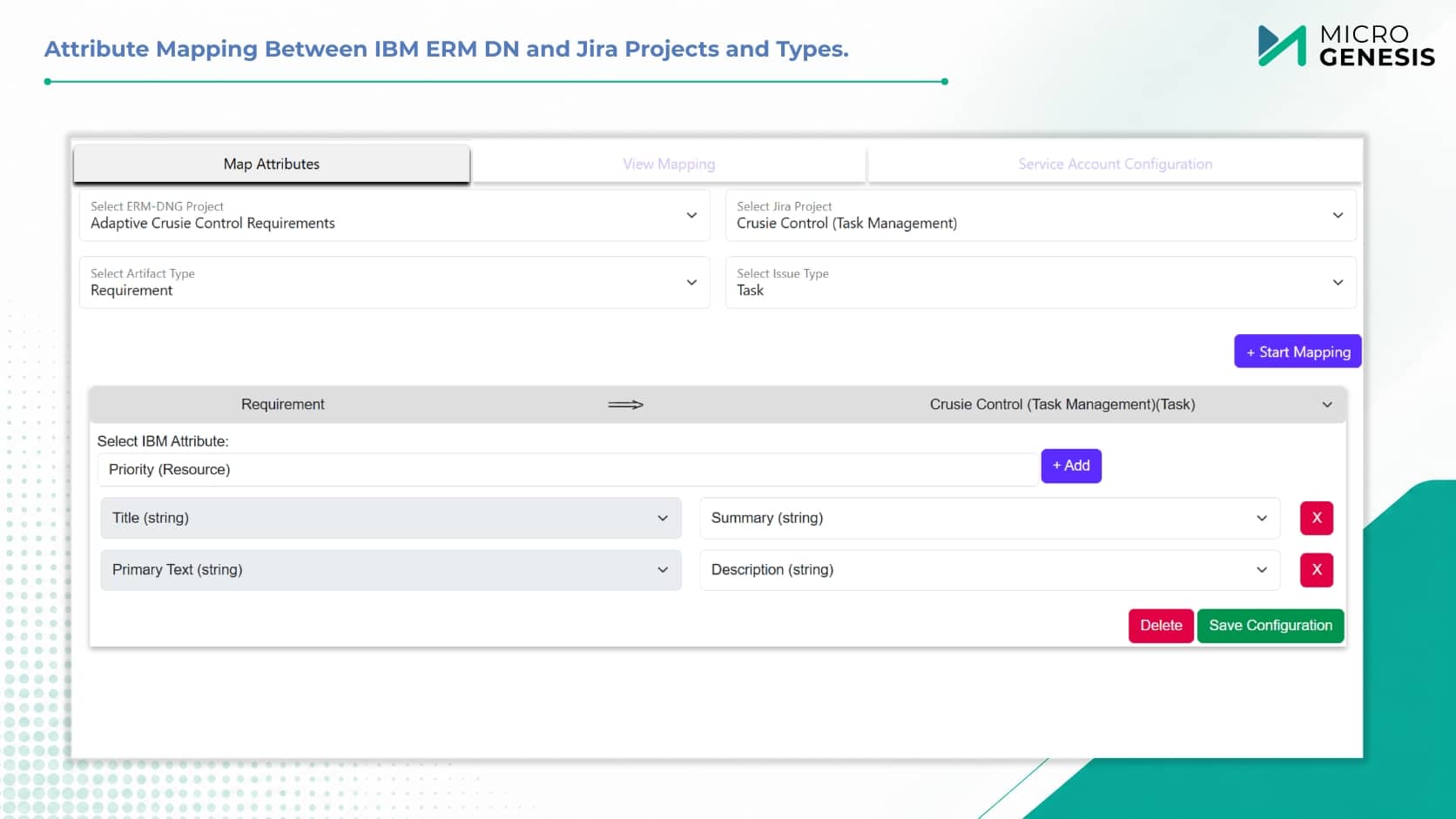
Define and manage mappings between ERM and Jira projects, artifact types, and attributes through an intuitive configuration interface. View and edit mappings at any time based on evolving project requirements, giving you full control over the synchronization behavior.

Automated ERM-to-Jira Synchronization

Changes made to ERM artifacts are automatically synchronized to their linked Jira issues, ensuring Jira always reflects the latest requirement update. This uni-directional flow eliminates the need for manual updates in Jira, reduces the risk of discrepancies, and keeps the development team aligned with the single source of truth in ERM.

End-to-End Traceability

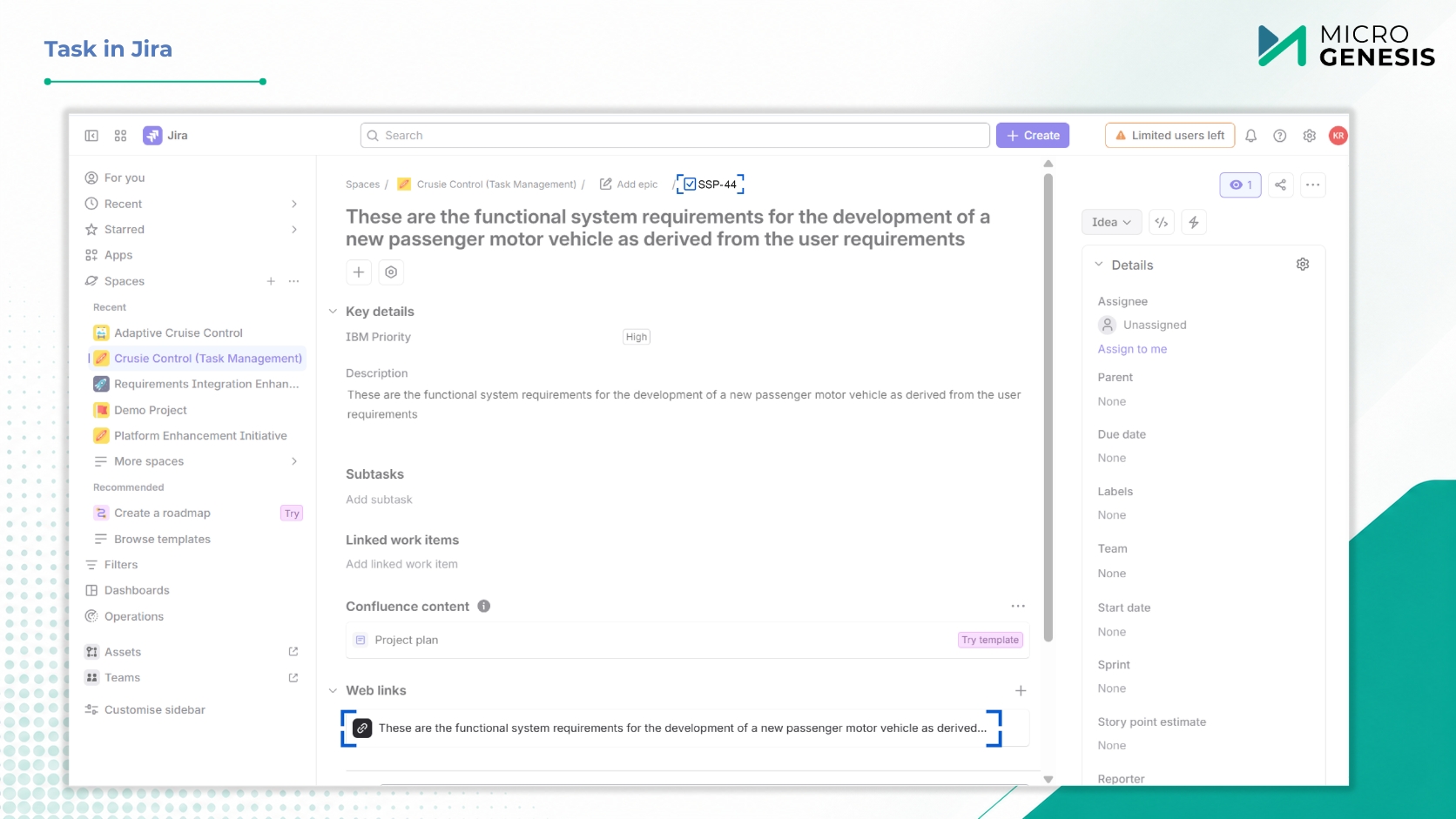
The adapter automatically establishes and maintains traceability links between ERM artifacts and their corresponding Jira issues. Each Jira issue includes a link back to the originating ERM artifact, providing complete visibility into the requirement-to-implementation lifecycle.

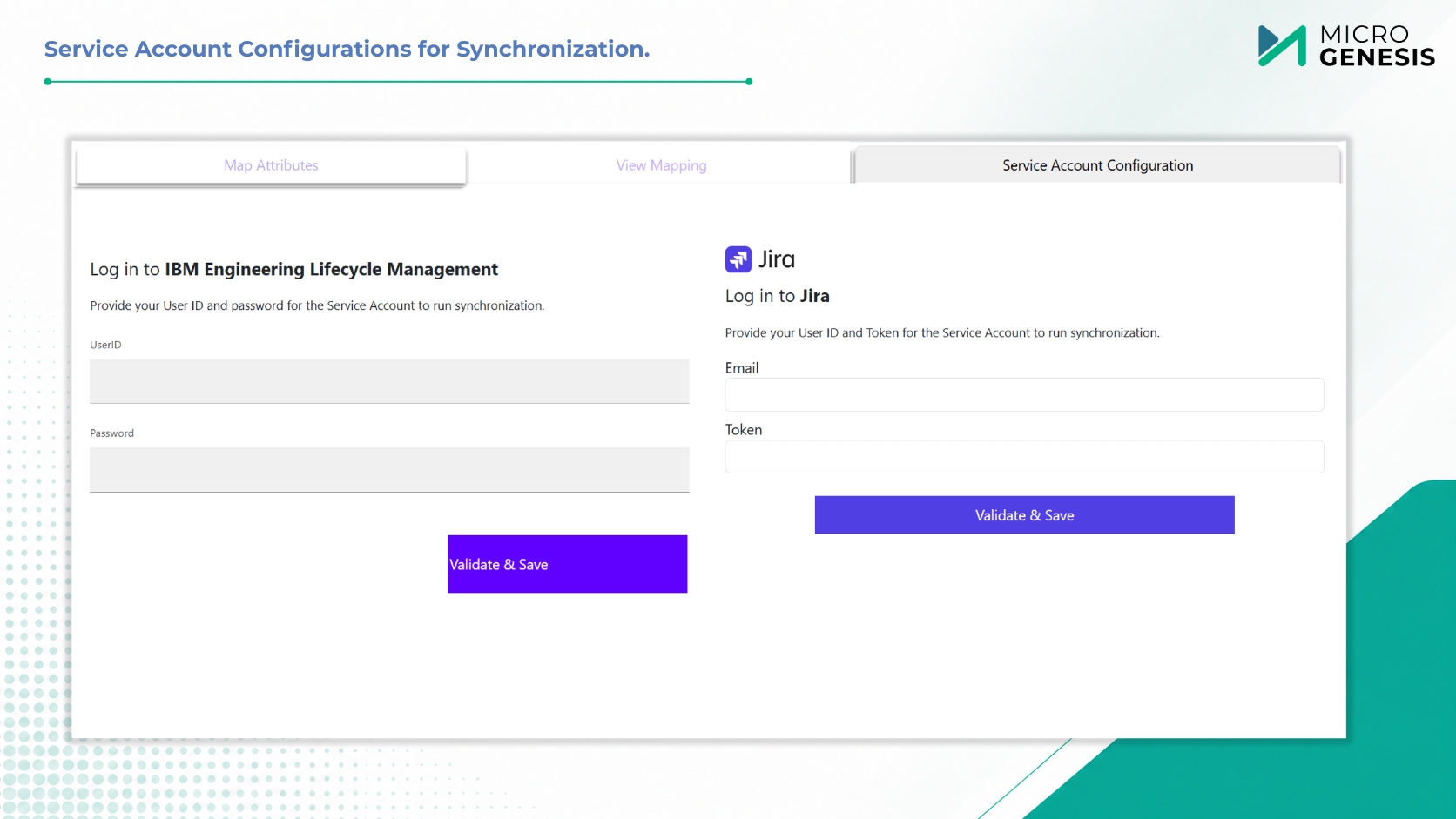
Service Account Configuration

Securely configure service account credentials for Jira integration, enabling seamless and authenticated communication between the two systems without compromising security

Artifact Discovery & Management

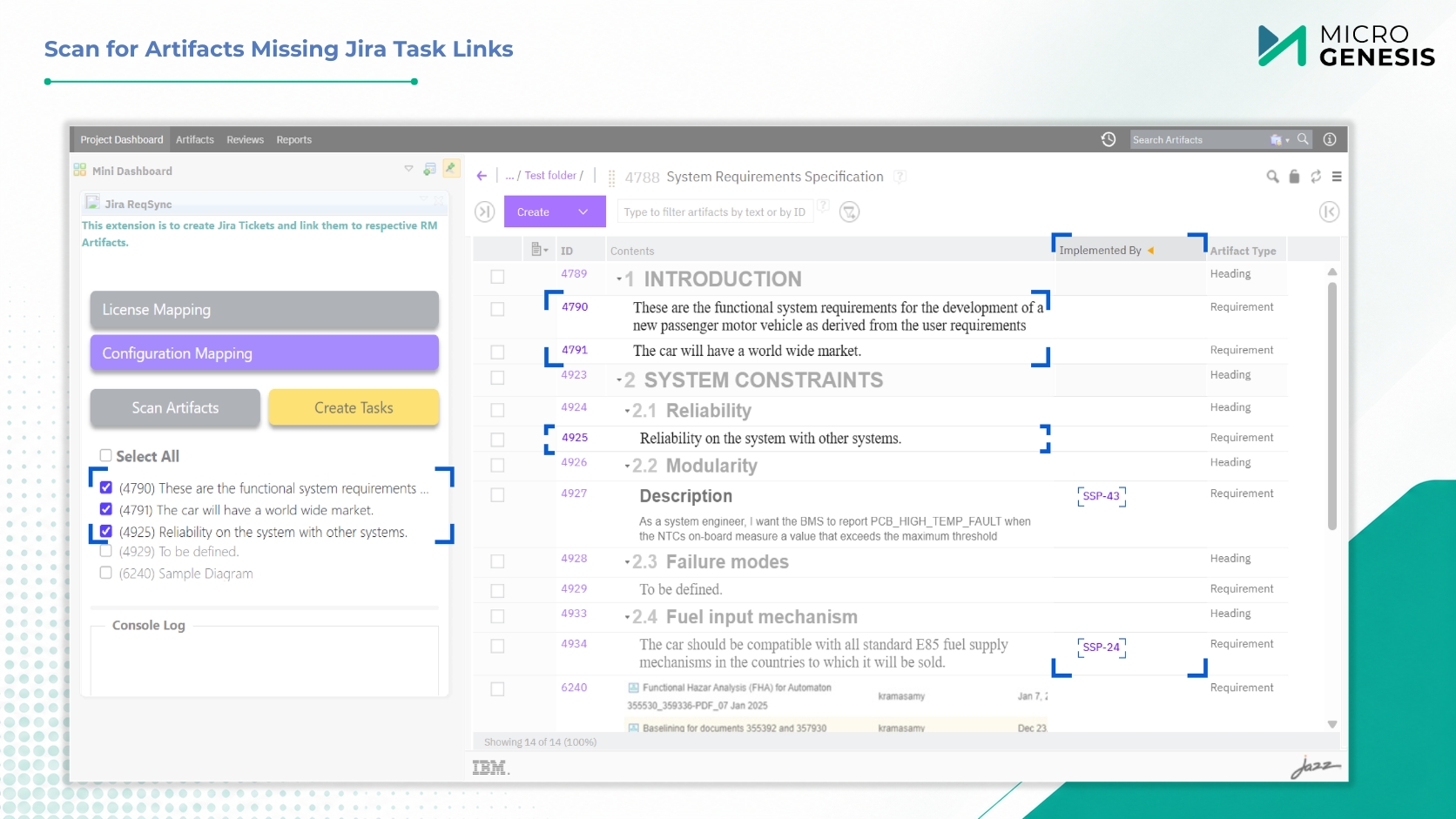
Easily identify all ERM artifacts for which corresponding Jira issues have not yet been created. The adapter provides a clear, filterable view of unmapped artifacts, enabling efficient bulk creation and ensuring no requirement is left untracked.

Key Benefits

Technology Stack

JavaScript – Frontend widget and configuration UI

Java – Backend service and synchronization engine

REST APIs – Seamless integration with Jira and IBM ELM

Deployment Model – Server-side plugin deployed within the ERM environment

A Glimpse into Seamless Integration

From attribute mapping to automated synchronization – see how it all comes together.

Optimize your product lifecycle with our comprehensive end-to-end Application Development and Maintenance services for a seamless experience.

Why Choose MicroGenesis

With over 20 years of experience in digital transformation, MicroGenesis is trusted by organizations across industries. Our deep understanding of engineering workflows, compliance needs, and enterprise tool chains makes us the ideal partner for building a connected ALM ecosystem.

Our adapters are built to support modern, cloud-ready workflows without compromising on traceability, security, or performance.

Get Live Synchronization Between IBM ELM (ERM) and Jira

Ready to streamline your requirement-to-issue workflows with a proven, automated IBM ELM – Jira synchronization solution?

Accelerating Automotive

Software Delivery

Gain practical insights into the engineering practices shaping the future of Software-Defined Vehicle development.

Salesforce Implementation Partner

From strategy to go-live — and beyond

As your dedicated Salesforce implementation partner, MicroGenesis delivers full-lifecycle implementations using a structured, low-risk methodology designed to get you to value quickly and keep you there through every phase of growth.

1. Discovery & Advisory

Workshops with your Salesforce consulting team to map processes, define goals, and shape a clear CRM roadmap.

2. Solution Design

Architecture, data model, and configuration blueprint crafted by certified Salesforce consultants aligned to your requirements.

3. Build & Configure

Declarative setup plus custom development across Sales, Service & Experience Cloud — built to Salesforce best practices.

4. Data & Integration

Secure data migration and Salesforce integration with your existing enterprise systems, delivered by our Salesforce integration partners team.

5. Testing & QA

Functional, integration, and user acceptance testing for a reliable, low-risk rollout of your Salesforce environment.

6. Deployment & Go-Live

Controlled release with cutover planning and hypercare support during the critical first days post-launch.

7. Training & Adoption

Enablement and change management from your Salesforce consulting firm to drive confident, lasting user adoption.

8. Managed Support

Ongoing 24×7 L1–L3 Salesforce managed support and continuous improvement for your live org.

Salesforce Managed Support

24X7 L1, L2 & L3 Salesforce support

Keep your Salesforce environment healthy, secure, and continuously improving with always-on managed support across all three tiers – delivered by our Salesforce partner team under clear SLAs.

24 X 7 X 365 Salesforce support coverage with defined SLAs and escalation paths

L1 : First Line

Day-to-day user support & monitoring
  • Ticket logging, triage & tracking
  • User access, login & password assistance
  • Basic how-to and navigation support
  • System monitoring and known issue resolution
  • Escalation to L2/L3 teams when required

L2: Functional

Configuration & Advanced Troubleshooting
  • Configuration changes and administrative tasks
  • Flow, validation rule, and automation troubleshooting
  • Reports, dashboards, and data issue resolution
  • Salesforce integration and synchronization diagnostics
  • Root cause analysis and issue resolution

L3: Engineering

Custom Development & Deep Expertise
  • Apex, Lightning Web Components (LWC), and custom code troubleshooting
  • Complex Salesforce integration engineering and support
  • Performance optimization and scalability tuning
  • Enhancements and new feature development
  • Vendor escalation management and coordination