
Modern software development demands applications that are scalable, portable, secure, and capable of being deployed rapidly across multiple environments. Traditional deployment methods often struggle to meet these expectations due to inconsistent environments, lengthy deployment cycles, and infrastructure dependencies.
This is where containerization has transformed the software development landscape. By packaging applications together with their dependencies into lightweight, portable containers, organizations can build once and run applications consistently across development, testing, staging, and production environments.
When combined with DevOps practices and cloud computing, containerization enables faster deployments, improved collaboration, automated infrastructure management, and continuous software delivery. It has become a foundational technology for organizations embracing cloud-native development, microservices, and modern application architectures.
Businesses adopting modern software delivery models often combine containerization with DevOps best practices to improve deployment reliability, collaboration, and operational efficiency.
In this guide, we’ll explore how containerization works, its role in DevOps and cloud computing, essential tools, real-world use cases, challenges, and best practices for successful implementation.
What Is Containerization?
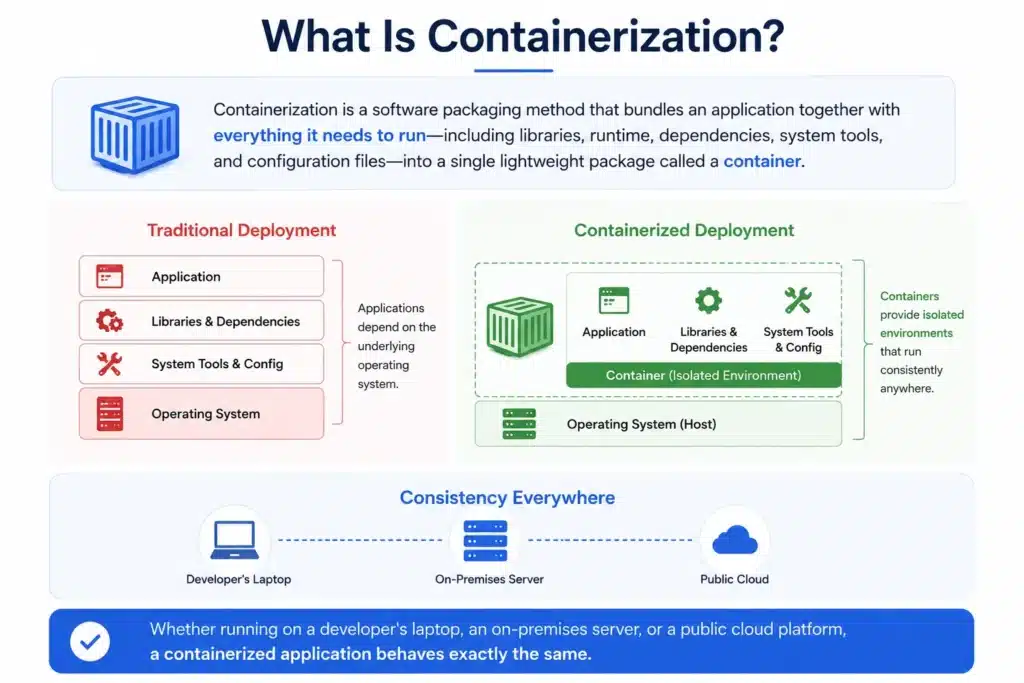
Containerization is a software packaging method that bundles an application together with everything it needs to run—including libraries, runtime, dependencies, system tools, and configuration files—into a single lightweight package called a container.
Unlike traditional deployment models where applications depend heavily on the underlying operating system, containers provide isolated environments that behave consistently regardless of where they are deployed.
Whether running on a developer’s laptop, an on-premises server, or a public cloud platform, a containerized application behaves exactly the same.
This consistency eliminates one of the most common software development challenges:
“It works on my machine, but not in production.”
Containers vs. Virtual Machines
Although containers and virtual machines (VMs) both provide isolated environments, they work differently.
| Feature | Containers | Virtual Machines |
| Startup Time | Seconds | Minutes |
| Resource Usage | Lightweight | Higher resource consumption |
| Operating System | Shares host kernel | Separate guest OS |
| Portability | Very High | Moderate |
| Deployment Speed | Fast | Slower |
| Ideal Use Cases | Cloud-native apps, microservices, DevOps | Legacy applications, full OS isolation |
Because containers share the host operating system kernel, they consume fewer resources while delivering significantly better performance compared to traditional virtual machines.
This efficiency makes them ideal for cloud-native development and DevOps automation.
Key Characteristics of Containers
Containerization offers several capabilities that make it one of the most important technologies in modern software engineering.
Lightweight Architecture
Containers share the host operating system kernel instead of running separate operating systems. This dramatically reduces memory usage and startup time.
Environment Consistency
Applications behave consistently across development, testing, staging, and production environments, eliminating environment-specific deployment issues.
Platform Portability
Containers can run on virtually any infrastructure, including on-premises servers, private clouds, and public cloud platforms such as AWS, Microsoft Azure, and Google Cloud.
Isolation
Each container operates independently, ensuring that applications and their dependencies remain isolated from other workloads running on the same host.
Scalability
Containers can be created, replicated, or removed within seconds, making them ideal for highly scalable applications.
Why Containerization Matters in DevOps
DevOps focuses on delivering software faster through collaboration, automation, and continuous improvement. Containerization complements these principles by providing consistent, repeatable deployment environments that simplify software delivery.
Instead of configuring servers manually for every application, teams package applications once and deploy them consistently everywhere.
This significantly reduces deployment failures while improving software quality.
Organizations building modern delivery pipelines often integrate containerization into DevOps pipelines to automate application builds, testing, deployment, and release management.
Containerization supports DevOps by enabling:
- Faster software delivery
- Improved collaboration
- Simplified deployments
- Infrastructure consistency
- Better scalability
- Reduced operational overhead
How Containerization Works in DevOps
Containers automate several stages of the software development lifecycle, making DevOps workflows more efficient and reliable.
1. Consistent Development Environments
Every developer works with identical runtime environments, eliminating configuration differences and reducing integration issues.
2. Faster CI/CD Pipelines
Containerized applications can be automatically built, tested, and deployed using CI/CD pipelines.
Instead of configuring test environments manually, pipelines create temporary containers, execute automated tests, and remove them after validation.
Organizations seeking faster deployments should continuously improve their CI/CD pipelines to reduce build times, increase deployment reliability, and accelerate software releases.
3. Simplified Rollbacks
Containers are immutable, meaning every deployment uses a specific container image.
If a deployment introduces unexpected issues, teams can quickly roll back to a previous container image without rebuilding or reconfiguring infrastructure.
4. Microservices Architecture
Modern applications are increasingly built as collections of smaller services.
Containers allow each microservice to be deployed, updated, and scaled independently without affecting the rest of the application.
This flexibility improves resilience while enabling rapid feature delivery.
Why Containers and Cloud Are a Perfect Match
Cloud computing and containerization complement each other exceptionally well because both emphasize flexibility, scalability, and automation.
Together they enable organizations to:
- Deploy applications rapidly
- Scale workloads automatically
- Optimize infrastructure costs
- Support hybrid and multi-cloud deployments
- Improve disaster recovery
- Simplify application modernization
Organizations moving workloads to cloud platforms often adopt cloud migration with DevOps to combine containerization, automation, and cloud-native infrastructure into a unified software delivery strategy.
Cloud providers such as AWS, Microsoft Azure, and Google Cloud now offer fully managed container platforms, making it easier than ever to deploy and manage containerized applications at enterprise scale.
Containerization Tools Used in Modern DevOps
Containerization is supported by a rich ecosystem of tools that simplify application packaging, deployment, orchestration, monitoring, and security. Choosing the right combination of tools enables organizations to build scalable, automated, and resilient DevOps pipelines.
The container ecosystem can be broadly categorized into the following components:
| Function | Popular Tools | Purpose |
| Container Engine | Docker, Podman, containerd | Build and run containers |
| Container Registry | Docker Hub, Azure Container Registry, Amazon ECR, Google Artifact Registry | Store and distribute container images |
| Orchestration | Kubernetes, Docker Swarm, OpenShift | Manage and scale containers |
| CI/CD | Jenkins, GitLab CI/CD, GitHub Actions, Bitbucket Pipelines | Automate build, testing, and deployment |
| Infrastructure as Code | Terraform, Ansible | Automate infrastructure provisioning |
| Monitoring | Prometheus, Grafana, Datadog | Monitor applications and infrastructure |
| Security | Trivy, Aqua Security, Snyk | Scan images and detect vulnerabilities |
Rather than relying on a single platform, most organizations combine these tools to build an end-to-end cloud-native DevOps workflow.
Popular Container Engines
Container engines are responsible for creating, running, and managing containers.
Docker
Docker remains the industry’s most widely adopted container platform. It simplifies application packaging by allowing developers to build standardized container images using Dockerfiles.
Docker enables teams to:
- Build portable applications
- Share standardized images
- Automate application deployment
- Simplify local development
- Improve collaboration between development and operations teams
Its extensive ecosystem and community support make Docker the preferred starting point for most containerized applications.
Podman
Podman is an open-source alternative to Docker that offers daemonless container management and enhanced security.
Unlike Docker, Podman allows containers to run without requiring a centralized background service, making it attractive for organizations with strict security and compliance requirements.
Containerd
Originally developed as part of Docker, containerd has become a lightweight industry-standard container runtime used by Kubernetes and many cloud platforms.
It focuses on efficiently managing container lifecycles while leaving higher-level orchestration to platforms like Kubernetes.
The Role of Kubernetes in Containerized DevOps
Building containers is only the first step. As applications grow, organizations often need to manage hundreds or even thousands of containers running across multiple servers.
This is where Kubernetes becomes essential.
Kubernetes is a container orchestration platform that automates the deployment, scaling, networking, and management of containerized applications.
It acts as the control plane for modern cloud-native infrastructure, enabling organizations to manage large-scale applications efficiently.
Organizations building enterprise-scale cloud-native applications often combine Kubernetes with GitLab Enterprise DevOps architecture to simplify deployment automation across distributed environments.
What Kubernetes Automates
Kubernetes continuously monitors application health while automating operational tasks such as:
- Container scheduling
- Automatic scaling
- Self-healing workloads
- Load balancing
- Service discovery
- Configuration management
- Secret management
- Rolling updates
- Automatic rollbacks
Instead of manually deploying containers across servers, Kubernetes ensures applications remain available while automatically responding to failures and traffic fluctuations.
Why Kubernetes Has Become the Industry Standard
Modern enterprises increasingly rely on Kubernetes because it provides:
- High availability
- Better resource utilization
- Simplified infrastructure management
- Cloud portability
- Support for microservices
- Built-in scalability
- Vendor neutrality
Today, major cloud providers—including AWS, Microsoft Azure, and Google Cloud—offer managed Kubernetes services, allowing organizations to deploy production workloads without managing control plane infrastructure.
Benefits of Containerization in DevOps
Containerization delivers significant advantages across software development, testing, deployment, and operations.
1. Application Portability
One of the biggest advantages of containers is their portability.
Applications packaged inside containers run consistently regardless of the underlying infrastructure.
Whether deployed on:
- Developer laptops
- On-premises servers
- Private cloud
- Public cloud
- Hybrid cloud
the application behaves identically.
This eliminates deployment inconsistencies and simplifies software distribution.
2. Faster Software Delivery
Containers significantly reduce application startup times.
Instead of waiting several minutes for virtual machines to initialize, containers typically start within seconds.
Combined with automated CI/CD pipelines, this enables organizations to:
- Release software faster
- Accelerate testing
- Reduce deployment windows
- Improve developer productivity
Organizations implementing cloud-native software delivery should also understand how cloud computing enhances DevOps practices to maximize deployment efficiency.
3. Independent Scalability
Containerized applications can scale individual services independently.
For example, an e-commerce platform experiencing increased checkout traffic can scale only the payment service instead of the entire application.
This reduces infrastructure costs while improving application performance.
4. Better Resource Utilization
Unlike traditional virtual machines that require separate operating systems, containers share the host operating system kernel.
This allows organizations to:
- Run more workloads per server
- Reduce infrastructure costs
- Improve hardware utilization
- Increase deployment density
5. Improved Security
Although containers share operating system resources, modern security practices significantly improve workload isolation.
Organizations should:
- Scan images regularly
- Use trusted base images
- Apply least-privilege principles
- Sign container images
- Monitor runtime behavior
Teams implementing secure container environments should also explore software supply chain security with GitLab to strengthen container governance and compliance.
6. Simplified DevOps Workflows
Containerization standardizes application deployment across every environment.
This simplifies:
- Development
- Testing
- Quality assurance
- Production deployment
- Disaster recovery
By reducing environment-specific issues, containers improve collaboration between development, operations, and QA teams while accelerating software delivery.
Containerization in Real-World DevOps
Today, organizations across industries use containerization to support a wide variety of workloads.
Some common use cases include:
| Use Case | Business Benefit |
| Microservices | Independent deployment and scaling of services |
| CI/CD Pipelines | Faster build, testing, and deployment workflows |
| API Development | Isolated and reproducible development environments |
| Machine Learning | Portable environments for training and inference |
| Data Processing | Scalable analytics and streaming workloads |
| Enterprise Applications | Modernization of legacy systems |
As organizations continue adopting cloud-native development, containerization has become the foundation for building resilient, scalable, and highly automated software delivery platforms.
Challenges of Containerization (and How to Overcome Them)
Although containerization offers significant advantages, organizations often face implementation challenges as they scale applications across cloud and hybrid environments. Understanding these challenges early helps teams build resilient and secure container platforms.
1. Container Orchestration Complexity
Managing a few containers is relatively straightforward, but operating hundreds or thousands across multiple environments introduces significant complexity.
Teams need to manage:
- Application scheduling
- Cluster management
- Service discovery
- Load balancing
- High availability
- Resource allocation
Without proper orchestration, container environments quickly become difficult to maintain.
Best Practice: Adopt managed Kubernetes platforms such as Amazon EKS, Azure Kubernetes Service (AKS), or Google Kubernetes Engine (GKE) to reduce operational overhead and simplify cluster management.
2. Container Security Risks
Containers improve application isolation, but security remains a shared responsibility.
Common security challenges include:
- Vulnerable container images
- Hardcoded secrets
- Excessive user privileges
- Outdated dependencies
- Supply chain attacks
Organizations should integrate security throughout the software delivery lifecycle rather than treating it as a final deployment step.
Businesses implementing secure cloud-native applications should also understand DevSecOps practices to integrate automated security testing directly into CI/CD pipelines.
3. Persistent Storage Management
Containers are designed to be lightweight and temporary. However, enterprise applications often require persistent storage for databases, analytics platforms, and business-critical workloads.
Without appropriate storage strategies, restarting or replacing containers may result in data loss.
Common approaches include:
- Persistent Volumes (PV)
- Persistent Volume Claims (PVC)
- Cloud-managed storage services
- StatefulSets in Kubernetes
Separating application logic from persistent storage creates more resilient architectures.
4. Monitoring Distributed Applications
Unlike traditional monolithic applications, containerized environments often consist of dozens—or even hundreds—of interconnected services.
This distributed architecture makes monitoring more complex.
Organizations should monitor:
- Application performance
- Container health
- Infrastructure utilization
- Network traffic
- Log aggregation
- Security events
Comprehensive observability helps teams quickly identify bottlenecks before they impact end users.
Best Practices for Containerization in DevOps
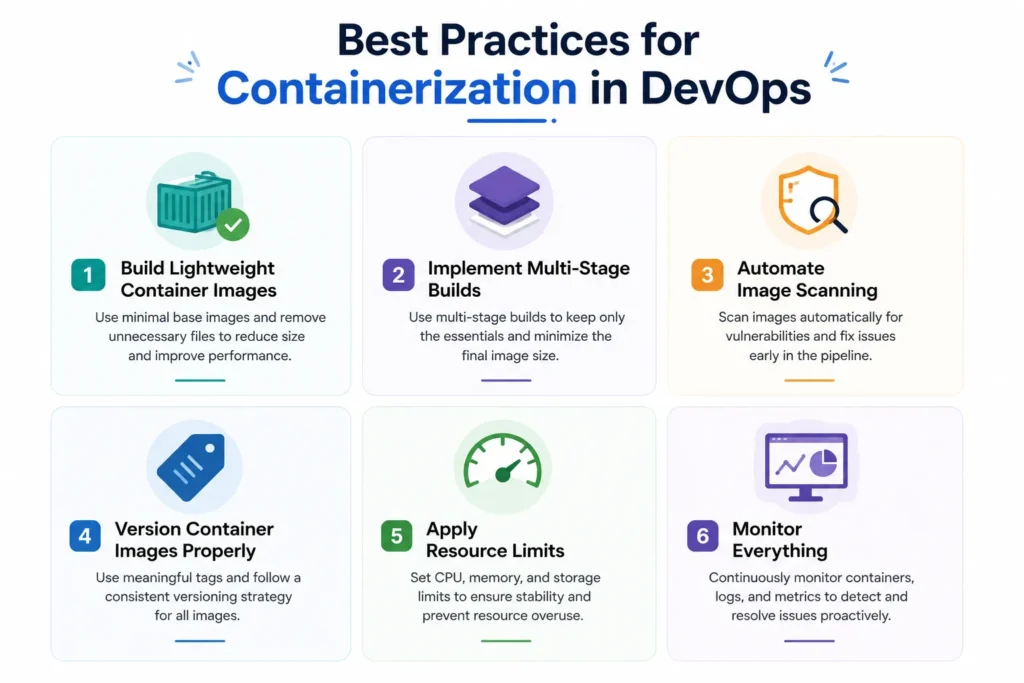
Successful container adoption requires more than simply packaging applications. Following industry best practices ensures better security, maintainability, and operational efficiency.
Build Lightweight Container Images
Smaller images deploy faster, consume fewer resources, and reduce potential security vulnerabilities.
Use minimal base images whenever possible and remove unnecessary packages during the build process.
Implement Multi-Stage Builds
Multi-stage Docker builds separate development dependencies from production images.
Benefits include:
- Smaller image sizes
- Faster deployments
- Improved security
- Better maintainability
Automate Image Scanning
Container images should be scanned continuously for vulnerabilities before deployment.
Integrating automated security scanning into CI/CD pipelines helps identify risks early while maintaining compliance.
Version Container Images Properly
Avoid using generic tags such as latest for production deployments.
Instead, adopt semantic versioning (for example, v2.4.1) to improve traceability and simplify rollbacks.
Apply Resource Limits
Defining CPU and memory limits prevents individual containers from consuming excessive resources and affecting other workloads running within the same cluster.
Monitor Everything
Containerized environments generate enormous volumes of operational data.
Implement centralized monitoring for:
- Logs
- Metrics
- Events
- Traces
- Performance dashboards
Continuous monitoring supports proactive incident management while improving application reliability.
Organizations implementing enterprise-scale cloud-native platforms should also explore optimizing IT operations in hybrid and multi-cloud environments to improve operational visibility across distributed infrastructure.
Emerging Trends in Containerization
Container technology continues to evolve rapidly as organizations modernize software delivery and embrace cloud-native development.
Some of the key trends shaping the future include:
Serverless Containers
Platforms such as AWS Fargate, Azure Container Apps, and Google Cloud Run eliminate infrastructure management while allowing developers to focus entirely on application development.
GitOps
GitOps enables infrastructure and application deployments through Git repositories, improving consistency, auditability, and deployment automation.
Organizations adopting GitOps often combine it with GitLab integrations to build highly automated and collaborative software delivery pipelines.
AI-Driven Operations (AIOps)
Artificial intelligence is transforming container management by predicting infrastructure issues, optimizing resource utilization, and automating incident response.
AIOps reduces manual monitoring while improving operational efficiency across complex cloud environments.
Edge Computing
As IoT and distributed applications continue growing, organizations increasingly deploy containerized workloads closer to end users, improving performance while reducing latency.
Why Choose MicroGenesis for Containerization and DevOps?
Successfully implementing containerization requires more than adopting Docker or Kubernetes. Organizations need a strategy that aligns application modernization, cloud infrastructure, security, and DevOps Consulting services with long-term business goals.
MicroGenesis helps organizations design and implement modern container platforms that accelerate software delivery while maintaining security, scalability, and operational efficiency. From container strategy and Kubernetes adoption to CI/CD automation and cloud-native transformation, our experts enable businesses to modernize application delivery with confidence.
Our expertise includes:
- Container platform implementation
- Kubernetes consulting and deployment
- CI/CD pipeline automation
- Cloud-native application modernization
- Infrastructure as Code (IaC)
- DevSecOps integration
- Container security and governance
By combining deep DevOps expertise with industry best practices, MicroGenesis helps organizations reduce deployment complexity, improve infrastructure utilization, and accelerate digital transformation initiatives.
Organizations looking to modernize application delivery can also explore DevOps automation strategies to build scalable and efficient software delivery workflows.
Conclusion
Containerization has become a cornerstone of modern software development, enabling organizations to build, deploy, and manage applications with greater speed, consistency, and scalability. When combined with DevOps services and cloud-native technologies, containers simplify software delivery while improving resource utilization, deployment reliability, and operational agility.
However, realizing the full value of containerization requires more than adopting the right tools. DevOps consulting services help organizations implement a well-defined strategy that includes automation, orchestration, security, observability, and continuous optimization.
Whether you’re modernizing legacy applications, adopting microservices, or building cloud-native platforms, implementing containerization with the right DevOps implementation services can significantly improve software quality and business agility.
With MicroGenesis as your trusted partner for DevOps consulting, you can confidently embrace containerization, streamline cloud operations, and build resilient, future-ready software delivery platforms that support long-term digital transformation.