
Jira is one of the most widely adopted work management and project tracking platforms in the world. Organizations use it to manage software development, Agile delivery, IT service management, product planning, resource allocation, and even business operations. Jira Got Slower as Our Team Grew — And Nobody Could Explain Why
When teams first implement Jira, the experience is usually positive. Projects are organized, workflows are clear, and visibility improves dramatically.
Then something changes.
The company grows.
More users are added.
More projects are created.
More custom fields appear.
More integrations get connected.
And suddenly, Jira feels slower.
Boards take longer to load.
Search results lag.
Dashboards become sluggish.
Reports take forever to generate.
Automation rules fail unexpectedly.
Yet when teams try to identify the root cause, nobody can provide a clear answer.
The assumption is often that Jira itself is the problem.
In reality, Jira rarely becomes slow for a single reason. Performance degradation is usually the result of multiple factors that accumulate as organizations scale.
In this article, we’ll explore why Jira often slows down as teams grow, the hidden causes behind performance issues, and practical strategies to restore speed, scalability, and productivity.
The Growth Problem Nobody Plans For
Most Jira implementations begin with a relatively small group of users.
A development team launches Jira to manage:
- Backlogs
- Sprints
- Tasks
- Bugs
- Releases
Everything works smoothly.
As the organization expands, Jira becomes the default platform for additional teams:
- Product Management
- IT Operations
- Service Desk
- PMOs
- Business Teams
- Leadership
What began as a simple project management tool evolves into a business-critical platform supporting hundreds or even thousands of users.
The challenge is that many organizations scale Jira usage without scaling governance.
As a result, complexity grows faster than performance optimization efforts.
Too Many Custom Fields Create Hidden Performance Problems
One of the most common causes of Jira performance degradation is excessive customization.
Organizations often create custom fields for every possible requirement.
Examples include:
- Project-specific metrics
- Department-specific classifications
- Approval statuses
- Reporting fields
- Compliance attributes
Initially, these additions seem harmless.
Over time, however, hundreds or even thousands of custom fields accumulate.
Every issue creation, update, search, and report must process these fields.
This increases database load and slows system performance.
Many organizations discover that years of unchecked customization contribute significantly to Jira sluggishness.
Understanding both the advantages and limitations outlined in the pros and cons of Jira software can help teams avoid over-customization while maintaining flexibility.
Workflows Become Overengineered
As teams mature, workflows often become increasingly complex.
Organizations introduce:
- Additional approval steps
- Custom statuses
- Automation triggers
- Validation rules
- Compliance checkpoints
What begins as a simple Agile workflow eventually evolves into a highly customized process containing dozens of statuses and transitions.
Complex workflows increase:
- Processing overhead
- Maintenance requirements
- User confusion
- Administrative complexity
Many organizations unintentionally sacrifice performance for process control.
The most effective Jira environments balance governance with simplicity.
Organizations leveraging structured Jira Agile workflows and boards often achieve greater efficiency by reducing unnecessary workflow complexity.
Dashboards Become Reporting Monsters
Dashboards are one of Jira’s most powerful capabilities.
Unfortunately, they are also one of the most common sources of performance issues.
As organizations grow, dashboards often accumulate:
- Multiple gadgets
- Complex filters
- Cross-project reports
- Real-time metrics
- Large datasets
Every dashboard load triggers numerous database queries.
A dashboard containing ten gadgets may generate dozens of simultaneous requests.
Multiply this across hundreds of users and performance degradation becomes inevitable.
Many teams blame Jira when the real issue lies in poorly optimized reporting practices.
Search Queries Get More Expensive
Jira Query Language (JQL) is extremely powerful.
However, poorly designed searches can become significant performance bottlenecks.
Common examples include:
- Broad queries across thousands of issues
- Nested conditions
- Excessive use of custom fields
- Complex reporting filters
As issue volumes grow, these searches require increasingly more processing power.
What once took milliseconds may eventually require several seconds.
Organizations should regularly review saved filters and reporting queries to ensure efficiency.
Too Many Apps and Integrations
The Atlassian Marketplace offers thousands of plugins and integrations.
Many organizations install apps to support:
- Reporting
- Resource planning
- Test management
- Documentation
- Service management
- Automation
While these tools add valuable functionality, they also introduce additional complexity.
Each integration may consume:
- Database resources
- API calls
- System memory
- Processing capacity
Over time, excessive integrations can significantly impact performance.
Organizations should periodically evaluate whether installed apps continue providing business value.
Resource Planning Creates Additional Complexity
As organizations grow, Jira often becomes the central platform for planning people, projects, budgets, and capacity.
This introduces new workloads such as:
- Resource allocation
- Capacity planning
- Forecasting
- Portfolio management
These activities often involve large datasets and complex reporting requirements.
Organizations using Jira for extensive resource planning should ensure proper configuration and governance to prevent performance degradation as workloads increase.
Without optimization, planning activities can place significant demands on system resources.
Product Teams Generate Massive Data Volumes
Modern product organizations generate enormous amounts of information.
Examples include:
- Customer feedback
- Product ideas
- Feature requests
- Discovery activities
- Prioritization frameworks
Tools such as Jira Product Discovery make it easier to capture and evaluate opportunities.
However, as adoption grows, data volumes increase significantly.
Organizations often struggle with managing large numbers of ideas, feedback records, and prioritization workflows.
Successfully overcoming common challenges in Jira Product Discovery requires careful governance and data management practices.
Prioritization Frameworks Can Add Complexity
Many product teams implement sophisticated prioritization models.
Examples include:
- RICE
- MoSCoW
- WSJF
- Value vs Effort matrices
These frameworks often require additional fields, calculations, and reporting structures.
While valuable for decision-making, they can contribute to growing Jira complexity.
Organizations should carefully evaluate how they implement and maintain idea prioritization frameworks in Jira Product Discovery to avoid creating unnecessary administrative overhead.
Jira Service Management Expands Rapidly
Many organizations start with Jira Software and later adopt Jira Service Management (JSM).
As service operations mature, additional capabilities are introduced:
- Incident management
- Change management
- Asset management
- Knowledge management
- Service request workflows
Without proper governance, service management environments can quickly become complex.
Following established Jira Service Management setup best practices helps organizations maintain performance while supporting growth.
Non-Technical Teams Use Jira Differently
As Jira expands beyond engineering teams, usage patterns change significantly.
Departments such as:
- HR
- Marketing
- Finance
- Procurement
- Legal
often have different requirements than software development teams.
Many organizations now use Jira for non-technical teams to manage workflows, approvals, campaigns, and operational activities.
While this increases organizational visibility, it also introduces additional projects, workflows, permissions, and reporting requirements.
Without governance, complexity grows rapidly.
Permission Structures Become Unmanageable
One overlooked performance issue involves permissions.
As organizations expand, administrators often create increasingly complex permission schemes.
Examples include:
- Department-specific access controls
- Regional permissions
- Project-level restrictions
- Custom roles
Every search and issue view requires Jira to evaluate these permissions.
Complex permission structures increase processing requirements and can affect performance.
Regular permission reviews help maintain scalability.
Automation Rules Create Invisible Load
Automation is one of Jira’s most valuable capabilities.
Organizations use automation for:
- Notifications
- Issue updates
- Workflow transitions
- Escalations
- Service requests
However, excessive automation can create hidden performance challenges.
Poorly designed automation rules may:
- Trigger repeatedly
- Execute unnecessary actions
- Generate excessive API calls
Organizations should regularly audit automation configurations to ensure efficiency.
Data Growth Is Inevitable
Every Jira implementation accumulates data over time.
This includes:
- Issues
- Attachments
- Comments
- Worklogs
- Audit records
Many organizations retain years of historical information.
While valuable for compliance and reporting, large datasets inevitably impact performance.
Data lifecycle management becomes increasingly important as organizations scale.
Signs Your Jira Instance Is Becoming Overloaded
Common warning signs include:
- Slow board loading
- Delayed searches
- Dashboard performance issues
- Slow report generation
- Automation failures
- Long page load times
- Increased user complaints
These symptoms often appear gradually, making them difficult to identify until productivity is significantly affected.
How to Improve Jira Performance as Your Team Grows
Organizations can take several steps to improve performance.
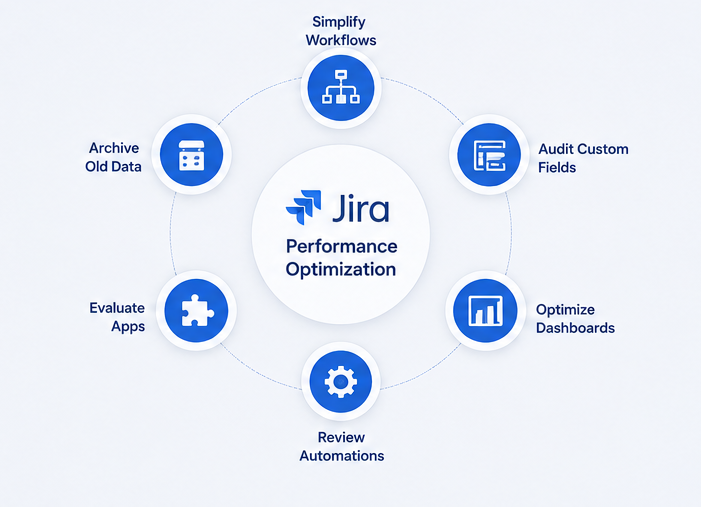
Simplify Workflows
Remove unnecessary statuses and transitions.
Audit Custom Fields
Eliminate unused or redundant fields.
Review Dashboards
Reduce excessive gadgets and reporting complexity.
Optimize JQL Queries
Improve search efficiency and reporting filters.
Evaluate Apps
Remove plugins that no longer provide business value.
Review Automation Rules
Identify inefficient workflows and excessive triggers.
Archive Old Data
Reduce active dataset sizes where appropriate.
Strengthen Governance
Establish standards for customization, reporting, and administration.
How MicroGenesis Can Help Optimize Jira Performance
As Jira environments grow, maintaining performance, scalability, and governance becomes increasingly challenging.
Organizations often struggle to balance customization, collaboration, reporting, and operational efficiency while supporting expanding teams and business requirements.
Through comprehensive Jira Service Management Services, MicroGenesis helps organizations optimize Jira environments, streamline workflows, improve governance, and ensure long-term scalability.
MicroGenesis assists organizations with:
- Jira implementation and optimization
- Workflow simplification
- Jira Service Management deployments
- Performance assessments
- Resource planning optimization
- Reporting and dashboard governance
- Automation strategy
- Atlassian ecosystem consulting
Whether you’re experiencing slow performance, growing administrative complexity, or scalability concerns, MicroGenesis helps organizations maximize the value of their Jira investment while maintaining a fast, efficient, and user-friendly environment.
Conclusion
Jira rarely becomes slow because of a single issue.
More often, performance degradation is the result of years of accumulated complexity:
- Excessive custom fields
- Overengineered workflows
- Heavy dashboards
- Complex permissions
- Too many integrations
- Growing data volumes
- Uncontrolled automation
As organizations grow, these factors compound until users begin noticing slower performance and reduced productivity.
The good news is that Jira can scale extremely well when supported by strong governance, thoughtful architecture, and ongoing optimization.
The question isn’t whether Jira can handle growth.
The real question is whether your Jira environment has evolved with the same disciplinae as the teams using it.