Modern product engineering has evolved far beyond managing standalone requirements documents or isolated development tasks. Today’s engineering organizations develop increasingly complex products that integrate embedded software, electronics, mechanical systems, cloud connectivity, and functional safety requirements. To manage this complexity successfully, engineering teams require complete visibility across requirements, development, testing, verification, and change management.
One of the biggest challenges organizations face is maintaining traceability between business requirements and engineering execution. Requirements often reside in one application, while development teams manage implementation through another. Without proper integration, engineering artifacts become disconnected, making impact analysis, compliance reporting, and change management increasingly difficult.
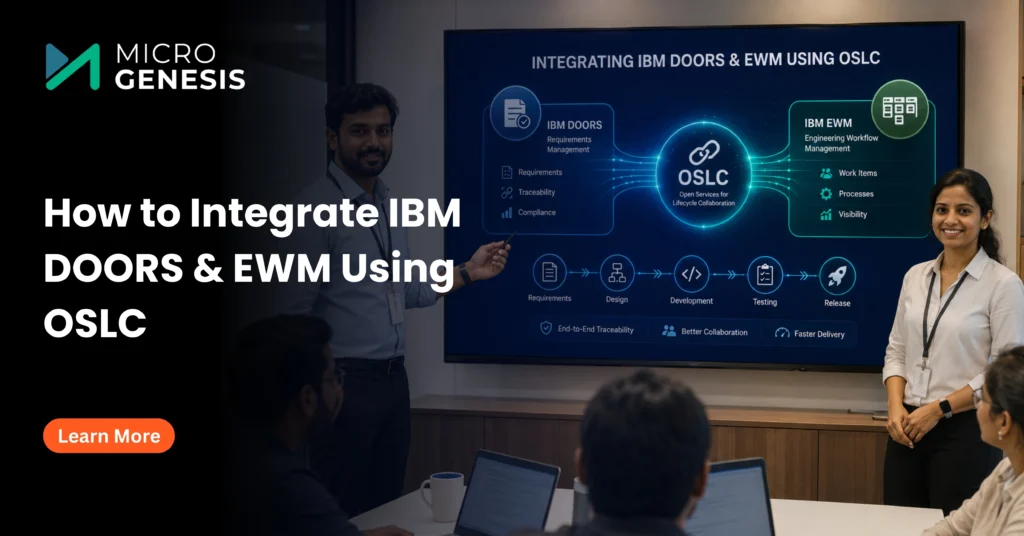
This is where integrating IBM Engineering Requirements Management DOORS with IBM Engineering Workflow Management (EWM) becomes invaluable. Together, these solutions enable organizations to establish end-to-end lifecycle traceability by connecting requirements directly with development work items, defects, change requests, and project activities.
Such integrations form a critical component of a mature Engineering Lifecycle Management strategy, where requirements, engineering workflows, testing, reporting, and governance operate within a connected engineering ecosystem rather than isolated applications.
The integration is powered by Open Services for Lifecycle Collaboration (OSLC), an open standard that enables engineering tools to exchange information through linked data instead of duplicating engineering artifacts. Using OSLC, organizations can establish live relationships between DOORS requirements and EWM work items while ensuring that every engineering change remains traceable throughout the product lifecycle.
This approach delivers significant benefits for organizations operating in highly regulated industries including:
- Automotive
- Aerospace & Defense
- Medical Devices
- Rail & Transportation
- Industrial Manufacturing
- Electronics
- Energy
- High-Tech Manufacturing
These industries depend on complete lifecycle traceability to comply with standards such as ISO 26262, ASPICE, DO-178C, IEC 62304, and EN 50128, where every requirement must be linked to implementation, verification, validation, and change records.
In this guide, you’ll learn:
- Why integrating IBM DOORS and IBM EWM is important
- How OSLC enables lifecycle integration
- Step-by-step configuration of DOORS-EWM integration
- Best practices for successful implementation
- Common challenges and troubleshooting tips
- Industry use cases
- How MicroGenesis helps organizations implement enterprise-grade IBM Engineering Lifecycle Management solutions
Why Integrate IBM DOORS and EWM?
Organizations rarely struggle because they lack engineering tools—they struggle because those tools operate independently.
Requirements teams often work inside IBM DOORS while software developers manage user stories, defects, tasks, and change requests within IBM Engineering Workflow Management. When these environments are disconnected, engineering teams spend significant time manually updating information, validating requirements coverage, and preparing compliance documentation.
Integrating IBM DOORS with IBM EWM eliminates these silos by creating a connected engineering environment where requirements and development work remain synchronized through live lifecycle relationships.
Organizations planning lifecycle integration should first establish a strong engineering foundation by following these Tips for Successful IBM ELM Implementation, ensuring that engineering processes, governance models, and lifecycle workflows are standardized before integration begins.
Key Benefits of DOORS-EWM Integration
Complete End-to-End Traceability
Every requirement can be directly linked to development tasks, defects, change requests, and verification activities. This allows engineering teams to immediately understand implementation status and perform accurate impact analysis whenever requirements change.
Improved Cross-Functional Collaboration
Business analysts, systems engineers, software developers, testers, and project managers work from a common engineering context instead of isolated applications. This reduces communication gaps and improves project visibility across multidisciplinary teams.
Live Data Linking
Unlike traditional integrations that duplicate information across systems, OSLC creates live links between engineering artifacts. Users can access real-time information directly from connected applications without synchronization delays or duplicate records.
Better Change Management
Engineering changes are inevitable during product development. Integrating DOORS with EWM allows organizations to place requirements under structured change control while tracking approvals, implementation progress, and verification activities within a unified engineering workflow.
Improved Regulatory Compliance
Industries developing safety-critical products must demonstrate complete lifecycle traceability during audits. DOORS-EWM integration simplifies compliance by maintaining auditable relationships between requirements, implementation, testing, defects, and engineering approvals.
Increased Engineering Productivity
By eliminating manual updates, duplicate documentation, and disconnected engineering information, teams spend more time developing products and less time managing engineering artifacts.
Understanding OSLC for DOORS-EWM Integration
Open Services for Lifecycle Collaboration (OSLC) is an open standard that enables lifecycle management applications to exchange information using linked data rather than copying engineering artifacts between systems.
Instead of synchronizing duplicate copies of requirements or work items, OSLC creates intelligent relationships that allow engineering applications to reference one another in real time.
This approach significantly strengthens Digital Requirements Management by ensuring that engineering teams always access the latest version of lifecycle information while maintaining a single source of truth across the engineering ecosystem.
OSLC provides a standardized framework that allows IBM DOORS, IBM Engineering Workflow Management, IBM Engineering Test Management, IBM Rhapsody, and many third-party engineering tools to communicate seamlessly without complex custom integrations.
How OSLC Works
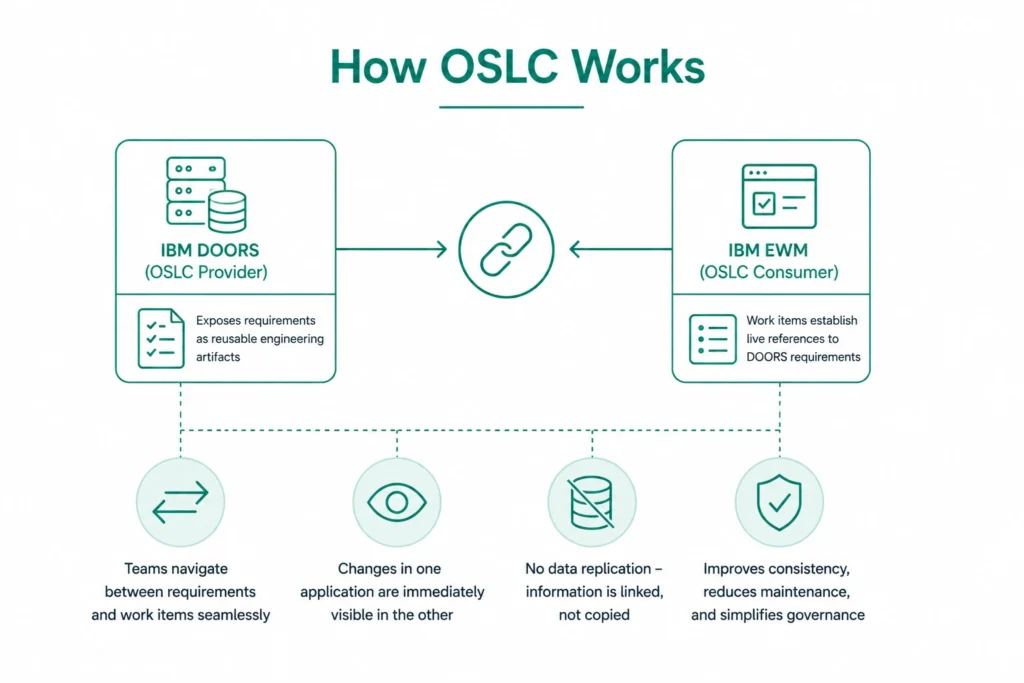
Within a typical Engineering Lifecycle Management environment:
- IBM DOORS acts as an OSLC Provider, exposing requirements as reusable engineering artifacts.
- IBM Engineering Workflow Management functions as an OSLC Consumer, enabling work items to establish live references to DOORS requirements.
- Engineering teams can navigate between requirements and work items without leaving their respective applications.
- Changes made within one lifecycle application become immediately visible through linked relationships rather than replicated data.
This linked-data approach improves engineering consistency while reducing maintenance overhead and simplifying lifecycle governance.
Step-by-Step Guide to Configuring DOORS-EWM Integration Using OSLC
Successfully integrating IBM Engineering Requirements Management DOORS with IBM Engineering Workflow Management (EWM) requires careful planning and configuration. Before implementation, organizations should ensure that both applications are running supported versions, users have the necessary permissions, and IBM Jazz Team Server (JTS) is properly configured.
Following a structured implementation approach minimizes deployment risks while ensuring secure communication, complete lifecycle traceability, and long-term maintainability.
Step 1: Install and Configure the Required Components
Before configuring OSLC integration, verify that all prerequisite IBM Engineering Lifecycle Management components are installed and operational.
A standard deployment includes:
- IBM Engineering Requirements Management DOORS (DOORS)
- IBM Engineering Workflow Management (EWM)
- IBM DOORS Web Access (DWA)
- IBM Jazz Team Server (JTS)
- IBM Common Licensing
Each component plays a specific role in enabling lifecycle collaboration.
- DOORS stores and manages engineering requirements.
- EWM manages work items, defects, user stories, tasks, and change requests.
- DOORS Web Access (DWA) exposes requirements through OSLC services.
- Jazz Team Server (JTS) provides authentication, application registration, and lifecycle administration.
- IBM Common Licensing manages product licensing across the engineering environment.
Since DOORS Web Access serves as the communication gateway between DOORS and other lifecycle applications, administrators should understand its architecture before deployment. Our guide on Mastering IBM DOORS Web Access (DWA) explains installation best practices, configuration options, browser access, and common administration tasks that help ensure a stable OSLC environment.
Before moving forward, verify:
- All servers are accessible.
- Required ports are open.
- SSL certificates are correctly configured.
- User authentication is working.
- Time synchronization is consistent across servers.
Completing these prerequisites helps prevent connectivity issues during OSLC registration.
Step 2: Enable OSLC in IBM DOORS
Once the required infrastructure is ready, the next step is enabling OSLC services within IBM DOORS.
Open the DOORS Database Administration console and navigate to the OSLC Settings panel.
Enable:
- OSLC Provider Mode
- External Consumer Access
- OSLC Query Services
- Linked Data Support
After enabling these settings:
- Configure the OSLC base URL.
- Assign appropriate permissions.
- Save the configuration.
- Restart the DOORS Web Access server.
Restarting DWA publishes the latest OSLC endpoints and ensures they are discoverable by IBM Jazz Team Server.
Organizations still running traditional DOORS environments often use this opportunity to evaluate migration strategies. If you’re considering modernizing your requirements platform, our comprehensive guide on Migrating from DOORS to DOORS Next explains the migration process, benefits, and planning considerations for moving to a collaborative web-based requirements management environment.
Step 3: Configure DOORS as an OSLC Provider
After enabling OSLC functionality, configure DOORS to expose engineering artifacts through standardized OSLC services.
Log into DOORS Web Access as an administrator.
Navigate to:
Administration → OSLC Configuration
Configure:
- Base Service URL
- Resource Shapes
- Query Capabilities
- Requirement Resource Types
- Authentication Method
- Access Permissions
These settings determine how external lifecycle applications discover and consume requirement information.
Organizations should also validate:
- Firewall accessibility
- Reverse proxy configuration
- HTTPS certificates
- DNS resolution
- Application context paths
Improper URL configuration is one of the most common causes of failed OSLC integrations.
Step 4: Register DOORS with Jazz Team Server (JTS)
IBM Jazz Team Server serves as the central lifecycle platform responsible for authentication and application relationships.
To register DOORS:
- Open Jazz Team Server Administration.
- Navigate to Server Administration.
- Select Registered Applications.
- Choose Add Registered Application.
- Enter the DOORS OSLC Service URL.
- Complete OAuth authentication.
- Save the application relationship.
Once registration is complete, Jazz Team Server can securely exchange lifecycle information between DOORS and Engineering Workflow Management.
Administrators should verify that:
- Consumer keys are generated.
- OAuth secrets are stored.
- Trusted application relationships are established.
- Authentication succeeds without warnings.
Step 5: Configure IBM Engineering Workflow Management (EWM) as an OSLC Consumer
After DOORS has been successfully registered, configure IBM Engineering Workflow Management to consume DOORS requirements.
Within EWM:
Navigate to:
Project Area → Associations → Requirements Management
Then:
- Select Add Association
- Choose the registered DOORS provider
- Authenticate using Jazz credentials
- Select the desired project area
- Save the association
Once configured, developers can create direct links between:
- Requirements
- User Stories
- Tasks
- Defects
- Change Requests
- Risks
- Engineering Work Items
These relationships provide real-time lifecycle visibility without duplicating engineering data.
Step 6: Validate the Integration
Validation is one of the most important phases of the implementation.
Create a sample requirement in DOORS.
Then:
- Create a work item inside EWM.
- Link the work item to the requirement.
- Save both artifacts.
- Open the linked requirement from EWM.
- Verify that lifecycle previews display correctly.
- Confirm bidirectional navigation.
Next, test several engineering scenarios:
- Requirement modification
- Requirement deletion
- Work item updates
- User permission changes
- Multiple concurrent users
- Project baseline creation
Successful validation confirms that the lifecycle relationship behaves correctly under real engineering conditions.
In addition to validating traceability, organizations should also verify dashboards, reports, and lifecycle metrics. Many engineering teams discover reporting gaps after implementation because engineering data is distributed across multiple lifecycle applications. Our article on Why IBM ELM Reporting Still Requires an Expert explains common reporting challenges and practical approaches for building meaningful engineering reports across integrated IBM ELM environments.
Key Features of DOORS-EWM OSLC Integration
Implementing OSLC integration between IBM Engineering Requirements Management DOORS and IBM Engineering Workflow Management (EWM) delivers much more than simple connectivity between two applications. It creates a unified engineering ecosystem where requirements, development tasks, defects, and change requests remain connected throughout the product lifecycle.
Below are the key capabilities organizations gain through a well-configured DOORS-EWM integration.
1. Live Data Linking Without Data Duplication
One of the biggest advantages of OSLC is its ability to create linked data rather than replicating engineering information across multiple systems.
Traditional integrations often synchronize requirements into development tools, creating duplicate records that become difficult to maintain over time. Whenever a requirement changes, engineering teams must manually verify whether synchronized copies remain accurate.
OSLC eliminates this challenge by maintaining a single source of truth.
Instead of copying requirement data, EWM stores a live reference to the original requirement in DOORS. When users open or hover over an OSLC link, they can instantly view requirement details—including status, owner, priority, attributes, and relationships—without leaving their current application.
This approach provides several benefits:
- Eliminates duplicate engineering data
- Reduces synchronization failures
- Ensures users always access the latest requirement
- Simplifies lifecycle governance
- Reduces maintenance overhead
Live linking also improves decision-making since developers, testers, and project managers always work with current engineering information.
2. End-to-End Bidirectional Traceability
Traceability is one of the primary reasons organizations adopt IBM Engineering Lifecycle Management.
OSLC enables complete bidirectional traceability between engineering artifacts, allowing teams to navigate seamlessly between requirements and implementation work.
For example:
- A business requirement links to one or more system requirements.
- System requirements connect to engineering work items.
- Development tasks reference implementation activities.
- Test cases validate requirement fulfillment.
- Defects remain linked to affected requirements.
- Change requests document approved modifications.
Whenever a stakeholder reviews a requirement, they can immediately determine:
- Has development started?
- Which developer owns the implementation?
- Are testing activities complete?
- Are defects still open?
- Has the requirement been verified?
- What is the overall implementation status?
Similarly, developers working inside EWM can quickly identify the original business or system requirement that initiated the work item, improving context and reducing implementation errors.
3. Centralized Change Management
Engineering requirements rarely remain static throughout a product’s lifecycle. Customer expectations evolve, regulations change, defects are discovered, and new business priorities emerge.
Without structured change management, engineering teams risk implementing outdated requirements or overlooking critical modifications.
By integrating DOORS with EWM, every proposed requirement change can initiate a formal engineering workflow.
A typical lifecycle includes:
- Requirement update submitted.
- Engineering review initiated.
- Change request created in EWM.
- Technical impact analysis performed.
- Approval workflow completed.
- Development work assigned.
- Testing executed.
- Requirement verified.
- Change closed with complete audit history.
Because requirements remain linked to work items throughout this process, project managers gain complete visibility into engineering progress while ensuring that every approved change is properly implemented and validated.
4. Improved Collaboration Across Engineering Teams
Modern product development involves multiple disciplines working simultaneously, including systems engineers, software developers, quality engineers, testers, product managers, compliance specialists, and project leaders.
Without integrated lifecycle tools, these teams often rely on spreadsheets, emails, meetings, and manually maintained documentation to exchange information.
OSLC significantly improves collaboration by providing a shared engineering context.
Each stakeholder can access the information they need directly from their preferred application while remaining connected to the broader engineering lifecycle.
For example:
- Systems engineers continue working in DOORS.
- Software developers manage work inside EWM.
- Test engineers execute validation activities.
- Project managers monitor engineering progress.
- Compliance teams review traceability relationships.
Because everyone references the same engineering artifacts, communication improves while reducing duplicate work and conflicting information.
5. Faster Impact Analysis
One of the most valuable capabilities provided by OSLC integration is automated impact analysis.
When requirements change, organizations often struggle to identify every engineering artifact affected by that change.
With lifecycle traceability already established, teams can immediately determine:
- Which user stories require updates?
- Which development tasks are affected?
- Which defects remain unresolved?
- Which test cases need re-execution?
- Which downstream requirements require review?
This visibility dramatically reduces engineering risk while accelerating change implementation.
6. Better Compliance and Audit Readiness
Organizations operating in regulated industries must demonstrate complete lifecycle traceability during customer assessments and regulatory audits.
Examples include:
- ISO 26262
- ASPICE
- IEC 62304
- DO-178C
- EN 50128
- ISO 13485
Auditors frequently request evidence showing that every approved requirement has:
- Been reviewed
- Assigned for implementation
- Developed
- Tested
- Verified
- Approved
Because DOORS and EWM remain connected through OSLC, organizations can generate traceability evidence much more efficiently, reducing audit preparation time and improving compliance confidence.
Common Challenges During DOORS-EWM Integration
Although OSLC integration is highly reliable, organizations may encounter challenges during deployment, particularly in complex enterprise environments.
Understanding these common issues helps teams reduce implementation delays and improve long-term stability.
Authentication and Permission Issues
OSLC communication relies on secure authentication between lifecycle applications.
If user permissions differ across DOORS, DWA, JTS, and EWM, engineers may experience:
- Authentication failures
- Missing artifacts
- Broken lifecycle links
- Access denied messages
A consistent role-based access model should be established before integration begins.
Incorrect OSLC Base URLs
Many integration issues stem from incorrectly configured OSLC service URLs.
Common problems include:
- Invalid hostname
- Incorrect context root
- HTTP instead of HTTPS
- Reverse proxy misconfiguration
- DNS resolution failures
Administrators should verify all application URLs before registering services with Jazz Team Server.
Incomplete Project Associations
Even after successful application registration, lifecycle links cannot be created unless project associations are properly configured.
Verify that:
- DOORS project is associated with the correct EWM project.
- Association types are correctly selected.
- Users have permissions in both projects.
- Lifecycle relationships are enabled.
Best Practices for a Successful DOORS-EWM Integration
Organizations that achieve the greatest value from IBM ELM integration typically follow a structured implementation strategy rather than treating OSLC as a simple technical configuration.
When evaluating lifecycle management platforms or planning future modernization initiatives, it’s also helpful to understand how IBM compares with alternative solutions. Our detailed comparison of IBM DOORS Next vs Polarion explores differences in collaboration, scalability, traceability, and support for complex engineering environments.
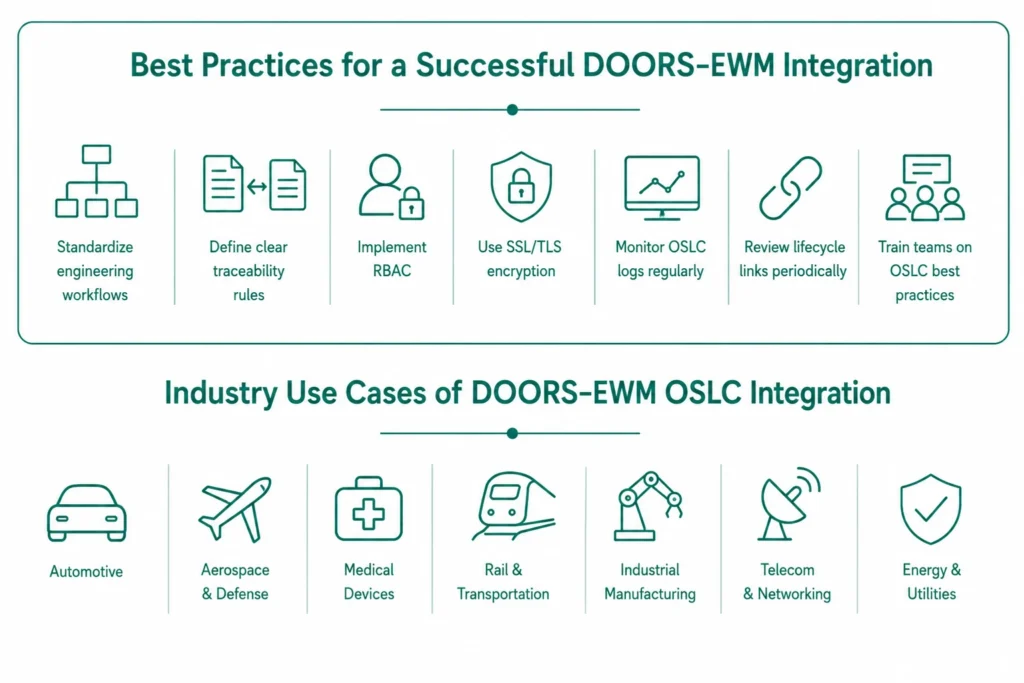
Some recommended best practices include:
- Establish standardized engineering workflows before integration.
- Define clear traceability rules for requirements, work items, defects, and test cases.
- Implement role-based access control (RBAC) to manage permissions consistently.
- Use SSL/TLS encryption to secure OSLC communication.
- Monitor OSLC logs regularly to identify and resolve integration issues proactively.
- Periodically review lifecycle links to ensure traceability remains complete as projects evolve.
- Train engineering teams on creating and maintaining meaningful OSLC relationships instead of relying on manual references or external documentation.
Following these practices helps organizations maximize the value of their IBM ELM investment while ensuring a scalable, maintainable, and audit-ready engineering lifecycle.
Industry Use Cases of DOORS-EWM OSLC Integration
Engineering organizations across industries are under increasing pressure to deliver innovative products faster while maintaining quality, safety, and regulatory compliance. As products become more software-driven and multidisciplinary, disconnected engineering tools create bottlenecks that slow development and increase project risks.
By integrating IBM Engineering Requirements Management DOORS with IBM Engineering Workflow Management (EWM) through OSLC, organizations can establish a connected engineering environment where requirements, development, testing, and change management remain synchronized throughout the product lifecycle.
Below are some of the industries where this integration delivers significant business value.
Automotive
Modern vehicles contain millions of lines of software code controlling everything from powertrain systems to advanced driver assistance systems (ADAS), infotainment, and autonomous driving features. Managing thousands of interconnected requirements while ensuring compliance with standards such as ISO 26262 and ASPICE requires complete lifecycle traceability.
DOORS-EWM integration enables automotive engineering teams to:
- Link vehicle requirements directly to development work items.
- Track software implementation against safety requirements.
- Perform rapid impact analysis for engineering changes.
- Improve collaboration between systems, software, and testing teams.
- Simplify compliance reporting during audits.
Organizations developing electric and software-defined vehicles can also benefit from our detailed guide on Addressing Complexity in Electric Vehicle (EV) System Design and Development Using IBM ELM, which explains how integrated lifecycle management helps manage complex vehicle development programs.
Aerospace and Defense
Aerospace and defense programs involve highly complex systems where every engineering decision must be documented and traceable.
Engineering teams must manage:
- System requirements
- Safety analyses
- Design documentation
- Verification activities
- Certification evidence
- Change approvals
With OSLC integration, project stakeholders can quickly navigate between requirements, engineering tasks, defects, and verification artifacts, significantly improving project visibility while supporting compliance with standards such as DO-178C and ARP4754A.
Medical Devices
Medical device manufacturers operate within highly regulated environments where every software and hardware requirement must be fully traceable throughout development.
DOORS-EWM integration enables organizations to:
- Maintain complete requirement traceability.
- Link risk assessments with implementation activities.
- Improve verification planning.
- Support regulatory audits.
- Generate evidence for IEC 62304 and ISO 13485 compliance.
Rail and Transportation
Rail signaling systems, onboard software, and infrastructure management solutions demand rigorous engineering governance.
Integrated lifecycle management allows engineering teams to maintain visibility across:
- Functional requirements
- Engineering changes
- Safety verification
- Test execution
- Issue resolution
- Certification documentation
This improves engineering quality while reducing project risks throughout long development cycles.
Industrial Manufacturing
Manufacturers developing industrial automation systems, robotics, and connected products increasingly rely on software-intensive engineering.
Integrating DOORS and EWM enables organizations to coordinate multidisciplinary engineering teams while maintaining complete visibility into requirements implementation and product validation.
Extending OSLC Beyond Requirements and Work Item Management
Although many organizations initially implement OSLC to connect requirements with engineering work items, the framework is capable of supporting much broader lifecycle integration.
IBM Engineering Lifecycle Management enables organizations to connect:
- Requirements Management
- Systems Modeling
- Architecture Management
- Software Development
- Test Management
- Configuration Management
- Change Management
- Reporting
- Lifecycle Dashboards
For organizations using model-based systems engineering (MBSE), integrating architecture models into the engineering lifecycle creates even greater traceability.
Our guide on Comprehensive Guide to Rhapsody Model Manager: Revolutionizing Architectural Management explains how architecture models can be linked with requirements, work items, and verification artifacts to create a comprehensive digital engineering environment.
By extending lifecycle integration beyond requirements alone, organizations establish a true digital thread that connects every stage of product development—from initial concept through deployment and ongoing maintenance.
Why IBM Engineering Lifecycle Management Is the Preferred Platform
While individual engineering tools can solve specific challenges, modern product development requires a connected platform that enables collaboration across the entire engineering lifecycle.
IBM Engineering Lifecycle Management (IBM ELM) provides this unified environment by integrating requirements management, workflow management, quality management, systems engineering, reporting, and lifecycle governance into a single ecosystem.
Organizations adopting IBM ELM gain several strategic advantages:
- Complete lifecycle traceability
- Improved cross-functional collaboration
- Scalable engineering governance
- Better compliance management
- Centralized reporting and dashboards
- Support for Agile, SAFe®, and hybrid development methodologies
- Open integration through OSLC standards
For organizations evaluating IBM ELM as their engineering platform, our article on 7 Reasons IBM ELM Is the Right Choice for Product Engineering explores how the platform helps engineering teams improve productivity, accelerate innovation, and manage increasingly complex product development programs.
Infrastructure and Upgrade Considerations
A successful OSLC integration depends not only on proper configuration but also on maintaining a modern, supported IBM ELM environment. As IBM evolves its technology stack, organizations must proactively review infrastructure dependencies to avoid compatibility and support issues.
One recent example is IBM’s decision to discontinue Microsoft SQL Server support for certain IBM ELM deployments. This change has significant implications for organizations planning upgrades or new implementations, particularly with respect to database migration strategies, long-term support, and system performance.
Before implementing or expanding OSLC integrations, review your current infrastructure and future roadmap. Our article on Why IBM’s Discontinuation of MSSQL Support Is a Game Changer explains the impact of this change and how organizations can prepare for a smooth transition while maintaining business continuity.
Why Choose MicroGenesis?
Successfully integrating IBM DOORS and Engineering Workflow Management requires more than technical configuration—it demands expertise in engineering processes, lifecycle governance, systems integration, and compliance.
As an IBM Gold Partner with decades of experience in Engineering Lifecycle Management, MicroGenesis helps organizations design, implement, and optimize IBM ELM environments tailored to their business and regulatory requirements.
Our IBM ELM services include:
- IBM DOORS and DOORS Next implementation
- IBM Engineering Workflow Management deployment
- OSLC integration and lifecycle traceability
- Jazz Team Server configuration
- Requirements management consulting
- Engineering process transformation
- Migration from legacy engineering tools
- Reporting and dashboard customization
- User training and managed support
Whether you’re starting your digital engineering journey or modernizing an existing IBM ELM deployment, our consultants help you build a scalable, secure, and future-ready engineering ecosystem that improves collaboration, accelerates development, and strengthens compliance.
Frequently Asked Questions (FAQs)
1. What is IBM Engineering Requirements Management DOORS?
IBM Engineering Requirements Management DOORS is a leading requirements management solution designed to capture, organize, analyze, and manage complex requirements throughout the product development lifecycle. It helps organizations establish end-to-end traceability, improve collaboration among engineering teams, and meet stringent regulatory and compliance requirements.
2. What is IBM Engineering Workflow Management (EWM)?
IBM Engineering Workflow Management (formerly Rational Team Concert) is a collaborative lifecycle management solution that enables Agile planning, work item tracking, source control, build automation, and project management. When integrated with DOORS, it provides seamless traceability between requirements and engineering execution.
3. What is OSLC, and why is it important?
Open Services for Lifecycle Collaboration (OSLC) is an open standard that enables engineering tools to share and reference lifecycle data through linked relationships instead of duplicating information.
By using OSLC, organizations can:
- Create live links between engineering artifacts
- Eliminate data duplication
- Improve collaboration
- Simplify impact analysis
- Maintain complete lifecycle traceability
- Support compliance and audit readiness
4. What are the prerequisites for integrating DOORS and EWM?
Before configuring OSLC integration, organizations should ensure that the following components are properly installed and configured:
- IBM Engineering Requirements Management DOORS
- IBM Engineering Workflow Management (EWM)
- IBM DOORS Web Access (DWA)
- IBM Jazz Team Server (JTS)
- IBM Common Licensing
- SSL certificates for secure communication
- Appropriate user permissions and role-based access controls
Proper infrastructure planning helps ensure a smooth and successful integration.
5. Can DOORS and EWM integration support regulatory compliance?
Yes. One of the biggest advantages of integrating DOORS with EWM is the ability to maintain complete traceability between requirements, development work items, testing, defects, and engineering changes.
This traceability helps organizations comply with industry standards such as:
- ISO 26262
- ASPICE
- IEC 62304
- DO-178C
- EN 50128
- ISO 13485
It also simplifies audit preparation by providing a complete history of engineering decisions and requirement implementation.
6. Which industries benefit the most from DOORS-EWM integration?
Organizations developing complex or safety-critical products gain the greatest value from OSLC-based lifecycle integration.
Common industries include:
- Automotive
- Aerospace & Defense
- Medical Devices
- Rail & Transportation
- Industrial Manufacturing
- Electronics
- Energy
- High-Tech Engineering
These industries rely on complete engineering traceability to improve product quality, reduce development risks, and meet regulatory requirements.
7. Does OSLC require data synchronization?
No. Unlike traditional integrations that replicate engineering information across multiple systems, OSLC uses linked data principles.
This means:
- Requirements remain stored in DOORS.
- Work items remain stored in EWM.
- Applications reference each other through live links.
- Users always access the latest information without maintaining duplicate records.
This significantly reduces maintenance effort while improving data consistency across engineering teams.
Conclusion
As engineering organizations develop increasingly connected and software-driven products, maintaining traceability between requirements and implementation has become essential for delivering quality, ensuring compliance, and accelerating innovation. Integrating IBM Engineering Requirements Management DOORS with IBM Engineering Workflow Management (EWM) using OSLC creates a connected engineering ecosystem where requirements, development activities, testing, and change management remain synchronized throughout the product lifecycle.
Rather than relying on manual updates or disconnected tools, OSLC establishes live, bidirectional relationships between engineering artifacts, enabling teams to perform faster impact analysis, improve collaboration, and maintain complete audit trails. Whether you’re developing automotive software, aerospace systems, medical devices, or industrial automation solutions, this integration provides the visibility and governance needed to manage complex engineering projects with confidence.
If you’re looking to build a scalable Engineering Lifecycle Management environment, optimize lifecycle traceability, or implement OSLC-based integrations, this guide on Integrating IBM Engineering Requirements Management DOORS and Engineering Workflow Management (EWM) Using OSLC serves as a valuable reference for planning and executing a successful integration.
Ready to Modernize Your Engineering Lifecycle?
MicroGenesis helps organizations implement, integrate, and optimize IBM Engineering Lifecycle Management solutions to improve collaboration, ensure end-to-end traceability, and support compliance across complex engineering programs.
Our IBM ELM expertise includes:
- IBM DOORS & DOORS Next Implementation
- IBM Engineering Workflow Management (EWM)
- OSLC Integration & Lifecycle Traceability
- Jazz Team Server (JTS) Configuration
- Engineering Process Consulting
- Requirements Management
- Migration & Upgrade Services
- Reporting & Dashboard Development
- Managed Support & Training
Contact MicroGenesis today to discover how our IBM ELM experts can help you build a connected, future-ready engineering environment that accelerates product development while maintaining complete lifecycle governance.