

Moving applications to AWS is one thing. Building a cloud environment that performs reliably, protects business data, scales with demand, and remains manageable over time is another.
Many organizations begin their AWS journey with a straightforward objective: modernize infrastructure, improve application performance, or reduce dependency on traditional data centers.
But once implementation begins, important questions emerge.
How should the AWS environment be structured? Which services are appropriate for each workload? How can applications remain available during infrastructure failures? What security controls should be configured before deployment?
These decisions directly affect the performance, security, reliability, and long-term cost of your cloud environment.
This is where professional AWS cloud architecture services and AWS implementation services become valuable.
A well-planned AWS architecture helps organizations create cloud environments aligned with their application requirements, operational capabilities, and business objectives.
In this guide, we explain how AWS cloud architecture and implementation work, the important design considerations, and how businesses can build cloud infrastructure that supports long-term growth.
What Is AWS Cloud Architecture and Implementation?
AWS cloud architecture refers to the design and organization of cloud resources, services, networking, security controls, and application components within Amazon Web Services.
AWS implementation is the process of configuring, deploying, integrating, and validating that architecture.
The two activities are closely connected, but they serve different purposes.
Architecture defines how the environment should work. Implementation turns that design into an operational system.
For example, an organization planning to host an enterprise application on AWS must consider:
Where application components and databases should run.
How users and internal systems will access the application.
How infrastructure should scale when demand increases.
How sensitive information will be protected.
What happens when a server or Availability Zone becomes unavailable.
How infrastructure will be monitored and maintained.
How cloud spending will be controlled.
These decisions should be made before production deployment rather than addressed individually as problems arise.
For a broader understanding of cloud planning, architecture, and optimization, explore our AWS Cloud Consulting Services Guide.
Why AWS Cloud Architecture Planning Matters
AWS provides a wide range of infrastructure and managed services. However, having access to these services does not automatically produce a reliable or cost-efficient environment.
The architecture must reflect the requirements of the applications and the business.
Consider a retail organization running an online ordering platform.
During normal operations, the application may handle a predictable number of transactions. During seasonal campaigns, traffic may increase significantly.
If the infrastructure is designed only for average demand, customers could experience slow response times or service interruptions.
On the other hand, permanently provisioning infrastructure for peak demand may increase operating costs.
A suitable AWS architecture can address these challenges through appropriate resource selection, scaling mechanisms, and availability planning.
Common Problems Caused by Poor Architecture
Limited scalability: Applications struggle to handle increasing traffic or workloads.
Security gaps: Excessive permissions, exposed resources, or inadequate network controls increase risk.
Unexpected costs: Oversized resources and inefficient infrastructure configurations increase cloud spending.
Availability issues: Applications depend on individual infrastructure components without suitable recovery mechanisms.
Operational complexity: Inconsistent environments and manual configuration make maintenance difficult.
These challenges are easier to address during architecture planning than after production systems are deployed.
Before designing infrastructure, organizations should understand their existing workloads and dependencies. Our article on AWS cloud strategy and assessment explains how to evaluate cloud readiness and define implementation priorities.
Planning a new AWS environment or reviewing an existing architecture? Speak to an AWS architect at MicroGenesis to discuss your infrastructure and application requirements.
Key Components of AWS Cloud Infrastructure Design
AWS infrastructure design involves selecting and connecting services based on workload requirements.
The objective is not to use as many AWS services as possible. It is to create an architecture that is appropriate, secure, scalable, and manageable.
1. Compute Architecture
Compute services provide the processing capacity required to run applications.
Common AWS options include:
Amazon EC2: Virtual servers for applications requiring control over operating systems and infrastructure configuration.
AWS Lambda: Serverless compute for event-driven functions and supported application workloads.
Amazon ECS and Amazon EKS: Container orchestration options for applications built using containers.
AWS Fargate: Serverless compute capacity for supported container workloads.
The right choice depends on application architecture, resource requirements, operational preferences, and cost considerations.
For example, a traditional enterprise application may initially run on EC2, while a new event-driven application may be suitable for Lambda.
2. Storage and Database Architecture
Applications require different approaches to storing and accessing information.
AWS offers services such as:
Amazon S3 for object storage.
Amazon EBS for block storage.
Amazon EFS for shared file storage.
Amazon RDS for supported relational database workloads.
Amazon DynamoDB for applications requiring a managed NoSQL database.
Storage and database decisions should consider performance, durability, availability, access patterns, backup, and cost.
3. Networking Architecture
Networking determines how applications, users, and services communicate.
Amazon Virtual Private Cloud (VPC) provides a foundation for organizing AWS network resources.
Architecture planning may include public and private subnets, route tables, security groups, network access controls, load balancers, and connectivity to on-premises infrastructure.
For example, an application may expose its web interface through a public-facing load balancer while keeping application servers and databases in private subnets.
This helps limit unnecessary direct exposure of internal components.
4. Monitoring and Operational Visibility
A production environment needs visibility into application and infrastructure behavior.
Amazon CloudWatch can help collect metrics, logs, and operational information. AWS CloudTrail records supported AWS account activity and API events.
Monitoring requirements should be defined during architecture planning so that teams can identify performance issues and investigate operational events after deployment.
Designing Scalable AWS Cloud Architecture
Scalability is one of the main reasons organizations adopt AWS.
However, scalable architecture requires more than increasing server capacity.
It involves understanding workload behavior and designing systems that can respond to changes in demand.
Horizontal and Vertical Scaling
Vertical scaling involves increasing the resources available to an individual server, such as CPU or memory.
Horizontal scaling involves adding more application instances to distribute workloads.
For applications that support it, horizontal scaling can provide flexibility during periods of changing demand.
AWS services such as EC2 Auto Scaling and Elastic Load Balancing can support automated capacity adjustments and traffic distribution.
Designing for Variable Workloads
Consider a business application that supports 500 daily users but experiences significantly higher demand during monthly reporting.
Running maximum infrastructure capacity continuously may not be necessary.
A suitable architecture could use automated scaling, managed services, or scheduled capacity adjustments depending on application requirements.
The goal is to maintain acceptable performance while avoiding unnecessary resource consumption.
Reducing Application Dependencies
Applications with tightly coupled components can be difficult to scale independently.
Where appropriate, architecture improvements may include separating application components, using asynchronous processing, or adopting managed services.
These decisions should be based on actual application requirements rather than assuming every system needs a microservices architecture.
Need an AWS architecture that can support business growth? Discuss your scalability requirements with MicroGenesis and explore suitable infrastructure design options.
AWS Security Architecture: Building Protection into the Design
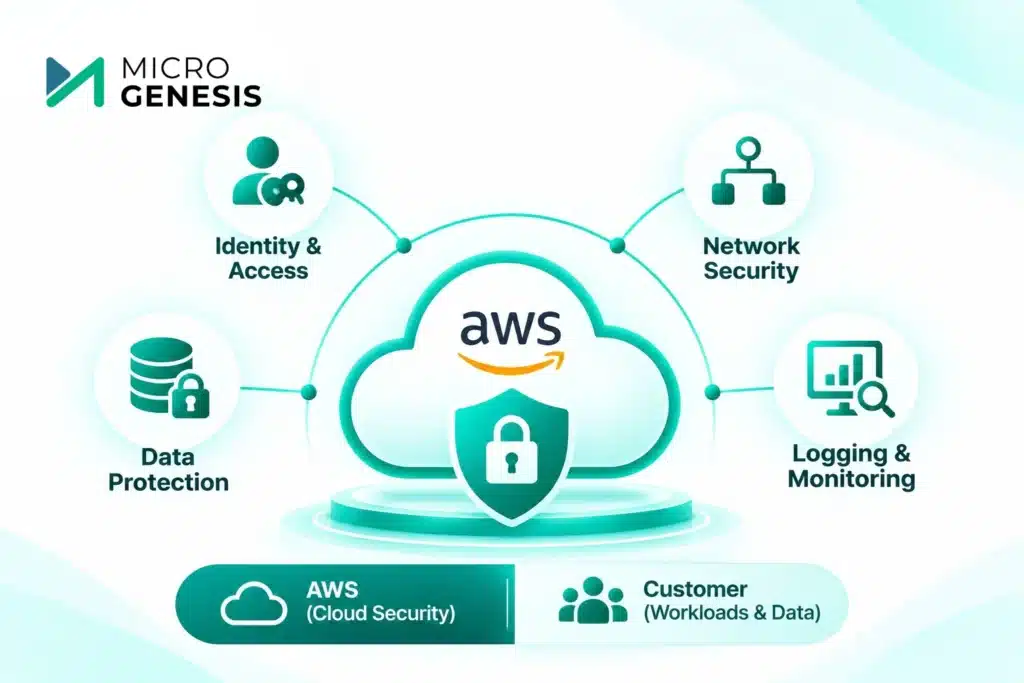
Security should be part of the architecture from the beginning.
AWS operates under a shared responsibility model. AWS manages security of the cloud infrastructure, while customers remain responsible for the security activities applicable to their workloads, configurations, data, and services.
The exact division of responsibilities depends on the AWS services being used.
Identity and Access Management
AWS Identity and Access Management (IAM) helps organizations control access to AWS resources.
Security planning should follow least-privilege principles, providing users and services only the permissions they require.
Multi-factor authentication, temporary credentials, and regular access reviews are also important considerations.
Network Security
Network architecture should limit unnecessary access between systems.
This may include private subnets, security groups, controlled connectivity, and appropriate network segmentation.
Internet-facing resources should be limited to components that genuinely require public access.
Data Protection
Sensitive information should be protected based on business and regulatory requirements.
AWS provides capabilities for encryption, key management, access control, and data protection.
Services such as AWS Key Management Service (KMS) can support encryption key management for compatible AWS services.
Logging and Security Monitoring
Security monitoring helps teams identify unusual activity and investigate incidents.
Depending on requirements, organizations may use AWS CloudTrail, Amazon GuardDuty, AWS Config, and other AWS security services.
Security controls should be tested and reviewed as environments evolve.
Designing AWS Architecture for High Availability and Reliability
An application can have sufficient compute capacity and strong security controls but still experience outages if its architecture contains avoidable single points of failure.
Availability planning should reflect the business impact of downtime.
Multi-Availability Zone Architecture
AWS Regions contain multiple Availability Zones.
For workloads requiring higher availability, organizations can distribute supported application components across multiple Availability Zones.
For example, an application may use a load balancer to distribute requests across EC2 instances running in different Availability Zones.
A compatible database service may also support Multi-AZ deployment options.
However, using multiple Availability Zones does not automatically make an application highly available. Application behavior, dependencies, failover configuration, and operational processes must also be considered.
Backup and Disaster Recovery
Backup and disaster recovery serve different purposes.
Backups help recover data after deletion, corruption, or other data-loss events.
Disaster recovery planning considers how business services can be restored after significant disruptions.
Organizations should define:
Recovery Time Objective (RTO): The target time for restoring a service.
Recovery Point Objective (RPO): The maximum acceptable amount of data loss measured in time.
These objectives help determine suitable backup, replication, and recovery strategies.
The AWS Well-Architected Review Checklist provides additional guidance on evaluating reliability, security, performance, and other architecture considerations.
AWS Environment Setup and Infrastructure Implementation
Once the architecture is approved, implementation begins.
This stage involves configuring AWS services and establishing the environment required to host applications securely and reliably.
A structured implementation process reduces configuration inconsistencies and helps teams validate infrastructure before production use.
Step 1: Establish the AWS Account Structure
Organizations should plan how AWS accounts and environments will be organized.
Depending on scale and governance requirements, separate accounts may be appropriate for production, development, testing, and shared services.
AWS Organizations and AWS Control Tower can support multi-account governance and landing zone setup.
Step 2: Configure Networking and Connectivity
The next step is implementing the planned network architecture.
This may involve VPC configuration, subnet creation, routing, security groups, internet connectivity, and hybrid network connections.
Network configuration should be validated before application deployment.
Step 3: Implement Security Controls
Identity permissions, encryption settings, logging, monitoring, and security policies should be configured according to the approved architecture.
Security should be reviewed before workloads are exposed to users or connected to enterprise systems.
Step 4: Provision Compute, Storage, and Databases
The required infrastructure services are deployed based on workload requirements.
Resource selection should reflect performance expectations, availability needs, and cost estimates.
Step 5: Configure Monitoring and Backup
Monitoring, alerts, backup policies, and recovery procedures should be established before production deployment.
This helps operational teams understand infrastructure behavior and respond to issues.
Step 6: Deploy and Validate Applications
Applications are deployed into the configured environment.
Validation should include connectivity, functional testing, performance, security controls, monitoring, and recovery procedures.
Production deployment should follow an agreed release and rollback plan.
Infrastructure as Code and Deployment Automation
Manually configuring AWS resources may be manageable for a small environment, but it becomes difficult as infrastructure grows.
Infrastructure as Code (IaC) helps teams define cloud infrastructure through configuration files rather than relying entirely on manual setup.
Tools such as AWS CloudFormation and Terraform can support repeatable infrastructure provisioning.
Why Infrastructure Automation Matters
IaC can help organizations:
Maintain consistent infrastructure configurations.
Review infrastructure changes through version control.
Reduce repetitive manual tasks.
Recreate environments more reliably.
Integrate infrastructure deployment with CI/CD processes.
For example, a development team may need similar infrastructure for testing and production.
Rather than manually recreating every component, IaC can help provision environments from reviewed configurations, with environment-specific settings applied where necessary.
Automation still requires appropriate testing, access controls, and change management.
Looking to standardize AWS infrastructure deployment? Speak to our AWS consulting team about architecture implementation and infrastructure automation.
Practical Example: AWS Architecture for an Enterprise Application
Consider a mid-sized enterprise planning to deploy a customer-facing application on AWS.
The application requires reliable performance, secure database access, and the ability to handle traffic increases.
A possible architecture could include:
| Component | Example AWS service | Purpose |
|---|---|---|
| DNS | Amazon Route 53 | Direct users to the application |
| Load balancing | Application Load Balancer | Distribute application traffic |
| Application hosting | Amazon EC2 with Auto Scaling | Run and scale application instances |
| Database | Amazon RDS | Manage relational data |
| Object storage | Amazon S3 | Store supported files and application objects |
| Identity and permissions | AWS IAM | Control access to AWS resources |
| Monitoring | Amazon CloudWatch | Monitor infrastructure and application metrics |
| Encryption keys | AWS KMS | Manage supported encryption keys |
Application instances could run in private subnets across multiple Availability Zones, with the load balancer providing the required public entry point.
The database could use an appropriate RDS deployment configuration based on availability and recovery requirements.
This is an illustrative architecture, not a universal recommendation. Actual service selection depends on application behavior, traffic, compliance, recovery objectives, and budget.
Common AWS Implementation Mistakes to Avoid
Even a technically correct deployment can create operational challenges if important architecture decisions are overlooked.
1. Deploying before completing architecture planning
Infrastructure should be designed around workload requirements rather than assembled service by service.
2. Using oversized resources
Selecting unnecessarily large instances can increase costs without delivering meaningful performance benefits.
3. Ignoring network and access controls
Poorly configured permissions or publicly exposed resources can introduce security risks.
4. Overlooking monitoring and backup
Applications should not enter production without suitable operational visibility and recovery arrangements.
5. Relying entirely on manual configuration
Manual deployment increases the possibility of configuration drift as environments expand.
6. Treating implementation as the end of cloud transformation
Cloud environments require ongoing monitoring, security reviews, maintenance, and optimization.
Organizations should establish operational ownership before production handover. Our guide to AWS managed service providers explains how ongoing cloud management can support infrastructure operations after implementation.
How MicroGenesis Helps with AWS Cloud Architecture and Implementation
Building an AWS environment requires decisions that affect infrastructure performance, security, scalability, and long-term operations.
MicroGenesis helps organizations approach these decisions through structured AWS consulting, architecture planning, and implementation support.
Our AWS Architecture and Implementation Approach
Infrastructure and workload assessment
We begin by understanding your existing applications, infrastructure dependencies, performance requirements, and business priorities.
AWS architecture planning
We help define suitable compute, storage, database, networking, security, and availability configurations based on workload needs.
Security and governance considerations
We incorporate identity management, network controls, logging, data protection, and operational governance into architecture planning.
AWS environment implementation
We support infrastructure configuration, provisioning, integration, and deployment activities according to the agreed scope.
Deployment validation
We consider application connectivity, performance, monitoring, and operational readiness before production handover.
Architecture improvement
For existing AWS environments, we help identify opportunities to improve infrastructure design, resource utilization, and operational practices.
Our broader experience in enterprise engineering, application development, integration, and DevOps helps us consider AWS architecture within the context of business applications and existing technology environments.
Through our AWS consulting services, organizations can access support for cloud planning, architecture design, and infrastructure implementation.
What Should You Expect from an AWS Architecture Engagement?
Before engaging an AWS architect, it is useful to understand the typical outputs of an architecture and implementation project.
| Deliverable | Business value |
|---|---|
| Architecture requirements document | Defines workload and business requirements |
| AWS architecture design | Establishes infrastructure components and relationships |
| Network and security design | Defines connectivity and access controls |
| Availability and recovery approach | Supports business continuity planning |
| Infrastructure configuration | Establishes the required AWS environment |
| Deployment automation approach | Supports consistent provisioning |
| Monitoring and backup configuration | Improves operational readiness |
| Validation and handover documentation | Supports ongoing infrastructure management |
The exact deliverables depend on project complexity, workload requirements, and the agreed engagement scope.
Final Thoughts
AWS provides the flexibility to build modern cloud environments, but successful implementation depends on the decisions made before and during deployment.
Organizations need to design infrastructure around actual application requirements, plan for scalability and availability, establish appropriate security controls, and validate environments before production use.
A well-structured AWS architecture can improve operational consistency, support business growth, and reduce avoidable infrastructure complexity.
Whether you are implementing AWS for the first time, modernizing existing infrastructure, or reviewing an established cloud environment, experienced architecture planning can help you make more informed decisions.
Speak to an AWS Architect
Are you planning a new AWS environment, looking to improve scalability, or preparing to deploy business-critical applications?
MicroGenesis can help you evaluate your requirements, plan suitable AWS architecture, and implement cloud infrastructure aligned with your business objectives.
Speak to an AWS Architect at MicroGenesis to discuss your cloud architecture and implementation requirements.