
Your Salesforce implementation is complete. The system is live, customer records have been migrated, and the sales team has received training.
But three months later, something is not working.
Sales representatives still maintain spreadsheets. Customer information is incomplete. Managers repeatedly remind employees to update opportunities, and the reports generated from Salesforce do not reflect what is happening in the business.
The problem may not be Salesforce itself.
It may be how the platform was designed, introduced, and adopted across the organization.
Salesforce user adoption is one of the most important factors influencing whether a CRM implementation delivers meaningful business value.
A technically successful implementation does not automatically mean employees will use the platform consistently.
People need to understand why Salesforce matters, how it supports their responsibilities, and how to use it without adding unnecessary work.
In this article, we examine seven common Salesforce implementation mistakes that affect user adoption, explain why they happen, and share practical ways to improve Salesforce adoption across enterprise teams.
What Is Salesforce User Adoption?
Salesforce user adoption refers to how consistently and effectively employees use Salesforce to perform their business activities.
It is not simply the number of users who log in.
An employee may access Salesforce every day but still maintain important customer information outside the platform.
Similarly, a sales representative may create opportunities without updating their stages, expected close dates, or next steps.
In both situations, Salesforce usage exists, but the business may not receive reliable information.
Effective adoption means employees use Salesforce as intended for relevant processes, maintain accurate information, and understand how the platform supports their work.
Why Salesforce User Adoption Matters
Low adoption can affect several business areas:
Sales visibility: Incomplete opportunity information makes pipeline reporting less reliable.
Customer experience: Teams may lack access to relevant customer interactions.
Productivity: Employees may duplicate work across Salesforce and spreadsheets.
Reporting: Dashboards may show outdated or inconsistent information.
Process consistency: Different teams may follow different workflows.
Return on investment: The organization may not realize the expected benefits of its CRM investment.
For enterprises, these issues can become more significant when Salesforce supports multiple departments, regions, and connected applications.
Our Salesforce Implementation Services Guide for Enterprise Businesses explains how implementation planning, integration, training, and ongoing improvement fit together.
Why Does Salesforce User Adoption Fail?
Salesforce adoption often struggles when organizations treat implementation primarily as a technology project.
The platform may be configured correctly, but employees may not understand the new processes or find the system useful.
Common causes include:
Limited involvement of end users during implementation.
Complicated workflows and unnecessary data entry.
Training that does not reflect daily responsibilities.
Poor data quality.
Lack of management involvement.
Inadequate communication about process changes.
Limited support after go-live.
These issues are connected.
For example, poor workflow design can make training more difficult, while unreliable customer data can reduce employees’ confidence in Salesforce.
Improving adoption requires addressing the underlying problems rather than simply asking employees to use the CRM more frequently.
1. Implementing Salesforce Without Involving End Users
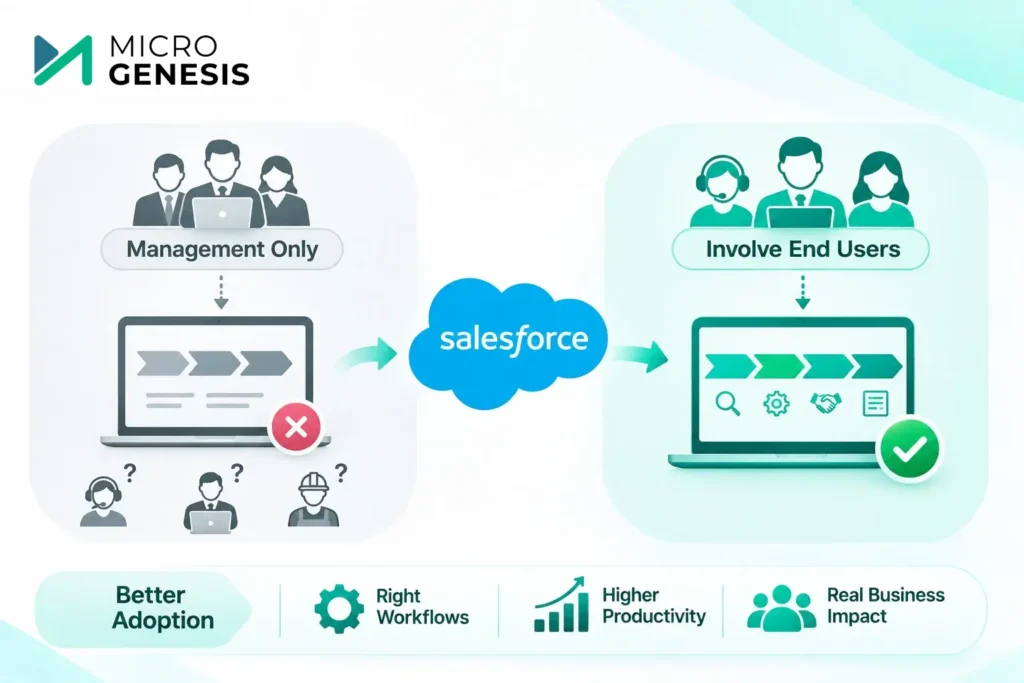
One of the most common mistakes is designing Salesforce around management requirements without understanding how employees perform their daily work.
Leadership may want detailed reports, standardized processes, and better forecasting.
These are reasonable objectives.
However, if the implementation team does not involve sales representatives, service agents, and other users, the final configuration may not support their actual workflows.
Example: An Opportunity Management Process That Does Not Fit
Consider a B2B engineering company with long sales cycles.
Opportunities may involve technical discussions, solution evaluations, commercial proposals, and several decision-makers.
If Salesforce is configured with generic sales stages that do not reflect these activities, employees may struggle to maintain accurate opportunity information.
They may create workarounds or continue tracking important details elsewhere.
How to Avoid This Mistake
Involve representatives from each user group during discovery and solution design.
Ask practical questions:
What information do employees need to complete their work?
Which activities currently take too much time?
What customer information is difficult to access?
Which processes should be standardized?
What reports would genuinely help employees?
Include users in testing before deployment.
Their feedback can identify workflow problems that may not be obvious to administrators or project managers.
Key takeaway: Design Salesforce around real business activities, not only reporting requirements.
2. Creating Complicated Workflows and Too Many Mandatory Fields
Salesforce provides extensive configuration and automation capabilities.
However, more configuration does not necessarily create a better user experience.
Organizations sometimes introduce too many required fields, approval steps, custom objects, or automation rules.
This can make simple tasks unnecessarily difficult.
Example: Updating an Opportunity Takes Too Long
A sales representative wants to update an opportunity after a customer meeting.
Instead of entering the meeting outcome and next action, the employee must complete several fields that are not relevant to the current sales stage.
The update takes longer than expected.
Over time, the representative may delay entering information or maintain notes outside Salesforce.
How to Improve Salesforce Usability
Start by reviewing which information is genuinely required at each stage.
Consider these improvements:
Remove unnecessary mandatory fields.
Use standard Salesforce functionality where appropriate.
Simplify page layouts.
Automate repetitive tasks when practical.
Avoid duplicate data entry.
Review approval workflows for unnecessary steps.
Test common activities with actual users.
For example, some information may only become necessary when an opportunity reaches the proposal or negotiation stage.
Collecting it at the appropriate time can make the process easier to follow.
Struggling with complicated Salesforce workflows? Discuss your Salesforce consulting requirements with MicroGenesis to explore workflow improvements and implementation support.
3. Providing Generic Salesforce Training
Training is essential, but a single demonstration of Salesforce features is rarely sufficient for an enterprise implementation.
Different employees use Salesforce for different purposes.
A sales representative needs to understand lead and opportunity management.
A customer service agent may need training on cases and customer interactions.
A manager may focus on dashboards, pipeline reviews, and reporting.
Providing identical training to every user can leave important questions unanswered.
Example: Training That Does Not Match Daily Work
An organization conducts a two-hour Salesforce training session covering navigation, records, and basic reporting.
Employees understand the interface but remain unsure how to manage their specific business processes.
When they return to work, they struggle to apply what they learned.
Salesforce Training Best Practices
Develop role-based training around actual tasks.
| User group | Training focus |
|---|---|
| Sales representatives | Leads, opportunities, activities and customer records |
| Sales managers | Pipeline reviews, dashboards and forecasting |
| Customer service teams | Cases, customer interactions and service workflows |
| Salesforce administrators | Users, permissions, configuration and support |
| Business leadership | Reporting, performance visibility and governance |
Training should include realistic scenarios rather than only explaining where features are located.
For example, sales representatives can practice creating an opportunity, updating its stage, recording customer interactions, and preparing it for approval.
Provide supporting documentation and opportunities for follow-up questions.
Training should also continue after go-live as workflows change or new employees join.
4. Migrating Poor-Quality Customer Data into Salesforce
Employees are less likely to trust Salesforce when the information it contains is inaccurate or incomplete.
Imagine a sales representative opening a customer account and finding duplicate records, outdated contact details, or missing opportunity history.
The employee may begin checking other systems before relying on Salesforce.
This defeats the objective of creating a consistent source of customer information.
How Poor Data Quality Affects Adoption
Poor data quality can lead to:
Duplicate customer accounts.
Incorrect ownership assignments.
Incomplete sales histories.
Unreliable dashboards.
Confusion between departments.
Continued dependence on spreadsheets.
How to Avoid This Mistake
Data preparation should begin before migration.
A structured approach includes:
Identify existing data sources.
Review data quality and completeness.
Define rules for handling duplicates.
Map source fields to Salesforce.
Conduct trial migrations.
Validate critical records and relationships.
Establish ongoing data ownership.
For example, if Salesforce and an ERP platform contain customer records, the organization should define which system owns specific information and how updates will be synchronized.
Data quality is not only a migration concern. It requires ongoing governance.
Our article on common Salesforce implementation challenges and solutions explains how data migration and integration problems can affect CRM implementation outcomes.
5. Failing to Communicate Why Salesforce Is Being Introduced
Employees are more likely to support a new system when they understand why the change is happening.
If Salesforce is presented only as a management reporting tool, users may see it as additional administrative work.
A clear communication plan should explain how Salesforce is expected to improve daily processes and business outcomes.
Example: Different Expectations Between Management and Sales
Management introduces Salesforce to improve pipeline visibility.
Sales representatives believe the system is primarily intended to monitor their activities.
As a result, they may update Salesforce only before weekly review meetings.
The organization receives periodic updates rather than consistently maintained information.
Building a Salesforce Change Management Plan
A practical change management plan should address:
Purpose: Explain why Salesforce is being implemented and what problems it should solve.
Process changes: Clarify which existing activities will change.
Responsibilities: Define what each user group is expected to do.
Training: Provide relevant guidance before and after deployment.
Communication: Share project updates and important decisions.
Feedback: Establish a way for employees to report problems and suggest improvements.
Leadership involvement: Ensure managers reinforce agreed processes through their own actions.
For example, sales managers can use Salesforce dashboards during regular pipeline meetings instead of requesting separate spreadsheets.
This demonstrates that Salesforce is becoming part of the organization’s working process.
6. Treating Go-Live as the End of User Adoption
Go-live is an important milestone, but it is not the end of implementation.
Employees may encounter problems that were not identified during testing.
Some workflows may require adjustments. New users may need additional training. Integration issues may affect daily operations.
Without post-go-live support, small problems can become persistent frustrations.
Example: Users Encounter Problems After Launch
A company deploys Salesforce across several regional sales teams.
During the first few weeks, employees discover that some reports are difficult to interpret and certain approval notifications are not reaching the intended users.
If these issues remain unresolved, confidence in the platform may decline.
How to Support Adoption After Go-Live
Establish a defined hypercare and improvement process.
Important activities include:
Providing a clear support contact.
Tracking user-reported issues.
Prioritizing problems affecting critical workflows.
Reviewing adoption metrics.
Conducting follow-up training.
Improving configuration where necessary.
Assigning ongoing administration responsibilities.
For enterprise organizations, ongoing Salesforce administration and managed support can help maintain the platform as requirements evolve.
The support model should reflect internal capabilities and the complexity of the environment.
Need support improving an existing Salesforce implementation? Speak with MicroGenesis about Salesforce consulting and ongoing support to review your operational requirements.
7. Measuring Logins Instead of Meaningful Salesforce Adoption
A common mistake is assuming that frequent logins indicate successful adoption.
Login activity can provide useful information, but it does not show whether employees are completing important business processes correctly.
A sales representative may log in daily without updating opportunities.
A manager may access dashboards regularly even though the underlying information is incomplete.
Organizations need adoption metrics connected to actual work.
Salesforce User Adoption Metrics and Dashboards
| Adoption metric | What it helps evaluate |
|---|---|
| Active users | Whether intended users are accessing Salesforce |
| Opportunity update frequency | Whether sales information is being maintained |
| Required data completeness | Whether important records contain usable information |
| Activity recording | Whether relevant customer interactions are documented |
| Workflow completion | Whether users follow defined processes |
| Duplicate record trends | Whether data quality is improving |
| Support requests | Where users encounter difficulties |
| User feedback | Whether workflows support daily activities |
Not every metric will be appropriate for every organization.
For example, a service team should not be evaluated using the same activity measures as a sales team.
Metrics should reflect the responsibilities of each user group.
How to Interpret Adoption Metrics
Suppose Salesforce reports show that most sales representatives log in regularly, but opportunity records have not been updated for several weeks.
This suggests that access is not the main problem.
The organization should investigate whether the opportunity process is too complicated, whether users understand the requirements, or whether information is being maintained elsewhere.
The purpose of adoption reporting is to identify improvement opportunities, not simply monitor employees.
Salesforce User Adoption Mistakes and Solutions: Quick Comparison
| Common mistake | Impact on adoption | Recommended solution |
|---|---|---|
| Limited user involvement | Workflows do not reflect daily activities | Include users in discovery and testing |
| Complicated configuration | Users avoid or delay updates | Simplify workflows and required fields |
| Generic training | Employees struggle with role-specific tasks | Provide practical, role-based training |
| Poor data quality | Users lose confidence in CRM information | Cleanse, validate and govern data |
| Weak change communication | Employees do not understand the value | Explain objectives and process changes |
| No post-go-live support | Problems remain unresolved | Establish hypercare and ongoing support |
| Measuring only logins | Adoption problems remain hidden | Track process-based usage and data quality |
How to Build a Salesforce User Adoption Strategy
Improving Salesforce adoption requires a coordinated approach involving business stakeholders, administrators, implementation teams, and end users.
A practical adoption strategy can follow five stages.
Step 1: Assess Current Adoption
Review how employees currently use Salesforce.
Identify incomplete records, inconsistent workflows, support issues, and areas where employees continue using other tools.
Step 2: Identify the Root Causes
Do not assume low adoption is always a training problem.
Investigate whether users face configuration issues, poor data quality, unnecessary steps, or unclear responsibilities.
Step 3: Prioritize Improvements
Focus first on problems affecting important business processes.
For example, simplifying opportunity updates may provide more immediate value than introducing additional dashboards.
Step 4: Improve Training and Communication
Provide practical guidance based on updated workflows.
Explain what has changed and how employees should use Salesforce.
Step 5: Monitor and Refine
Review adoption metrics and user feedback regularly.
Make adjustments as business requirements evolve.
For organizations preparing a new rollout, our Salesforce Implementation Checklist for Enterprise Businesses provides a structured approach to readiness, testing, training, and deployment.
When Should You Consider Salesforce Adoption Consulting Services?
Some adoption problems can be addressed internally through administrator support and targeted training.
However, external Salesforce adoption consulting may be useful when issues involve multiple departments, complex workflows, integrations, or ongoing implementation problems.
Consider specialist support when:
Employees consistently avoid using Salesforce.
Customer information remains incomplete or unreliable.
Business teams maintain parallel spreadsheets.
Workflows require significant redesign.
Salesforce integrations affect daily operations.
Internal teams lack capacity for configuration and adoption improvements.
Previous implementation changes have not resolved the underlying problems.
A Salesforce adoption audit should examine the actual causes of low usage before recommending changes.
The review may include configuration, business processes, user feedback, data quality, training, and operational support.
How MicroGenesis Helps Improve Salesforce User Adoption
Salesforce adoption is closely connected to implementation quality, integration reliability, and ongoing platform management.
MicroGenesis approaches Salesforce consulting with broader enterprise engineering, application integration, and managed services capabilities.
Our approach focuses on helping organizations align Salesforce with business processes and operational requirements.
Salesforce Workflow and Configuration Assessment
We help organizations review existing Salesforce configurations and identify opportunities to simplify workflows or address process gaps.
Salesforce Integration and Data Considerations
Reliable integrations and accurate information are important for user confidence.
We consider data dependencies, integration requirements, and information quality when evaluating Salesforce environments.
Implementation and Adoption Planning
For new implementations, we help organizations consider user requirements, testing, training, and operational readiness as part of the delivery process.
Ongoing Salesforce Administration and Improvement
Salesforce environments evolve as business requirements change.
Our broader managed services capabilities support discussions around administration, configuration improvements, and operational support based on the agreed engagement scope.
If you are evaluating implementation providers, our article on how to choose the right Salesforce implementation partner explains the capabilities and support arrangements worth reviewing.
Looking to improve Salesforce adoption across your organization? Discuss your Salesforce requirements with MicroGenesis to explore implementation improvements, integration support, and ongoing administration needs.
Frequently Asked Questions About Salesforce User Adoption
How can businesses improve Salesforce user adoption?
Start by understanding why employees are not using Salesforce consistently. Review workflow complexity, data quality, training, and management involvement. Then address the underlying problems and monitor meaningful adoption metrics.
Why does Salesforce adoption fail?
Salesforce adoption may fail when employees are not involved in implementation, workflows are difficult to use, training is inadequate, data is unreliable, or ongoing support is missing.
What are the most important Salesforce adoption metrics?
Useful metrics include active users, opportunity update frequency, data completeness, workflow completion, support requests, and role-specific activity measures.
How long does Salesforce user adoption take?
There is no universal timeline. Adoption depends on implementation complexity, process changes, training, organizational readiness, and the support available after deployment.
Can Salesforce user adoption be improved after implementation?
Yes. Organizations can review existing workflows, identify usability problems, improve training, address data quality issues, and establish clearer operating processes without necessarily replacing the entire implementation.
When should a company hire a Salesforce change management consultant?
Specialist support may be valuable when adoption challenges affect several departments, require significant process changes, or cannot be resolved through routine administration and training.
Final Thoughts
Salesforce user adoption is not achieved simply by launching the platform or completing employee training.
It depends on whether Salesforce supports daily work, provides reliable information, and fits into the organization’s business processes.
The most common adoption mistakes involve limited user involvement, complicated workflows, poor data quality, inadequate training, weak communication, and insufficient support.
Addressing these problems requires a combination of technical improvements and organizational change.
For enterprise businesses, the goal should be to make Salesforce a dependable part of daily operations rather than another system employees are required to update.
Improve Salesforce Adoption with MicroGenesis
Are your teams struggling with Salesforce workflows, incomplete CRM data, low adoption, or ongoing administration challenges?
MicroGenesis can help you evaluate your Salesforce environment, identify implementation and integration issues, and plan practical improvements.
Schedule a Salesforce Consultation with MicroGenesis to discuss your user adoption challenges and next steps.