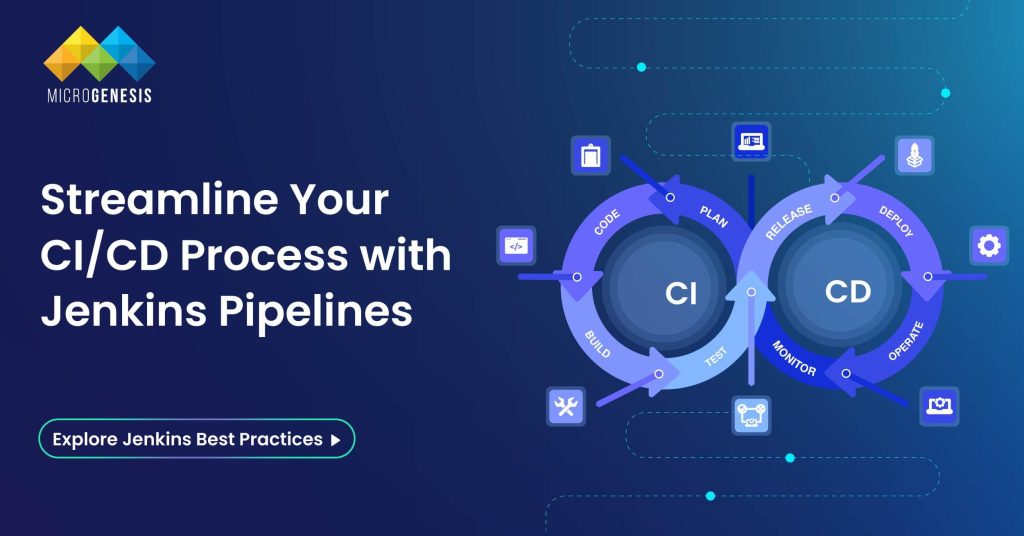
Jenkins Pipelines represent the backbone of modern software delivery, enabling developers to automate and streamline complex workflows efficiently. Whether you’re a seasoned DevOps engineer or a beginner exploring CI/CD concepts, mastering Jenkins Pipelines is pivotal for ensuring seamless software development, testing, and deployment.
What is a Jenkins Pipeline?
A Jenkins Pipeline is a robust set of automation tools within Jenkins, designed to support continuous integration and continuous delivery (CI/CD). It is a suite of plugins that enable defining and automating the build, test, and deployment phases of a software development process as code, known as Pipeline as Code.
This concept simplifies managing workflows and provides visibility, scalability, and resilience to the software delivery process, ensuring a streamlined approach to developing and deploying applications. Here’s a detailed exploration:
Key Features of Jenkins Pipeline (Expanded)
- Pipeline as Code
Jenkins pipelines use Groovy scripting to define workflows in text files like Jenkinsfile. This enables teams to version control their CI/CD processes alongside the application code. As workflows are stored as code, they are easy to review, share, and replicate, fostering consistency and collaboration.
- Extensibility
Jenkins seamlessly integrates with numerous plugins, tools, and external services, such as Git for source control, Docker for containerized builds, and Kubernetes for orchestration. These integrations provide flexibility and adaptability to suit diverse project requirements and infrastructure needs.
- Scalability
With its ability to run jobs across distributed environments, Jenkins Pipelines can manage workloads for projects of varying sizes. It leverages master-agent architecture, allowing parallel task execution and efficient resource utilization, making it ideal for enterprise-level CI/CD systems.
- Visualization
Jenkins offers robust dashboards to monitor pipeline execution and performance metrics. These visual tools display detailed logs, job statuses, and build histories, enabling teams to quickly identify and address bottlenecks or failures in the pipeline.
Types of Jenkins Pipelines (Expanded)
Declarative Pipeline
Declarative pipelines are designed with a high-level, user-friendly syntax that emphasizes simplicity and readability. They are ideal for structured workflows and for users who are new to Jenkins. These pipelines are defined using a pipeline block, encapsulating all configuration details within structured stages. The syntax reduces complexity by providing built-in validation and error checking, which helps avoid mistakes in pipeline configuration. The declarative approach enforces a standardized format, making it easier for teams to adopt best practices and maintain consistency across workflows.
Key Features of Declarative Pipelines:
- Intuitive and structured syntax.
- Simplifies defining stages, steps, and post-build actions.
- Facilitates better error handling with predefined blocks like post, agent, and environment.
Scripted Pipeline
Scripted pipelines use the Groovy-based Domain-Specific Language (DSL) of Jenkins, offering advanced customization and dynamic functionality. They are well-suited for users with programming expertise who require flexible, programmatic control over pipeline behavior. Unlike declarative pipelines, scripted pipelines follow a free-form syntax, where workflows are defined using the node block. This allows users to incorporate loops, conditional logic, and external libraries, catering to complex CI/CD workflows.
Key Features of Scripted Pipelines:
- Highly flexible, suitable for intricate workflows.
- Supports advanced programming constructs like loops, conditionals, and external libraries.
- Ideal for projects requiring dynamic configurations or reusable pipeline logic.
Choosing Between Declarative and Scripted Pipelines
Selecting between declarative and scripted pipelines hinges on your project’s complexity and your team’s skill set:
- Declarative Pipelines: Ideal for simpler workflows with a structured format, making them suitable for teams seeking standardization or onboarding new members. They streamline configuration with intuitive syntax and built-in validations.
- Scripted Pipelines: Best for advanced users tackling dynamic or complex requirements. Their flexibility allows for intricate logic, reusable code, and tailored solutions, making them suitable for experienced developers managing sophisticated CI/CD processes.
Stages in a Jenkins Pipeline
1. Build Stage
The build stage focuses on compiling source code, managing dependencies, and preparing the application for further processes. This stage ensures that the codebase is correctly compiled and can involve tools like Maven, Gradle, or other build automation systems.
2. Test Stage
Testing is crucial to maintain software quality. In this stage:
- Unit tests verify individual components.
- Integration tests ensure that modules work together.
- Performance and regression tests identify issues under various conditions.
3. Integration Stage
The integration stage validates that the combined code from multiple developers works cohesively. It resolves any conflicts, detects build issues, and confirms compatibility across various environments or platforms. As a DevOps service provider, we ensure seamless integration with expert tools and practices for efficient collaboration and error-free builds.
4. Deploy Stage
This stage automates the process of deploying the application to production, staging, or testing environments. It can include configurations for containers (e.g., Docker), virtual machines, or cloud platforms (AWS, Azure, GCP). Deployment pipelines often include rollback strategies and monitoring to ensure reliability.
Benefits of Jenkins Pipelines
1. Automation: Jenkins pipelines automate various repetitive tasks, such as building, testing, and deploying code, which helps to speed up the entire software development process. By automating these steps, developers can reduce manual intervention, ensuring a faster delivery pipeline while minimizing human errors.
2. Version Control Integration: Jenkins integrates directly with version control systems like Git, allowing teams to store pipelines as code. This integration ensures that the pipeline configurations are consistent, versioned, and auditable, enabling teams to track changes effectively and maintain codebase integrity.
3. Error Detection: Jenkins pipelines help detect errors early in the development cycle by running automated tests after each code change. Identifying and addressing issues at the earliest stages helps prevent delays in the later stages of the development process, ultimately leading to lower costs and better quality.
4. Team Collaboration: Jenkins provides a central platform where developers, testers, and operations teams can collaborate. With a unified view of the pipeline, all stakeholders can efficiently communicate, share progress, and ensure that the delivery pipeline is running smoothly. This promotes better teamwork, accountability, and continuous improvement across teams.
Read more: What Is DevSecOps and How Does It Work?
Best Practices for Using Jenkins Pipelines
- Use Declarative Pipelines for Simplicity: For simplicity and readability, especially for beginners or smaller teams, use declarative pipelines. This approach offers a more structured and readable syntax.
- Modular Pipelines: Break down pipelines into smaller, reusable components. This improves maintainability and reduces duplication across multiple projects or stages.
- Secure Secrets Management: Store sensitive information securely by using tools like the Jenkins Credentials Plugin. This helps to protect credentials and other sensitive data within your pipeline.
- Scalable Nodes: Distribute builds across multiple nodes to handle larger projects or reduce bottlenecks, ensuring smoother performance and scalability.
- Monitor and Optimize: Regularly monitor pipeline performance and make adjustments as needed. Use performance analytics and feedback to identify areas for optimization, reducing build times and improving efficiency.
Common Challenges and How to Overcome Them
- Pipeline Maintenance Complexity:
Solution: Regularly review and refactor pipelines to ensure they remain easy to maintain. Use modular and reusable components to simplify ongoing updates and changes.
- Resource Constraints:
Solution: Scale Jenkins infrastructure by adding more nodes and adjusting resource allocation to prevent bottlenecks during high-load builds.
- Testing Failures:
Solution: Implement a robust testing strategy that includes unit, integration, and functional tests. Identify flaky tests and handle them with retry mechanisms to reduce false negatives.
- Security Vulnerabilities:
Solution: Regularly audit pipeline configurations and use best practices for secret management. Apply security plugins to restrict access and minimize risks.
Advanced Features of Jenkins Pipeline
- Parallel Execution: Jenkins pipelines can run multiple tasks simultaneously, speeding up the overall process. This is especially useful for testing and building various parts of an application concurrently.
- Docker Integration: Jenkins pipelines can be integrated with Docker to create isolated containers for building, testing, and deploying applications, ensuring consistency across different environments.
- Shared Libraries: You can define reusable steps or functions in a shared library, making your pipeline code more modular and maintainable across projects.
- Pipeline Triggers: Pipelines can be triggered automatically based on certain events like code commits, pull requests, or scheduled intervals, enabling continuous integration and continuous delivery (CI/CD).
- Matrix Builds: Jenkins allows you to execute a matrix of builds, enabling you to test multiple versions, environments, or configurations at once, which is particularly useful for testing cross-browser or cross-platform compatibility.
- User-Defined Parameters: Pipelines can be customized by adding parameters that allow users to pass dynamic values during runtime, giving flexibility to build and deploy different versions or configurations.
- Declarative and Scripted Pipeline Syntax: Advanced users can use the scripted pipeline syntax to provide more granular control over the build process, while declarative syntax simplifies the pipeline structure and is more user-friendly.
Conclusion
Jenkins Pipelines revolutionize the CI/CD process, offering developers an efficient, automated, and collaborative way to manage software delivery. By adopting pipelines, teams can ensure quality, scalability, and faster time-to-market for their applications. At MicroGenesis, a trusted digital transformation company, our DevOps consulting services empower businesses to harness the full potential of Jenkins Pipelines, delivering tailored solutions that align with your operational needs. Explore the world of Jenkins Pipelines with MicroGenesis to streamline your workflows, enhance collaboration, and stay ahead in the competitive software development landscape.