Salesforce can help organizations improve customer management, connect sales and service teams, and gain better visibility into business operations. But implementing Salesforce successfully requires more than configuring the platform and importing customer data.
Many organizations begin with clear expectations. They want better sales reporting, faster customer service, fewer manual processes, and a single view of customer information.
However, challenges often emerge during implementation.
Customer records may be scattered across different systems. Business teams may disagree on how workflows should operate. Integrations with ERP applications may be more complicated than expected. As requirements change, project timelines and budgets can become difficult to manage.
These problems do not necessarily mean Salesforce is the wrong platform. They often indicate gaps in planning, data preparation, solution design, or project execution.
Understanding common Salesforce implementation challenges and solutions can help businesses identify potential risks before they affect the project.
In this article, we examine seven challenges organizations frequently encounter, explain why they happen, and discuss practical ways to address them.
Why Do Salesforce Implementations Fail?
Salesforce implementation projects can fall short of expectations when technology decisions are made without sufficient consideration of business processes, data quality, integration requirements, and user needs.
A project may be technically complete but still fail to deliver its intended business outcomes.
For example, an organization may successfully deploy Salesforce Sales Cloud, migrate customer records, and configure opportunity workflows.
However, if sales representatives continue maintaining separate spreadsheets because the new process is difficult to use, the implementation has not achieved its objective of creating a reliable CRM.
Similarly, if Salesforce cannot exchange essential information with the company’s ERP system, employees may still need to transfer data manually between applications.
Successful implementation requires alignment between business requirements, technical architecture, and daily operations.
Our Salesforce Implementation Services Guide for Enterprise Businesses explains how discovery, architecture, integration, migration, testing, and user adoption contribute to a structured implementation.
1. Unclear Business Requirements and Implementation Scope
One of the most common Salesforce implementation challenges is starting configuration before the organization has clearly defined what it wants to achieve.
Different departments may have different expectations.
Sales teams may want better opportunity tracking. Marketing may prioritize lead visibility. Customer service teams may need case management, while management expects consolidated reporting.
If these requirements are not discussed and prioritized, the implementation can become a collection of disconnected requests.
Example: Different Sales Processes Across Business Units
Consider an engineering company operating three business units.
One team manages short sales cycles, another handles long enterprise opportunities, and a third works primarily through channel partners.
If the implementation team creates one generic sales process without understanding these differences, users may find the workflow unsuitable.
On the other hand, configuring completely separate processes for every team could introduce unnecessary complexity.
How to Avoid This Challenge
Begin with structured discovery involving business and technical stakeholders.
Document existing processes and operational problems.
Identify the business outcomes Salesforce should support.
Separate essential requirements from optional enhancements.
Define which Salesforce capabilities are included in the initial release.
Establish measurable acceptance criteria.
Obtain stakeholder approval before major configuration begins.
Expert consideration: Avoid treating every existing process as something that must be recreated in Salesforce. Some processes may benefit from standardization or simplification.
A good discovery phase should help the organization decide what needs to change, not simply document what exists today.
2. Salesforce Data Migration Challenges
Data migration is often more complicated than organizations initially expect.
Customer information may be stored in legacy CRM platforms, spreadsheets, ERP applications, marketing systems, and internal databases.
These sources may contain duplicate records, incomplete fields, inconsistent formats, and outdated information.
Moving poor-quality data into Salesforce can affect reporting, automation, and user confidence.
Example: Duplicate Customer Records
Consider a manufacturing company with customer information stored in three systems.
The sales team maintains account records in a CRM, finance uses an ERP platform, and marketing manages a separate contact database.
The same customer may appear under slightly different company names in each system.
If these records are imported without review, Salesforce may contain multiple accounts for the same organization.
This can create confusion about account ownership, opportunity history, and reporting.
How to Avoid This Challenge
A structured Salesforce data migration process should include:
1. Data discovery: Identify all relevant source systems and record types.
2. Data profiling: Review completeness, duplicates, and inconsistencies.
3. Data mapping: Define how source information corresponds to Salesforce objects and fields.
4. Data cleansing: Correct or remove unsuitable records according to agreed rules.
5. Trial migration: Test the migration using representative data.
6. Validation: Verify record counts, relationships, and important business information.
7. Final migration: Complete the approved transfer and reconciliation process.
Data ownership should also be established.
For example, the business must decide whether Salesforce or the ERP system will remain the authoritative source for specific customer information.
Facing complex Salesforce data migration requirements? Discuss your Salesforce implementation with MicroGenesis to evaluate data mapping, migration planning, and validation needs.
3. Salesforce Integration Issues with ERP and Enterprise Applications
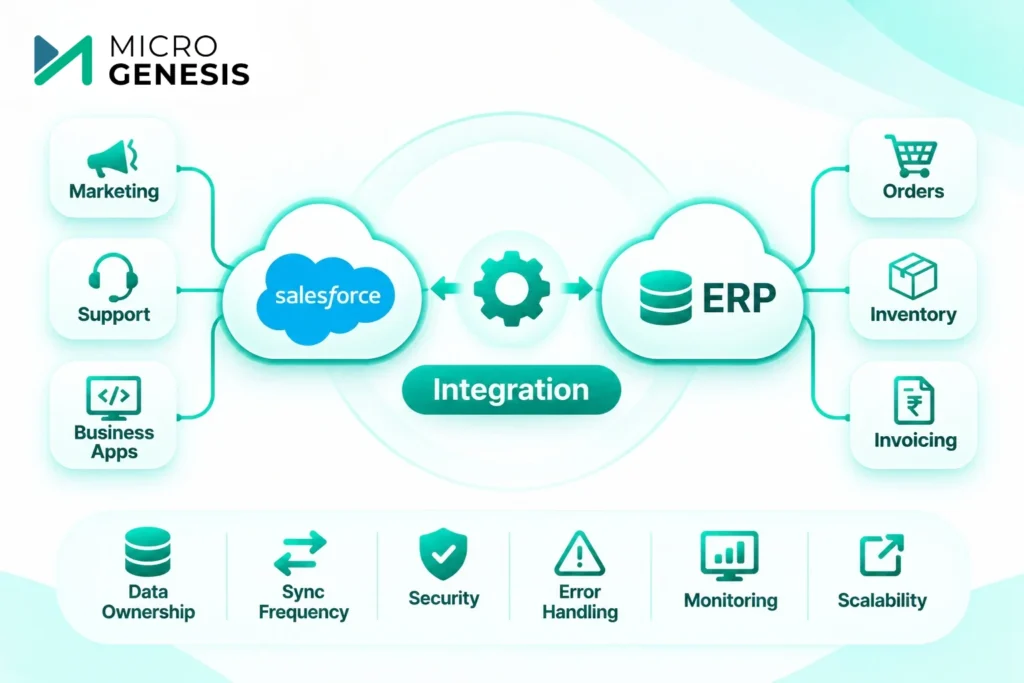
For enterprise organizations, Salesforce rarely operates independently.
It may need to exchange information with ERP platforms, finance applications, marketing tools, customer support systems, and internal business applications.
Integration becomes challenging when systems use different data structures, business rules, or update schedules.
Example: Salesforce and ERP Integration
Imagine a company using Salesforce to manage opportunities while its ERP system handles orders, inventory, and invoicing.
When an opportunity is approved, relevant information must move to the ERP system.
However, the two platforms may use different customer identifiers or product codes.
Without proper mapping and validation, the integration could create duplicate customers or fail to process certain orders.
The issue is not necessarily the connection between the systems. It may be the underlying differences in how business information is managed.
How to Avoid This Challenge
Integration planning should begin during solution design.
Key activities include:
Identifying systems that need to exchange information.
Defining which application owns each type of data.
Mapping fields and business rules.
Selecting suitable APIs or integration tools.
Defining synchronization frequency.
Establishing error handling and monitoring.
Testing complete business transactions.
Common Integration Decisions
| Integration consideration | Question to answer |
|---|---|
| Data ownership | Which system maintains the authoritative record? |
| Synchronization | Should updates occur immediately or at scheduled intervals? |
| Security | How will access and data exchange be protected? |
| Error handling | What happens when a transaction fails? |
| Monitoring | How will teams identify and resolve integration issues? |
| Scalability | Can the integration support increasing transaction volumes? |
For example, an integration should not simply transfer an order successfully under normal conditions. It should also handle missing customer information, unavailable systems, and repeated transactions appropriately.
Organizations planning complex integrations should involve both Salesforce specialists and the teams responsible for existing enterprise applications.
4. Scope Creep and Uncontrolled Customization
Salesforce projects often evolve as stakeholders see the platform taking shape.
A sales manager may request an additional approval process. Marketing may ask for new reporting capabilities. Another department may want its own custom workflow.
Individual requests may appear reasonable, but collectively they can affect timelines, budgets, and solution complexity.
This is commonly known as scope creep.
Example: A Simple CRM Project Becomes a Larger Transformation
An organization initially plans to implement Sales Cloud for opportunity management.
During development, stakeholders request customer service workflows, additional integrations, custom dashboards, and a partner portal.
These may be valuable capabilities, but they significantly expand the original project.
Attempting to include everything in the first release can delay deployment and increase testing requirements.
How to Avoid Scope Creep in Salesforce Projects
Define the initial project scope and expected deliverables.
Prioritize requirements according to business value.
Establish a formal change-request process.
Assess the impact of new requirements on cost and timelines.
Separate essential functionality from future enhancements.
Review changes with authorized business stakeholders.
Customization should also be evaluated carefully.
Salesforce provides standard configuration and automation capabilities that may satisfy many business requirements.
Custom development should be introduced when there is a clear need that cannot be adequately addressed through standard functionality.
Why this matters: Every customization introduces something the organization may need to test, maintain, and review when requirements or platform capabilities change.
For additional budgeting considerations, read our guide to Salesforce implementation cost and factors influencing project investment.
5. Poor User Adoption and Resistance to Change
An implementation can meet its technical requirements and still struggle because employees do not use Salesforce consistently.
This is particularly common when organizations replace familiar systems or introduce new approval and reporting processes.
Employees may resist the change if they do not understand its purpose or if Salesforce makes routine tasks more complicated.
Example: Sales Representatives Continue Using Spreadsheets
A company implements Salesforce to improve opportunity visibility.
However, sales representatives are required to complete numerous fields before updating an opportunity.
They find the process time-consuming and continue maintaining personal spreadsheets.
As a result, management receives incomplete pipeline information.
The organization has invested in Salesforce, but the intended reporting improvements are limited.
How to Avoid User Adoption Problems
User adoption should be considered throughout implementation.
Involve users early. Include representatives from different teams during discovery and testing.
Design practical workflows. Avoid unnecessary fields, approvals, and manual steps.
Provide role-based training. Sales representatives, service agents, and managers have different responsibilities.
Explain the business value. Help employees understand how Salesforce supports their work.
Monitor adoption after launch. Review usage patterns, data completeness, and user feedback.
Improve where necessary. Address recurring usability problems rather than assuming additional training will solve everything.
Our article on common Salesforce implementation mistakes that affect user adoption explores these challenges in greater detail.
6. Inadequate Testing and Go-Live Preparation
Testing is sometimes compressed when implementation timelines become tight.
This creates risks because individual Salesforce features may work correctly while complete business processes still fail.
For example, an opportunity approval workflow may function as expected, but the related ERP integration may not process the approved transaction.
Testing should therefore cover both Salesforce functionality and the systems connected to it.
What Should Be Tested Before Go-Live?
| Testing area | What to validate |
|---|---|
| Functional testing | Salesforce configuration and business rules |
| Integration testing | Data exchange between connected applications |
| Data validation | Migrated records and relationships |
| Security testing | User permissions and access restrictions |
| User acceptance testing | Real business scenarios performed by users |
| Performance considerations | Relevant workload and transaction requirements |
| Deployment validation | Production configuration and release readiness |
How to Avoid Deployment Problems
Establish a testing plan early in the project.
Define expected outcomes, assign responsibilities, and track issues until they are resolved or formally accepted.
Business users should participate in user acceptance testing because they understand the operational scenarios the system must support.
A go-live plan should also cover data cutover, stakeholder communication, support responsibilities, and rollback options where feasible.
After deployment, a defined hypercare period can help teams identify and address early operational issues.
For a practical preparation framework, explore our Salesforce Implementation Checklist for Enterprise Businesses.
Concerned about Salesforce implementation risks before go-live? Speak with MicroGenesis about Salesforce consulting services to review your implementation requirements and deployment priorities.
7. Lack of Post-Implementation Support and Governance
Many organizations focus heavily on reaching the go-live milestone.
However, Salesforce requires ongoing administration, monitoring, maintenance, and improvement.
Business processes change. New employees join. Integrations need attention. Reporting requirements evolve.
Without clear operational ownership, even a successful implementation can become difficult to manage.
Example: Integration Issues After Deployment
A company successfully integrates Salesforce with its finance application.
Several months later, the finance system introduces changes to its data structure.
The integration begins failing, but no team has clear responsibility for monitoring and resolving the issue.
Employees return to manual data transfers, increasing operational effort.
How to Avoid This Challenge
Before go-live, define an operating model covering:
Salesforce administration and user management.
Integration monitoring and issue resolution.
Security and access reviews.
Configuration changes and enhancements.
Release testing and deployment controls.
User support and training.
Reporting and data quality reviews.
Organizations should decide whether these activities will be handled internally, through an external provider, or using a combination of both.
A suitable managed services arrangement can help provide ongoing operational support, depending on the agreed responsibilities and service scope.
Salesforce Implementation Challenges and Solutions: Quick Comparison
The following table summarizes the seven challenges and the actions organizations can take to address them.
| Implementation challenge | Potential business impact | Recommended approach |
|---|---|---|
| Unclear requirements | Rework and inconsistent workflows | Structured discovery and scope definition |
| Poor data quality | Duplicate records and unreliable reporting | Data cleansing, mapping and validation |
| Integration complexity | Failed transactions and manual work | Early integration architecture and testing |
| Scope creep | Budget increases and delays | Change control and phased delivery |
| Low user adoption | Incomplete CRM usage | User involvement and practical training |
| Inadequate testing | Production defects and disruption | End-to-end testing and go-live planning |
| Limited ongoing support | Operational issues and configuration problems | Defined governance and support ownership |
What Should You Do If Your Salesforce Implementation Is Already Struggling?
Not every implementation challenge requires starting the project again.
If your Salesforce project is delayed, over budget, or failing to meet business expectations, begin by identifying the underlying problems.
A structured recovery assessment can help determine whether the issues relate to requirements, architecture, data, integrations, testing, or user adoption.
A Practical Salesforce Project Recovery Approach
1. Review the current implementation
Document completed functionality, unresolved issues, technical dependencies, and business concerns.
2. Identify critical risks
Prioritize problems affecting business operations, data integrity, security, or essential integrations.
3. Reassess the implementation scope
Determine which requirements are essential and which can be addressed in later phases.
4. Validate the solution design
Review whether existing configuration, customization, and integrations support the intended business processes.
5. Establish a recovery plan
Define corrective actions, responsibilities, testing requirements, and realistic milestones.
6. Stabilize before expanding
Avoid introducing additional functionality until critical problems have been addressed.
For example, if a Salesforce implementation is struggling because customer data does not synchronize correctly with an ERP platform, adding more automation may increase complexity.
The priority should be resolving the data and integration issues before introducing further changes.
Organizations seeking Salesforce implementation risk management or project recovery support should request a technical assessment before committing to a recovery timeline.
How MicroGenesis Helps Address Salesforce Implementation Challenges
Enterprise Salesforce projects require coordination between business teams, CRM specialists, integration teams, and operational stakeholders.
MicroGenesis approaches Salesforce consulting with a focus on business requirements, enterprise integration, application engineering, and long-term maintainability.
Our broader technology capabilities help us consider Salesforce within the organization’s existing application environment.
Salesforce Implementation Planning
We help organizations evaluate business processes, define implementation requirements, and establish practical delivery priorities.
Salesforce Data Migration and Integration
We consider data mapping, migration validation, application dependencies, and integration requirements as part of implementation planning.
Salesforce Configuration and Testing
We focus on suitable configuration, required customization, testing, and deployment readiness based on the agreed project scope.
Salesforce Implementation Assessment and Improvement
For organizations experiencing implementation difficulties, a structured assessment can help identify configuration gaps, data issues, integration problems, and opportunities for improvement.
Ongoing Salesforce Support Considerations
Our broader managed services capabilities help us consider administration, integration maintenance, and operational support requirements beyond the initial implementation.
The appropriate engagement depends on the organization’s existing Salesforce environment, project status, and technical requirements.
Experiencing Salesforce implementation challenges? Discuss your Salesforce project with MicroGenesis to evaluate your requirements, identify priorities, and explore suitable next steps.
Frequently Asked Questions About Salesforce Implementation Challenges
What are the most common Salesforce implementation challenges?
Common challenges include unclear requirements, poor data quality, complex integrations, scope creep, low user adoption, inadequate testing, and insufficient post-implementation support.
Why do Salesforce implementations fail?
Projects may fail to achieve expected outcomes when business requirements are unclear, data quality is poor, integrations are incomplete, or employees struggle to adopt the system. Weak project governance and inadequate testing can also contribute.
How can businesses avoid Salesforce data migration problems?
Start by identifying data sources, reviewing data quality, defining field mappings, removing duplicates where appropriate, conducting trial migrations, and validating records before production use.
How do you prevent scope creep in Salesforce projects?
Establish clear requirements, prioritize essential functionality, define project deliverables, and use a formal change-control process to evaluate new requests.
Can a failed Salesforce implementation be fixed?
Many implementation problems can be addressed through a structured assessment and corrective action plan. The appropriate recovery approach depends on the condition of the existing configuration, data, integrations, and business processes.
When should an organization hire a Salesforce integration specialist?
Specialist support may be useful when Salesforce must connect with complex ERP systems, multiple enterprise applications, or integrations requiring detailed data mapping, security, and error handling.
Final Thoughts
Salesforce implementation challenges are easier to manage when organizations identify risks early and establish a structured delivery approach.
Clear requirements, reliable data, suitable integrations, controlled customization, user involvement, thorough testing, and ongoing support all contribute to implementation success.
For enterprises, these activities must be considered together.
A well-configured CRM will deliver limited value if customer information is unreliable or critical business processes remain disconnected.
Whether your organization is preparing for Salesforce implementation or addressing issues in an existing project, the first step is understanding the underlying requirements and risks.
Need Help with Salesforce Implementation or Project Recovery?
Are you dealing with data migration problems, ERP integration issues, project delays, or low Salesforce adoption?
MicroGenesis can help you assess your Salesforce environment, review implementation requirements, and identify practical improvement opportunities.
Schedule a Salesforce Consultation with MicroGenesis to discuss your implementation challenges and next steps.