Continuous Integration and Continuous Delivery (CI/CD) have transformed how modern software is built, tested, and delivered. By automating repetitive development tasks, organizations can release software faster, improve quality, reduce manual effort, and respond quickly to changing customer needs.
However, implementing CI/CD successfully is easier said than done.
Many organizations invest heavily in DevOps tools such as Jenkins, GitLab CI/CD, Azure DevOps, or GitHub Actions, only to discover that their pipelines become unreliable, slow, or difficult to maintain over time.
Developers encounter broken builds. Test environments become inconsistent. Security vulnerabilities slip into production. Deployment failures delay releases, and pipeline complexity grows faster than the applications themselves.
The reality is that CI/CD itself isn’t the problem. Poor pipeline design, fragmented processes, inadequate automation, and lack of governance are usually the root causes.
In this guide, we’ll explore the most common CI/CD failures organizations face, understand why they happen, and discuss practical strategies to build faster, more reliable, and resilient delivery pipelines.
Why CI/CD Is the Foundation of Modern DevOps
Traditional software delivery relied on manual builds, manual testing, and scheduled releases that often occurred every few months.
Modern software businesses simply cannot operate this way.
Today’s customers expect:
- Faster feature releases
- Continuous improvements
- Better software quality
- Zero downtime
- Immediate security patches
CI/CD enables organizations to meet these expectations by automating software delivery from code commit to production.
A typical CI/CD pipeline includes:
Developer Commit
↓
Source Control
↓
Automated Build
↓
Unit Testing
↓
Static Code Analysis
↓
Security Scanning
↓
Artifact Repository
↓
Deployment
↓
Integration Testing
↓
Production Release
Organizations that are still building their DevOps capabilities should first understand the complete DevOps pipeline and how each stage contributes to reliable software delivery. Our guide on DevOps Pipeline: A Complete Guide to Modern Software Delivery explains every stage in detail.
Why Do CI/CD Pipelines Fail?
CI/CD pipelines are living systems.
As applications grow, development teams expand, and infrastructure becomes more complex; pipelines evolve.
Without proper governance, evolution often introduces hidden problems.
The most common causes include:
Poor Pipeline Design
Many pipelines grow organically.
New stages are continuously added without reviewing overall architecture.
Eventually pipelines become difficult to maintain.
Manual Processes
Although CI/CD aims to automate delivery, many organizations still rely on manual:
- Approvals
- Deployments
- Testing
- Configuration updates
Manual intervention increases delays and introduces human error.
Organizations can significantly reduce manual effort by adopting proven DevOps automation best practices and implementation strategies that standardize delivery pipelines and eliminate repetitive tasks.
Weak Testing Strategy
Many teams automate builds but fail to automate sufficient testing.
As a result:
- Bugs reach production
- Releases become risky
- Teams lose confidence in deployments
Modern engineering teams increasingly adopt Continuous Integration and Continuous Deployment (CI/CD) practices that integrate automated testing into every stage of the delivery pipeline instead of treating testing as a separate activity.
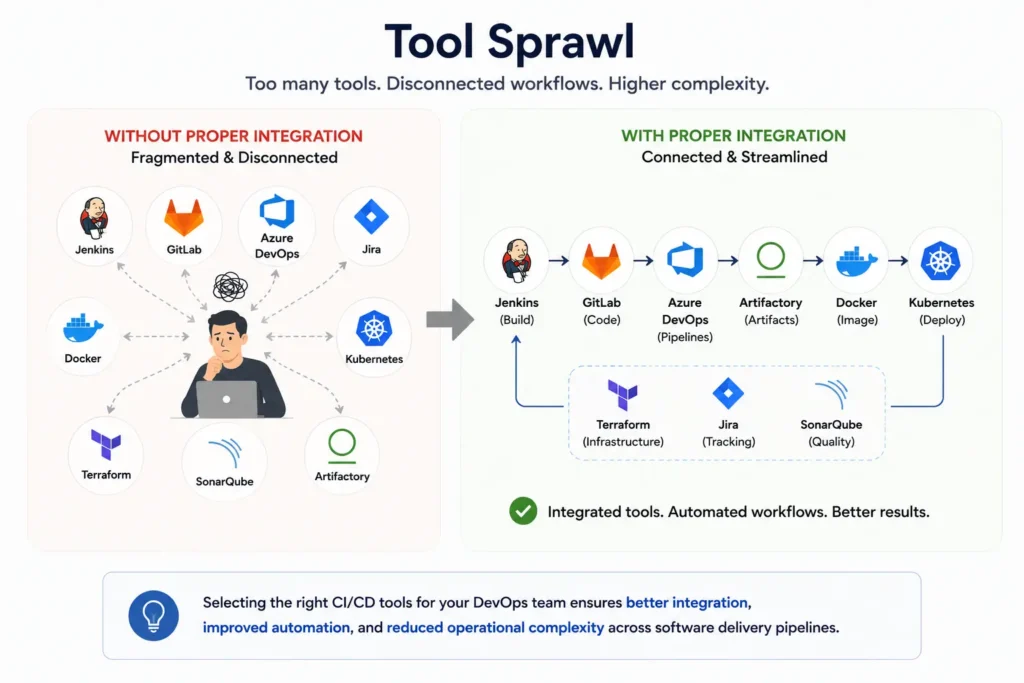
Organizations often use:
- Jenkins
- GitLab
- Azure DevOps
- Jira
- Kubernetes
- Docker
- Terraform
- SonarQube
- Artifactory
Without proper integration these tools create fragmented workflows.
Selecting the right CI/CD tools for your DevOps team ensures better integration, improved automation, and reduced operational complexity across software delivery pipelines.
Lack of DevOps Culture
Technology alone cannot deliver CI/CD success.
Successful organizations embrace:
- Shared ownership
- Continuous feedback
- Automation
- Collaboration
- Continuous improvement
Building a collaborative engineering culture is just as important as implementing automation. Organizations that invest in DevOps best practices consistently achieve faster releases and more reliable software delivery.
Failure #1 – Broken Builds
Broken builds are among the most common CI/CD failures.
Nothing frustrates developers more than committing code only to discover the pipeline has failed before testing even begins.
Common Causes
- Compilation errors
- Dependency conflicts
- Incorrect configuration
- Missing libraries
- Version incompatibilities
- Build script failures
Even small configuration mistakes can prevent the entire pipeline from progressing.
Business Impact
Broken builds:
- Delay releases
- Reduce developer productivity
- Create deployment bottlenecks
- Increase debugging effort
When multiple developers commit changes simultaneously, broken builds can quickly affect the entire engineering team.
How to Solve It
Organizations should:
- Validate code before merge
- Use branch protection policies
- Automate dependency management
- Standardize build environments
- Maintain reusable build templates
Teams using Jenkins can improve build reliability by implementing structured pipeline management. Learn how Jenkins Pipelines simplify software build, testing, and deployment automation.
Failure #2 – Flaky Automated Tests
Automated testing builds confidence.
Flaky tests destroy it.
A flaky test passes during one pipeline execution and fails during another—even though the application hasn’t changed.
Eventually developers begin ignoring test failures altogether.
Common Causes
- Poor test design
- Timing issues
- Shared environments
- External dependencies
- Test data conflicts
Business Impact
Flaky tests:
- Delay deployments
- Reduce confidence
- Waste engineering time
- Increase false positives
Solutions
Improve test reliability by:
- Isolating test environments
- Removing shared dependencies
- Using deterministic test data
- Running unstable tests separately
- Regularly reviewing automated test suites
Organizations implementing CI/CD should view automated testing as an ongoing engineering capability rather than a one-time setup.
Failure #3 – Slow CI/CD Pipelines
Many organizations celebrate pipeline automation while overlooking execution time.
A pipeline that requires two hours to complete offers a little competitive advantage.
Slow pipelines reduce:
- Developer productivity
- Release frequency
- Customer responsiveness
Why Pipelines Become Slow
Common causes include:
- Sequential job execution
- Large Docker images
- Inefficient builds
- Long-running test suites
- Redundant validation
- Large artifact downloads
Business Impact
Slow pipelines encourage developers to:
- Delay commits
- Skip testing
- Avoid frequent deployments
Solutions
Engineering teams should:
- Execute jobs in parallel
- Cache dependencies
- Optimize Docker images
- Split test suites
- Use incremental builds
- Remove redundant pipeline stages
Development teams using GitLab can further improve build performance by following these strategies for optimizing CI/CD pipelines in GitLab for speed and reliability.
Failure #4 – Environment Configuration Drift
One of the oldest software engineering problems remains surprisingly common.
“It works on my machine.”
Configuration drift occurs when development, testing, staging, and production environments gradually become different.
Common Causes
- Manual server changes
- Different software versions
- Missing environment variables
- Inconsistent operating systems
Business Impact
Configuration drift leads to:
- Production outages
- Failed deployments
- Longer debugging cycles
- Security vulnerabilities
Solutions
Modern organizations eliminate configuration drift by adopting:
- Infrastructure as Code (IaC)
- Docker
- Kubernetes
- Immutable infrastructure
- Automated configuration management
Containerization plays a crucial role in ensuring consistent environments across every stage of the CI/CD pipeline. Learn how containerization in cloud and DevOps environments improves deployment consistency and scalability.
Failure #5 – Deployment Failures
A successful build doesn’t always guarantee a successful deployment.
Many organizations discover deployment issues only after software reaches staging or production, resulting in downtime, emergency rollbacks, and frustrated users.
Common Causes
Deployment failures often occur because of:
- Incorrect deployment scripts
- Missing environment variables
- Infrastructure inconsistencies
- Database migration errors
- Manual deployment steps
- Insufficient rollback planning
In complex enterprise environments, even a small configuration mismatch can prevent an otherwise successful release from reaching production.
Business Impact
Deployment failures can lead to:
- Application downtime
- Revenue loss
- SLA breaches
- Customer dissatisfaction
- Increased operational costs
- Delayed product releases
How to Solve It
Organizations can significantly reduce deployment risks by implementing:
- Blue-Green Deployments
- Canary Releases
- Feature Flags
- Automated Rollback Mechanisms
- Infrastructure as Code
- Deployment Validation
Modern deployment strategies allow organizations to release software gradually, monitor production behavior, and quickly recover if issues occur.
Teams building scalable delivery pipelines should also establish a structured DevOps implementation strategy that incorporates deployment automation from the beginning.
Failure #6 – Poor Secrets Management
One of the most overlooked CI/CD failures involves improper handling of secrets.
Many organizations still store:
- API Keys
- Database Passwords
- Cloud Credentials
- SSH Keys
- Access Tokens
inside source code repositories or pipeline configuration files.
This creates serious security risks.
Common Causes
- Hardcoded credentials
- Shared passwords
- Plain text configuration files
- Lack of centralized secrets management
- Inconsistent access controls
Business Impact
Poor secrets management can result in:
- Data breaches
- Unauthorized system access
- Compliance violations
- Credential leaks
- Supply chain attacks
How to Solve It
Adopt centralized secrets management platforms such as:
- HashiCorp Vault
- Azure Key Vault
- AWS Secrets Manager
- Kubernetes Secrets
Combine this with:
- Role-Based Access Control (RBAC)
- Secret Rotation
- Multi-Factor Authentication
- Least Privilege Access
Integrating security throughout the software delivery lifecycle is a key principle of DevSecOps, ensuring vulnerabilities are addressed before they reach production.
Failure #7 – Dependency Management Problems
Modern applications rely heavily on third-party libraries and open-source packages.
While these accelerate development, they also introduce risks.
Common dependency issues include:
- Version conflicts
- Deprecated libraries
- Vulnerable packages
- License compliance issues
- Build inconsistencies
Business Impact
Poor dependency management often results in:
- Failed builds
- Security vulnerabilities
- Longer debugging cycles
- Compliance risks
- Unexpected production failures
How to Solve It
Organizations should:
- Lock dependency versions
- Regularly update libraries
- Automate dependency scanning
- Generate Software Bills of Materials (SBOM)
- Use artifact repositories
Dependency scanning should become a standard part of every CI/CD pipeline rather than an occasional manual activity.
Failure #8 – Security Testing Happens Too Late
Many organizations still perform security testing immediately before production deployment.
This approach creates bottlenecks and delays releases.
Instead, security should be integrated into every stage of the CI/CD pipeline.
Common Problems
- Manual penetration testing only
- No static code analysis
- Missing dependency scans
- Container vulnerabilities
- No Infrastructure as Code scanning
Business Impact
Late security testing leads to:
- Release delays
- Increased remediation costs
- Compliance failures
- Security incidents
- Customer trust issues
How to Solve It
Adopt Shift-Left Security by integrating:
- Static Application Security Testing (SAST)
- Dynamic Application Security Testing (DAST)
- Container Security
- Software Composition Analysis
- Infrastructure as Code Scanning
Security becomes significantly easier to manage when embedded directly into automated CI/CD workflows.
Failure #9 – Overly Complex Pipelines
Many CI/CD pipelines become increasingly complicated over time.
Every project adds:
- More stages
- More scripts
- More conditions
- More approvals
- More integrations
Eventually, no one fully understands how the pipeline works.
Symptoms
- Thousands of lines of YAML
- Duplicate jobs
- Long execution times
- Difficult debugging
- Frequent maintenance
Business Impact
Complex pipelines reduce:
- Developer productivity
- Pipeline reliability
- Maintainability
- Delivery speed
How to Solve It
Organizations should simplify pipelines by:
- Creating reusable templates
- Building modular pipelines
- Standardizing naming conventions
- Removing duplicate stages
- Using shared libraries
- Documenting pipeline architecture
A well-designed CI/CD pipeline should be scalable, maintainable, and easy for new engineers to understand.
Organizations building mature delivery practices often revisit there DevOps lifecycle phases to continuously optimize pipeline architecture and eliminate unnecessary complexity.
Comparison Table: Common CI/CD Failures and Solutions
| CI/CD Failure | Business Impact | Recommended Solution |
| Broken Builds | Delayed releases | Automated validation & branch protection |
| Flaky Tests | Low deployment confidence | Stable automated testing |
| Slow Pipelines | Reduced developer productivity | Parallel execution & caching |
| Configuration Drift | Deployment failures | Infrastructure as Code |
| Deployment Failures | Downtime | Blue-Green & Canary deployments |
| Poor Secrets Management | Security risks | Centralized secrets management |
| Dependency Issues | Build failures | Automated dependency scanning |
| Late Security Testing | Compliance delays | Shift-Left DevSecOps |
| Complex Pipelines | High maintenance | Modular reusable pipelines |
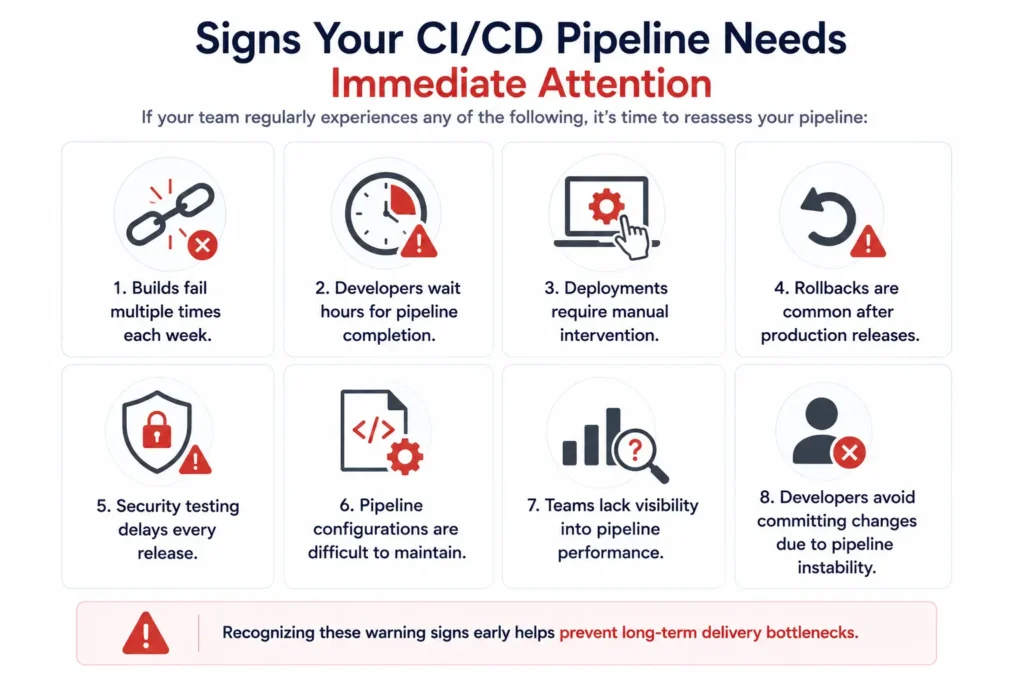
If your team regularly experiences any of the following, it’s time to reassess your pipeline:
- Builds fail multiple times each week.
- Developers wait hours for pipeline completion.
- Deployments require manual intervention.
- Rollbacks are common after production releases.
- Security testing delays every release.
- Pipeline configurations are difficult to maintain.
- Teams lack visibility into pipeline performance.
- Developers avoid committing changes due to pipeline instability.
Recognizing these warning signs early helps prevent long-term delivery bottlenecks.
CI/CD Best Practices for Reliable Software Delivery
Building a CI/CD pipeline is only the beginning. Maintaining a reliable, secure, and scalable pipeline requires continuous optimization.
Organizations with mature DevOps practices follow several best practices that reduce failures while improving delivery speed.
1. Keep Pipelines Simple
Avoid creating large monolithic pipelines.
Instead:
- Break pipelines into reusable stages
- Standardize templates
- Reuse deployment scripts
- Document every pipeline
Simple pipelines are easier to maintain and troubleshoot.
2. Automate Everything Possible
Manual intervention slows delivery and increases human error.
Automate:
- Builds
- Unit Tests
- Security Scans
- Deployments
- Rollbacks
- Notifications
- Infrastructure Provisioning
Organizations looking to improve automation maturity should adopt proven DevOps automation best practices to eliminate repetitive tasks and accelerate software delivery.
3. Implement Infrastructure as Code (IaC)
Managing infrastructure manually creates inconsistencies.
Infrastructure as Code enables teams to provision identical environments repeatedly using code.
Popular IaC tools include:
- Terraform
- AWS CloudFormation
- Azure Bicep
- Pulumi
Benefits include:
- Consistency
- Faster deployments
- Better disaster recovery
- Improved compliance
4. Shift Security Left
Security should begin with the first code commit.
Integrate:
- Static Code Analysis
- Dependency Scanning
- Container Security
- Secret Detection
- Infrastructure Scanning
Organizations adopting DevSecOps integrate security into every stage of software delivery rather than treating it as a final checkpoint.
5. Continuously Monitor Pipeline Performance
A CI/CD pipeline should never become a “set it and forget it” system.
Track:
- Build Duration
- Deployment Success Rate
- Test Failures
- Rollback Frequency
- Queue Time
- Infrastructure Utilization
Continuous monitoring helps identify bottlenecks before they affect delivery.
Essential CI/CD Metrics Every DevOps Team Should Track
Successful organizations rely on measurable KPIs rather than assumptions.
The industry-standard DORA Metrics provide an excellent framework for evaluating CI/CD performance.
| Metric | Why It Matters |
| Deployment Frequency | Measures delivery speed |
| Lead Time for Changes | Indicates development efficiency |
| Change Failure Rate | Measures release quality |
| Mean Time to Recovery (MTTR) | Shows operational resilience |
| Build Success Rate | Indicates pipeline stability |
| Test Pass Rate | Measures software quality |
| Pipeline Duration | Identifies delivery bottlenecks |
Organizations that regularly monitor these metrics are better positioned to improve both software quality and engineering productivity.
How AI Is Transforming CI/CD
Artificial Intelligence is becoming an integral part of modern DevOps pipelines.
AI is helping organizations:
Predict Build Failures
Machine learning models can identify patterns that indicate potential pipeline failures before they occur.
Optimize Pipeline Performance
AI can recommend:
- Pipeline optimizations
- Test prioritization
- Build parallelization
- Infrastructure scaling
Intelligent Root Cause Analysis
Instead of manually reviewing thousands of log entries, AI can rapidly identify likely causes of pipeline failures.
Automated Test Selection
Rather than executing every test, AI selects only the tests affected by recent code changes.
This dramatically reduces pipeline execution time.
Self-Healing Pipelines
Emerging AI capabilities can automatically:
- Restart failed jobs
- Roll back deployments
- Adjust infrastructure resources
- Re-run unstable tests
AI is expected to become a standard capability in enterprise DevOps over the next few years.
Common CI/CD Failure Prevention Checklist
Use this checklist to evaluate the health of your pipeline.
| Best Practice | Status |
| Automated Builds | ☐ |
| Automated Testing | ☐ |
| Infrastructure as Code | ☐ |
| Containerized Environments | ☐ |
| Security Scanning | ☐ |
| Secrets Management | ☐ |
| Automated Rollbacks | ☐ |
| Monitoring & Alerts | ☐ |
| Pipeline Documentation | ☐ |
| Continuous Optimization | ☐ |
If several items remain unchecked, your pipeline likely has opportunities for improvement.
How MicroGenesis Helps Organizations Build Reliable CI/CD Pipelines
Implementing CI/CD is more than selecting Jenkins or GitLab CI/CD.
Successful software delivery requires a combination of process, automation, cloud strategy, security, infrastructure, and organizational culture.
MicroGenesis helps organizations modernize software delivery through comprehensive DevOps consulting and implementation services.
Our CI/CD Expertise Includes
DevOps Consulting
We assess your current software delivery processes and develop a roadmap aligned with your business objectives.
CI/CD Pipeline Design
We design scalable CI/CD pipelines using industry-leading platforms including:
- Jenkins
- GitLab CI/CD
- Azure DevOps
- GitHub Actions
Cloud-Native DevOps
Our consultants help organizations modernize delivery pipelines across AWS, Microsoft Azure, and Google Cloud.
Organizations migrating applications should also understand how DevOps simplifies cloud migration and modernization.
Cloud adoption becomes even more effective when organizations understand how cloud computing enhances DevOps practices across modern application architectures.
Containerization & Kubernetes
We help organizations implement:
- Docker
- Kubernetes
- Helm
- Container Security
- Container Orchestration
Teams evaluating orchestration platforms should compare Docker and Kubernetes to determine the best architecture for their applications.
DevSecOps
Security becomes part of every deployment through:
- SAST
- DAST
- Container Security
- Dependency Scanning
- Compliance Automation
Continuous Testing
Our engineers implement automated testing frameworks that improve release confidence while reducing manual testing effort.
Monitoring & Observability
We build complete visibility across software delivery pipelines using modern monitoring and analytics platforms.
Managed DevOps Services
We provide ongoing optimization, health checks, pipeline improvements, and operational support to ensure your CI/CD environment continues delivering business value.
Explore our comprehensive DevOps Services to learn how MicroGenesis helps organizations accelerate software delivery while improving quality and operational efficiency.
Final Thoughts
CI/CD has become the backbone of modern software engineering, enabling organizations to deliver applications faster, more reliable, and with greater confidence.
However, building a pipeline is the only step. Sustaining a high-performing CI/CD environment requires continuous improvement, automation, security integration, monitoring, and collaboration.
The most common failures—broken builds, flaky tests, slow pipelines, configuration drift, deployment failures, poor secrets management, dependency issues, late security testing, and overly complex workflows—are all preventable with the right strategy and engineering practices.
By investing in robust DevOps processes, adopting automation, integrating security early, and continuously measuring pipeline performance, organizations can reduce deployment risks, accelerate release cycles, and improve software quality.
Whether you’re just beginning your DevOps journey or optimizing an enterprise-scale delivery pipeline, addressing these common CI/CD failures will help you build a resilient software delivery ecosystem capable of supporting continuous innovation.