
Jira and Confluence are often purchased as separate Atlassian products, but their real value becomes much clearer when they work as one connected environment.
Jira gives teams a structured way to plan and track work. Confluence provides the space for requirements, decisions, project documentation, meeting notes, technical knowledge, and business context. When these systems are connected properly, teams can move from planning to execution to documentation without constantly switching between disconnected tools.
For a small team, linking a Jira issue to a Confluence page may be enough. For an enterprise, however, successful integration involves much more: information architecture, permissions, workflows, templates, reporting, automation, governance, and integration with the rest of the technology stack.
This guide explains how Jira and Confluence work together, what you can integrate, practical enterprise use cases, industry examples, implementation best practices, common mistakes, and when working with a Jira consultant or Atlassian partner makes sense.
Jira and Confluence Integration at a Glance
|
Area |
Jira |
Confluence |
Value of Integration |
|
Primary purpose |
Work and project tracking |
Documentation and collaboration |
Connect execution with context |
|
Requirements |
Track implementation work |
Document requirements |
Trace requirements to delivery |
|
Project planning |
Epics, tasks, workflows |
Plans, roadmaps, decisions |
Connect plans with execution |
|
Reporting |
Dashboards and reports |
Executive/project pages |
Share live project information |
|
Knowledge management |
Limited |
Strong |
Connect knowledge to work |
|
ITSM |
Incidents, requests, changes |
Knowledge base |
Improve self-service |
|
Development |
Issues and delivery tracking |
Technical documentation |
Connect code-related work with knowledge |
|
Governance |
Workflows and permissions |
Controlled documentation |
Improve organizational consistency |
The important point is that Jira and Confluence are complementary rather than competing tools. Atlassian describes the combination as a way to connect plans, specifications, decisions, and Jira work items so teams can maintain context across their work.
Why Integrate Jira and Confluence?
Create a Connected Source of Truth
One of the biggest problems in growing organizations is not a lack of information. It is information scattered across too many places.
A product manager may have requirements in Confluence.
A developer may be working from a Jira story.
A QA engineer may have test-related information in Jira.
A business stakeholder may receive project status through email.
A release manager may maintain a separate spreadsheet.
The information exists, but the connections between it are weak.
Jira-Confluence integration helps bring those pieces together.
A product requirements document can be connected to the Jira work items implementing it. Project decisions can remain alongside the documentation that explains them. Jira work can then be surfaced within Confluence for stakeholders.
Atlassian’s current Jira-Confluence integration allows teams to create, view, and edit Confluence content from Jira and create Jira work items from Confluence content.
Reduce Context Switching
Context switching becomes increasingly expensive as teams grow.
A developer should not have to search through email to understand why a requirement changed.
A project manager should not have to ask developers for the current status of every work item.
A business stakeholder should not need deep Jira knowledge just to understand project progress.
When Jira and Confluence are connected, teams can bring relevant information closer to the work.
For example:
Confluence
Product requirement
↓
Business decision
↓
Design documentation
Jira
Epic
↓
Stories
↓
Tasks
↓
Bugs
↓
Release
The integration creates a much clearer relationship between why something is being built and what is being done to build it.
Improve Project Visibility for Leadership
Enterprise stakeholders rarely want to inspect individual Jira tickets.
They want answers to questions such as:
- What has been completed?
- What is delayed?
- What is blocking delivery?
- What is planned for the next release?
- Which decisions are still pending?
- What risks require management attention?
Confluence can act as a business-friendly layer on top of Jira information.
Jira work items, dashboards, roadmaps, reports, and other project information can be surfaced in Confluence so stakeholders can consume the information in a more contextual format.
Is your Jira environment growing faster than your teams can manage it?
Jira and Confluence integration delivers the most value when the underlying workflows, permissions, information architecture, and governance are designed properly.
MicroGenesis helps organizations assess, configure, integrate, and optimize Atlassian environments around their actual business processes.
Explore Jira Consulting Services
How Does Jira and Confluence Integration Work?
The integration can be as simple or sophisticated as your organization requires.
At the basic level, teams can connect Jira and Confluence spaces and link work items with documentation.
For example:
Jira Epic: Customer Portal Modernization
Linked Confluence content:
- Business requirements
- Architecture decisions
- UX research
- Meeting notes
- Release plan
- Retrospective
This gives everyone a connected view of the project.
Atlassian’s current Cloud experience supports connecting Jira and Confluence spaces, viewing and creating Confluence content from Jira, adding Confluence content to Jira work items, and displaying Jira work items in Confluence.
Key Jira-Confluence Integration Features
Display Jira Work Items in Confluence
Teams can display Jira work items on Confluence pages and live documents.
This is particularly useful for:
- Project status pages
- Sprint summaries
- Release documentation
- Product roadmaps
- Executive reports
- Team dashboards
Confluence can display individual Jira work items or lists of work items using filters or JQL.
For example:
Release 4.2 Status
- 42 stories completed
- 5 stories in progress
- 3 critical bugs
- 1 release blocker
Instead of manually updating these numbers in a presentation, teams can surface information from Jira.
Create Jira Work Items from Confluence
This is one of the most useful capabilities for business and product teams.
Imagine a product manager is documenting customer feedback in Confluence.
One requirement becomes:
“Customers need the ability to export reports in CSV format.”
Instead of copying that requirement into Jira manually, the team can convert the relevant content into Jira work.
Atlassian currently supports creating Jira work items from Confluence content without requiring users to constantly switch between applications.
This is particularly valuable during:
- Requirements workshops
- Sprint planning
- Retrospectives
- Customer feedback reviews
- Product discovery
- Project meetings
Link Requirements to Delivery
This is where integration becomes particularly valuable for enterprise software teams.
A typical flow can look like:
Business requirement
↓
Confluence requirement document
↓
Jira Epic
↓
Jira Stories
↓
Development tasks
↓
Testing
↓
Release
↓
Release documentation
The objective is not simply to create more links.
The objective is to make the relationship between business intent and delivery work easier to understand.
This is particularly important for organizations with complex approval processes or regulated environments.
Embed Jira Reports and Dashboards
Confluence can be used as a reporting layer for project and delivery information.
Teams can bring Jira dashboards, gadgets, backlogs, releases, roadmaps, and work-item information into Confluence.
This creates useful pages such as:
Executive Project Dashboard
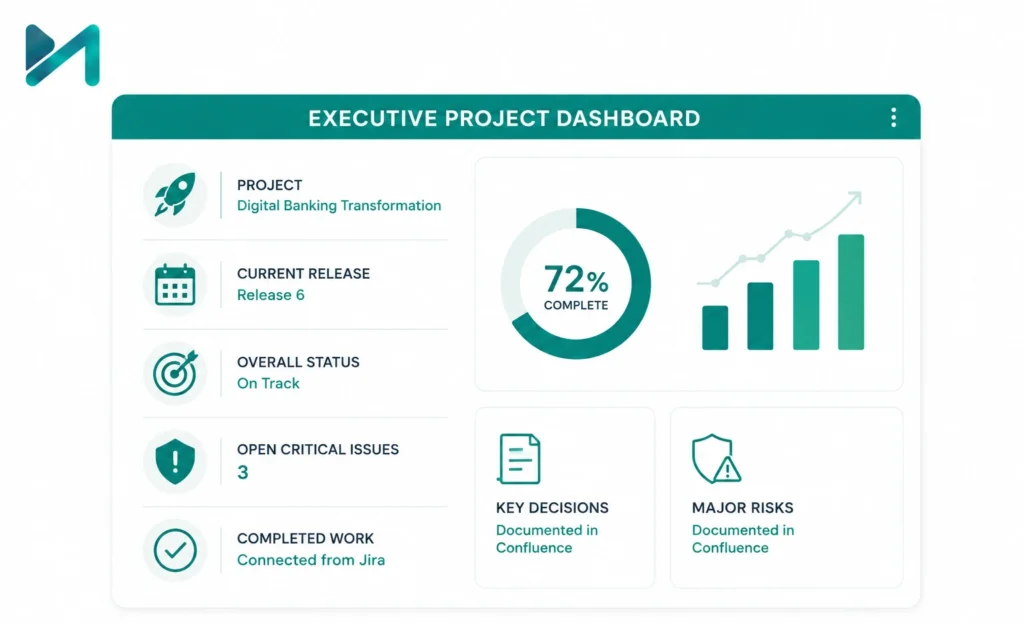
Project: Digital Banking Transformation
Current release: Release 6
Overall status: On track
Open critical issues: 3
Completed work: Connected from Jira
Key decisions: Documented in Confluence
Major risks: Documented in Confluence
The leadership team gets the information it needs without having to navigate the entire Jira project.
Jira + Confluence for Different Teams
The integration becomes more valuable when it is designed around how different teams actually work.
Product Management
Product managers can use Confluence for:
- Product requirements
- Customer research
- Product strategy
- Roadmaps
- Business cases
- Decision records
Jira can then manage:
- Epics
- Stories
- Tasks
- Bugs
- Releases
The result is a connected product lifecycle.
For organizations expanding their product discovery capabilities, Jira Product Discovery integration with Jira Software can further connect ideas with execution.
Software Development
Development teams can use Confluence for:
- Architecture documentation
- Technical specifications
- API documentation
- Development standards
- Release notes
- Decision records
Jira manages:
- Development work
- Bugs
- Stories
- Sprints
- Releases
For teams looking to improve Jira-based Agile execution, see our guide to Jira Agile workflows and boards.
IT Service Management
This is one of the strongest Jira-Confluence use cases.
Jira Service Management can manage:
- Incidents
- Service requests
- Problems
- Changes
- Approvals
Confluence can provide:
- Knowledge articles
- Troubleshooting guides
- Service documentation
- FAQs
- Standard operating procedures
Atlassian reports that a Confluence-powered knowledge base can deflect customer-reported requests in Jira Service Management; its current integration page cites 45% deflection based on analysis of approximately 80,000 Jira Service Management sessions.
For organizations evaluating this model, Jira Service Management setup best practices can help establish a stronger foundation.
Looking to connect Jira Service Management with a structured knowledge base?
MicroGenesis can help design Jira Service Management and Confluence environments that support self-service, knowledge management, workflows, automation, reporting, and enterprise governance.
Jira and Confluence Integration Across Industries
The value of integration changes depending on the industry.
Banking and Financial Services
A financial services organization may use:
Confluence
- Business requirements
- Regulatory documentation
- Policy references
- Architecture decisions
- Audit evidence
Jira
- Development tasks
- Change requests
- Defects
- Security remediation
- Release management
The integration creates a clearer relationship between business requirements, implementation work, and supporting documentation.
Healthcare and Life Sciences
Healthcare organizations often need stronger documentation and controlled processes.
Jira and Confluence can support:
- Product requirements
- Validation documentation
- Development activities
- Defect tracking
- Change management
- Quality documentation
- Approval workflows
For organizations using Jira Service Management in healthcare, MicroGenesis has also explored Jira Service Management for healthcare operations.
Manufacturing
Manufacturing organizations can connect:
Confluence
- Product specifications
- Process documentation
- Engineering decisions
- Standard operating procedures
with:
Jira
- Engineering tasks
- Production issues
- Improvement initiatives
- Quality actions
- Project milestones
This helps engineering, operations, quality, and management teams work from connected information.
Automotive
Automotive organizations often manage complex engineering programs involving software, hardware, testing, suppliers, and multiple teams.
Jira and Confluence can support:
- Software requirements
- Development activities
- Defect tracking
- Release documentation
- Engineering decisions
- Program status
For organizations using Jira beyond traditional software teams, Jira for non-technical teams provides useful context.
Telecom
Telecom organizations can use the combination for:
- Network transformation projects
- Service delivery
- Change management
- Technical documentation
- Incident management
- Release planning
Jira tracks the work while Confluence provides the operational context.
Retail and E-commerce
Retail teams can connect:
- Product roadmaps
- Campaign plans
- Website enhancements
- Customer feedback
- Development tasks
- Launch checklists
Marketing can work in Confluence while delivery teams manage execution in Jira.
Aerospace and Defence
For complex engineering programs, documentation and traceability are critical.
Jira and Confluence can support:
- Requirements discussions
- Engineering decisions
- Development activities
- Issue management
- Review records
- Project documentation
Where formal requirements management is required, Jira-Confluence integration should be considered as part of a broader engineering toolchain rather than treated as a standalone solution.
Integrating Jira and Confluence With Other Enterprise Tools
Jira and Confluence rarely operate alone in an enterprise.
The next step is connecting them with the tools employees already use.
Slack and Microsoft Teams
Teams can receive Jira notifications in collaboration channels.
Typical use cases include:
- Issue status notifications
- Approval requests
- Release notifications
- Incident alerts
- Team discussions
The goal is not to duplicate Jira in Slack or Teams. It is to bring the right notification into the communication channel where the team already works.
GitHub, GitLab and Bitbucket
Development organizations can connect Jira work with source-code activity.
For example:
Jira issue
↓
Git branch
↓
Commit
↓
Pull request
↓
Build
↓
Deployment
This gives engineering leadership better visibility into how work moves from planning to production.
Organizations already invested in the Atlassian ecosystem can also explore Bitbucket integration and value for teamss.
Google Workspace and Microsoft 365
Teams can connect project documentation with their broader collaboration environment.
Examples include:
- Meeting notes
- Project plans
- Action items
- Presentation links
- Business documents
- Approval records
The important consideration is governance. More integrations do not automatically mean better productivity.
Salesforce and CRM Platforms
A customer issue identified in Salesforce can potentially trigger work in Jira.
For example:
Customer complaint
↓
Salesforce
↓
Jira issue
↓
Engineering investigation
↓
Confluence root-cause documentation
↓
Resolution
This gives customer-facing and technical teams a shared operational flow.
7 Best Practices for Jira-Confluence Integration
Define What Belongs in Jira and What Belongs in Confluence
This should be decided before implementation.
A simple principle works well:
Jira = work
Confluence = knowledge and context
Of course, enterprise environments require exceptions, but the principle helps prevent duplication.
Establish a Clear Information Architecture
Don’t allow every team to create spaces and pages without governance.
Define:
- Space naming
- Page structures
- Templates
- Ownership
- Archiving
- Permissions
- Labels
- Content lifecycle
This becomes increasingly important as the organization grows.
If your Jira environment has already accumulated years of unused projects, workflows, fields, and configurations, consider an enterprise Jira cleanup before expanding the integration.
Align Permissions
Jira and Confluence may contain different types of sensitive information.
For example:
- HR documentation
- Security information
- Customer information
- Financial data
- Product strategy
Permissions should therefore be designed intentionally rather than copied blindly between systems.
Standardize Templates
Templates make integration much easier to scale.
Useful Confluence templates include:
- Project charter
- Requirements document
- Architecture decision record
- Meeting notes
- Release notes
- Incident review
- Retrospective
- Product specification
These templates can then reference or connect to Jira work.
Automate Repetitive Work
Automation should remove repetitive administration, not create unnecessary complexity.
Examples:
New Epic created
→ Create project documentation template
Major incident closed
→ Create incident review page
Release completed
→ Create release documentation
New project approved
→ Create standardized Confluence project space
The exact automation should depend on the organization’s workflows and governance requirements.
Train Users Around Business Workflows
Technology adoption improves when employees understand why the integration exists.
Don’t train users only on:
“Click here to insert a Jira macro.”
Explain:
“This is how your requirement connects to the delivery work.”
That difference matters.
Review the Integration Regularly
Enterprise Jira and Confluence environments evolve.
Review:
- Unused spaces
- Duplicate pages
- Broken links
- Outdated templates
- Permission issues
- Unused workflows
- Automation rules
- Integration failures
- Reporting accuracy
A quarterly or semi-annual governance review can prevent the environment from becoming difficult to manage.
Common Jira-Confluence Integration Mistakes
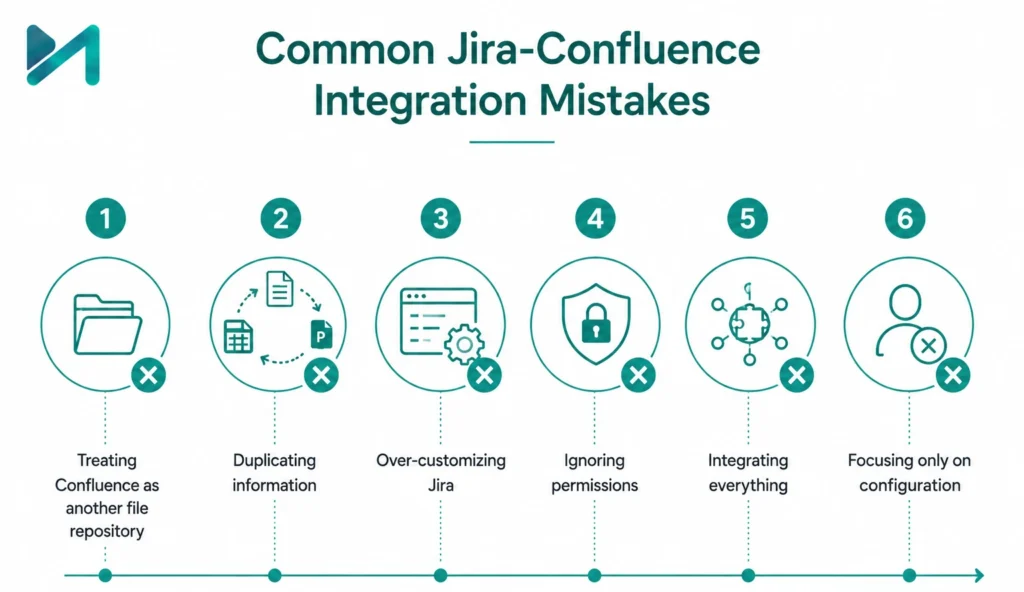
Mistake 1: Treating Confluence as another file repository
Confluence should be structured around knowledge and collaboration, not simply used as a dumping ground for documents.
Mistake 2: Duplicating information
If the same status is manually maintained in Jira, Confluence, Excel, and PowerPoint, integration has not solved the underlying problem.
Mistake 3: Over-customizing Jira
More workflows and fields do not necessarily mean better control.
Mistake 4: Ignoring permissions
A connected environment can increase visibility, but sensitive content still needs appropriate access controls.
Mistake 5: Integrating everything
Not every application needs a two-way integration.
Start with business-critical workflows.
Mistake 6: Focusing only on configuration
A technically correct integration can still fail if users do not adopt the new workflow.
When Should You Hire a Jira Consultant?
For a small team, Jira and Confluence can often be connected without external assistance.
The situation changes when you have:
- Multiple Jira projects
- Multiple business units
- Complex workflows
- Large user populations
- Legacy Jira configurations
- Multiple Confluence spaces
- Regulatory requirements
- Advanced automation
- Multiple external integrations
- Jira Service Management
- Data migration requirements
- Enterprise governance requirements
At this point, the challenge is no longer:
“How do I connect Jira to Confluence?”
It becomes:
“How should Jira and Confluence fit into our operating model?”
That is where a Jira implementation consultant or experienced Jira professional services team can add real value.
Need more than a basic Jira-Confluence connection?
MicroGenesis works with organizations that need to design, implement, integrate, optimize, migrate, and govern Jira environments rather than simply configure individual features.
Our Jira experts can help with workflows, integrations, automation, permissions, reporting, Jira Service Management, Confluence structures, and enterprise-scale adoption.
How MicroGenesis Can Help With Jira and Confluence

A successful Jira-Confluence implementation starts with the business process, not the configuration screen.
MicroGenesis can help organizations with:
- Jira consulting
- Jira implementation
- Jira workflow design
- Jira Service Management
- Confluence implementation
- Jira-Confluence integration
- Atlassian tool integration
- Jira automation
- Custom Jira integrations
- Enterprise Jira optimization
- Migration and consolidation
- Governance and permissions
- User adoption and training
Our approach is to understand how your teams currently work, identify friction points, and then design Jira and Confluence around those workflows.
For organizations in the Middle East, this can include localized support for businesses looking for Jira consulting services in Dubai, as well as broader enterprise Atlassian engagements.
Explore Jira Consulting Services
Frequently Asked Questions
Can Jira and Confluence be used together?
Yes. Jira and Confluence are designed to complement each other. Jira manages work while Confluence provides documentation, knowledge, planning, and context. Atlassian currently supports connecting the two so teams can work with Jira work items and Confluence content across both environments.
How do you integrate Jira and Confluence?
For Cloud environments, teams can connect Jira and Confluence spaces and then link or embed work items, pages, roadmaps, dashboards, and other relevant content. The exact setup depends on your Atlassian environment and the level of integration required.
What is the difference between Jira and Confluence?
Jira is primarily used to plan and track work. Confluence is primarily used to create, organize, and share knowledge and documentation. Using them together connects execution with context.
Can you create Jira issues from Confluence?
Yes. Current Atlassian functionality allows users to turn Confluence content into Jira work items without constantly switching between applications.
Can Jira issues be displayed in Confluence?
Yes. Jira work items can be displayed in Confluence pages and live docs, including lists based on searches and JQL.
Can Jira and Confluence integrate with Slack and GitHub?
Yes. Jira and Confluence can form part of a broader enterprise toolchain that includes collaboration platforms, source-code repositories, CI/CD systems, CRM platforms, and other business applications. The integration design should be based on the workflow rather than simply connecting every available tool.
When should I work with a Jira consultant?
Consider a Jira consultant when the environment involves complex workflows, multiple teams, integrations, migrations, governance, automation, Jira Service Management, or enterprise-scale adoption.
Make Jira and Confluence Work as One Connected System
Jira and Confluence are most valuable when they stop behaving like two separate applications.
Jira tells your organization what needs to happen.
Confluence captures why it needs to happen, what was decided, and what the team needs to know.
When those two layers are connected properly, teams can improve visibility, reduce duplicated work, preserve institutional knowledge, and give technical and business stakeholders a clearer view of delivery.
But integration alone is not the objective.
The real objective is to create a connected operating environment where information moves with the work.
For organizations with simple requirements, that may mean connecting a few Jira projects to Confluence.
For larger enterprises, it may involve Jira architecture, Confluence governance, automation, Jira Service Management, integrations, migration, security, reporting, and user adoption.
That is where the difference between simply using Jira and optimizing Jira for the business becomes significant.
Ready to Get More From Your Atlassian Environment?
If your teams are spending too much time searching for information, manually updating reports, duplicating documentation, or moving work between disconnected systems, it may be time to rethink how Jira and Confluence are configured.
MicroGenesis helps organizations design and optimize Jira and Confluence environments around their business processes, with expertise across implementation, integration, automation, governance, and ongoing optimization.
Talk to a Jira Consultant at MicroGenesis
The goal isn’t to add more tools. It’s to make the tools you already have work better together.