Choosing the right Git repository management platform is about more than comparing monthly subscription costs. Development teams need a solution that supports secure source code management, seamless collaboration, continuous integration, and scalability as projects grow. This is where Bitbucket has become a preferred choice for startups, SMBs, and enterprise organizations alike.
Developed by Atlassian, Bitbucket is a Git-based repository hosting platform that combines version control, code collaboration, CI/CD, and native integration with Jira, Confluence, and other DevOps tools. Its flexible pricing structure allows organizations to start with a free plan and upgrade as their development processes mature.
One of the most frequently asked questions from software teams is, “How much does Bitbucket cost?” Others want to know whether Bitbucket is free, which plan includes Bitbucket Pipelines, and whether the Premium or Enterprise plans justify the additional investment.
The answer depends on several factors, including your team size, security requirements, CI/CD usage, governance needs, and long-term growth plans. While the Free plan works well for individual developers and small teams, larger organizations often benefit from the advanced administration, security, and scalability available in the Standard, Premium, and Enterprise plans.
In this comprehensive guide, you’ll learn:
- What Bitbucket is and how it works
- Bitbucket pricing plans explained
- Features included in each plan
- Differences between Standard and Premium
- Bitbucket Pipelines pricing and build minutes
- Bitbucket vs GitHub and GitLab
- How to choose the right Bitbucket plan
- Best practices for maximizing your investment
Whether you’re evaluating Bitbucket for the first time or planning to upgrade your existing subscription, this guide will help you make an informed decision.
What Is Bitbucket?
Bitbucket is Atlassian’s Git-based source code management and collaboration platform that enables software development teams to securely store, manage, review, and deploy code from a centralized repository.
Unlike traditional version control systems, Bitbucket provides an integrated development environment where teams can collaborate throughout the software development lifecycle. Developers can create repositories, manage branches, submit pull requests, perform code reviews, automate builds, and deploy applications while maintaining complete visibility into project progress.
Because Bitbucket is built around Git, every change is tracked, making it easy to manage versions, collaborate on features, resolve merge conflicts, and roll back changes when necessary.
Today, Bitbucket is widely used for:
- Source code management
- Git repository hosting
- Code collaboration
- Pull request reviews
- Branch management
- Continuous Integration and Continuous Deployment (CI/CD)
- DevOps automation
- Software release management
Its tight integration with the Atlassian ecosystem makes it particularly valuable for organizations already using Jira and Confluence.
For example, developers can automatically link commits, pull requests, and deployments to Jira issues, giving project managers complete visibility from requirement creation to production deployment.
If your organization already relies on Jira for project management, integrating it with documentation and development tools creates a more connected software delivery process. Learn more in our guide on Integrating Jira with Confluence and Other Tools for Productivity.
Why Development Teams Choose Bitbucket
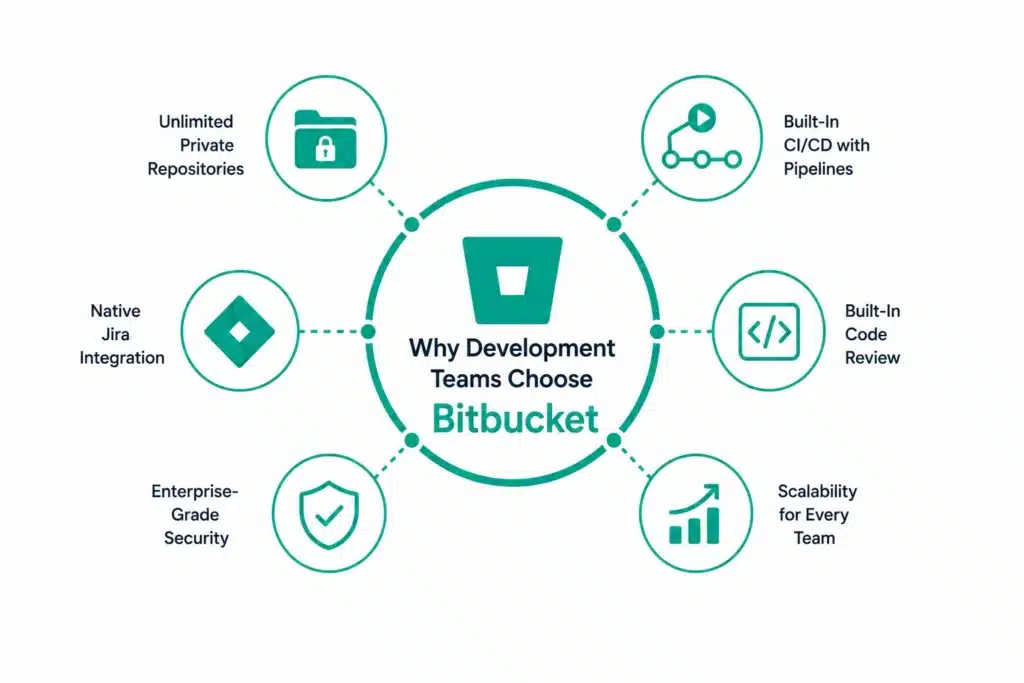
Bitbucket has become one of the leading Git repository hosting platforms because it combines powerful collaboration capabilities with enterprise-grade security and seamless DevOps integration.
Unlike standalone Git hosting platforms, Bitbucket connects planning, development, testing, and deployment into a single ecosystem.
Some of its biggest advantages include:
Unlimited Private Repositories
Unlike many repository hosting platforms that historically restricted private repositories, Bitbucket enables teams to securely host private code repositories while maintaining full ownership of their source code.
Built-In CI/CD with Bitbucket Pipelines
Bitbucket includes Bitbucket Pipelines, a cloud-native CI/CD service that automates building, testing, and deploying applications directly from the repository.
This eliminates the need for many third-party automation tools and helps development teams accelerate software delivery.
Native Jira Integration
One of Bitbucket’s biggest strengths is its deep integration with Jira Software.
Developers can:
- Link commits to Jira issues
- View development progress inside Jira
- Track deployments
- Monitor pull requests
- Improve traceability throughout the SDLC
Organizations already using Jira can significantly improve collaboration between development and project management teams.
If you’re exploring ways to build a more connected Atlassian environment, our guide on Custom Jira Integrations explains how businesses integrate Jira with development, collaboration, and enterprise applications.
Built-In Code Review
Bitbucket simplifies collaborative development through robust pull request and code review capabilities.
Teams can:
- Review code changes
- Add inline comments
- Request approvals
- Enforce merge checks
- Protect important branches
These features improve code quality while reducing production defects.
Enterprise-Grade Security
Security remains a priority for organizations managing sensitive applications and intellectual property.
Bitbucket includes features such as:
- Two-factor authentication
- IP allowlisting
- Branch permissions
- Access controls
- Audit logs
- Deployment permissions
- Repository permissions
Higher-tier plans also introduce additional governance features for regulated industries.
Scalability
Whether your organization has five developers or five thousand, Bitbucket scales with your business.
Teams can begin with the Free plan and progressively adopt more advanced capabilities without changing platforms.
Growing businesses often combine Bitbucket with Jira to standardize software delivery processes across departments. If you’re planning for long-term growth, our guide on How Growing Companies Can Implement Jira to Reduce Costs and Improve Efficiency explains how scalable Atlassian solutions support expanding organizations.
Understanding Bitbucket Pricing
One reason Bitbucket remains popular is its flexible pricing model, which accommodates everyone from individual developers to global enterprises.
Instead of offering a one-size-fits-all subscription, Atlassian provides multiple pricing tiers based on team size, administrative requirements, security needs, and CI/CD usage.
Bitbucket currently offers four primary plans:
|
Plan |
Best For |
|
Free |
Individual developers and small teams |
|
Standard |
Growing businesses and SMBs |
|
Premium |
Large teams requiring advanced security and governance |
|
Enterprise |
Large organizations with complex compliance and administration requirements |
Each plan builds upon the previous one by introducing additional collaboration features, administrative controls, security enhancements, and increased CI/CD capacity.
Choosing the right plan depends on factors such as:
- Number of users
- Repository requirements
- Build and deployment frequency
- Security policies
- Compliance requirements
- Administrative controls
- Expected business growth
Rather than selecting the lowest-cost option, organizations should evaluate which plan aligns best with their development processes and future scalability.
Bitbucket Free Plan
For individual developers, students, startups, and small software teams, the Bitbucket Free Plan offers an excellent starting point.
Unlike many competing platforms, the Free plan includes several enterprise-grade capabilities that enable teams to build professional development workflows without an upfront investment.
Key Features
- Up to 5 users
- Unlimited private repositories
- Git repository hosting
- Jira Software integration
- Basic branch permissions
- Pull requests and code reviews
- Bitbucket Pipelines with monthly build minutes
- Community support
The Free plan is ideal for:
- Freelance developers
- Personal projects
- Startup MVP development
- Student projects
- Small Agile teams
- Open-source contributors managing private repositories
Although generous, the Free plan has limitations related to build minutes, administration, and advanced security. As development teams grow, many organizations upgrade to the Standard plan for increased collaboration capabilities, more CI/CD capacity, and additional administrative controls.
Bitbucket Standard Plan
The Bitbucket Standard plan is designed for growing software development teams that need more CI/CD capacity, collaboration features, and administration capabilities than the Free plan provides.
While the Free plan is ideal for small teams, the Standard plan introduces higher resource limits and additional functionality that supports larger development projects and distributed teams.
At the time of writing, the Standard plan starts at USD 3.65 per user per month, with a minimum billing equivalent to five users for small workspaces. Atlassian also offers a free trial before billing begins. Pricing may vary over time, so organizations should verify current rates before purchasing.
Key Features of the Standard Plan
The Standard plan includes everything available in the Free plan, along with additional capabilities such as:
- Unlimited users
- Unlimited public and private Git repositories
- 2,500 Bitbucket Pipelines build minutes per month
- 5 GB Git LFS storage
- Built-in code review with pull requests
- Branch permissions and merge checks
- Native Jira and Confluence integration
- 4x and 8x pipeline runners
- Overage protection for additional build minutes and Git LFS storage (paid)
For most growing software teams, the Standard plan offers the best balance between cost and functionality. It provides sufficient CI/CD capacity, repository management, and collaboration features without the additional governance capabilities required primarily by enterprise organizations.
Who Should Choose Standard?
The Standard plan is well suited for:
- Growing startups
- SMB software companies
- Agile development teams
- DevOps teams
- SaaS businesses
- Organizations adopting CI/CD
If your development team collaborates closely with project managers, integrating Bitbucket with Jira helps create end-to-end visibility across planning, coding, testing, and deployment. Learn more in our guide on Why Companies Choose Atlassian Jira Software.
Bitbucket Premium Plan
As development teams scale, governance, compliance, and security become increasingly important.
The Bitbucket Premium plan builds upon the Standard plan by introducing advanced administration, access controls, deployment governance, and enterprise-ready security features.
At the time of writing, the Premium plan starts at USD 7.25 per user per month. Like the Standard plan, pricing is subscription-based and subject to change by Atlassian.
Premium Features
Everything included in Standard, plus:
- 3,500 Bitbucket Pipelines build minutes per month
- 10 GB Git LFS storage
- Deployment permissions
- IP allowlisting
- Required two-step verification (2SV)
- Advanced merge checks
- Smart Mirroring
- Repository access controls
- Pipelines configuration sharing
- Advanced auditing and governance capabilities
These features make Premium particularly valuable for organizations with strict security requirements, distributed development teams, and regulated environments where governance and compliance are critical.
Best For
Premium is recommended for:
- Enterprise software companies
- Financial institutions
- Healthcare organizations
- Government agencies
- Global development teams
- Companies managing sensitive intellectual property
Organizations with mature DevOps practices often combine Premium with optimized Agile workflows. If you’re looking to improve software delivery, our guide on Jira Agile Workflows & Boards explains how Agile planning and development work together within the Atlassian ecosystem.
Bitbucket Enterprise
Large enterprises often require capabilities beyond standard subscription plans.
Bitbucket Enterprise is intended for organizations managing thousands of users, complex compliance requirements, and large-scale software delivery environments.
Unlike the Standard and Premium plans, Enterprise pricing is customized based on organizational requirements and deployment models. Interested organizations typically work directly with Atlassian or an authorized Atlassian Solution Partner to receive a tailored quote.
Enterprise environments typically include:
- Centralized administration
- Enterprise identity management
- Advanced governance
- Enhanced compliance controls
- Dedicated enterprise support
- Large-scale repository management
- Enterprise-grade scalability
Many organizations also combine Enterprise with Atlassian Guard and other enterprise products to strengthen security and identity management across the Atlassian Cloud ecosystem.
Best For
Enterprise is ideal for:
- Fortune 500 organizations
- Large software enterprises
- Government departments
- Global technology companies
- Organizations with strict compliance requirements
Bitbucket Pricing Comparison
|
Feature |
Free |
Standard |
Premium |
Enterprise |
|
Best For |
Individuals & small teams |
Growing teams |
Large organizations |
Large enterprises |
|
Users |
Up to 5 |
Unlimited |
Unlimited |
Unlimited |
|
Unlimited Private Repositories |
✔ |
✔ |
✔ |
✔ |
|
Build Minutes |
50/month |
2,500/month |
3,500/month |
Custom |
|
Git LFS Storage |
1 GB |
5 GB |
10 GB |
Custom |
|
Pull Requests |
✔ |
✔ |
✔ |
✔ |
|
Code Reviews |
✔ |
✔ |
✔ |
✔ |
|
Branch Permissions |
Basic |
Advanced |
Advanced |
Advanced |
|
Deployment Permissions |
✖ |
✖ |
✔ |
✔ |
|
IP Allowlisting |
✖ |
✖ |
✔ |
✔ |
|
Required 2-Step Verification |
✖ |
✖ |
✔ |
✔ |
|
Smart Mirroring |
✖ |
✖ |
✔ |
✔ |
|
Enterprise Support |
✖ |
✖ |
✖ |
✔ |
Features and pricing may change. Always verify the latest details on Atlassian’s official pricing page before making purchasing decisions.
Bitbucket Standard vs Premium
Choosing between the Standard and Premium plans depends on your team’s size, security requirements, and governance needs.
|
Capability |
Standard |
Premium |
|
Starting Price |
USD 3.65/user/month |
USD 7.25/user/month |
|
Build Minutes |
2,500/month |
3,500/month |
|
Git LFS Storage |
5 GB |
10 GB |
|
Deployment Permissions |
✖ |
✔ |
|
IP Allowlisting |
✖ |
✔ |
|
Required Two-Step Verification |
✖ |
✔ |
|
Smart Mirroring |
✖ |
✔ |
|
Advanced Governance |
Basic |
Advanced |
|
Best For |
SMBs and growing teams |
Enterprises and regulated industries |
If your organization primarily needs repository hosting, code collaboration, and CI/CD, the Standard plan will meet the needs of most teams. However, businesses operating in regulated industries or managing critical production environments will benefit from the additional governance and security features included in Premium.
Understanding Bitbucket Pipelines Pricing
One of the most searched Bitbucket topics is Bitbucket Pipelines pricing, and for good reason. Continuous Integration and Continuous Deployment (CI/CD) pipelines consume build minutes, making them an important consideration when selecting a Bitbucket plan. This aligns with the high-volume search queries you’ve identified, such as “bitbucket pipelines pricing,” “bitbucket pipeline pricing,” and “bitbucket pipelines cost.”
Bitbucket Pipelines is Atlassian’s built-in CI/CD service that automatically builds, tests, and deploys code directly from your Bitbucket repositories. Every plan includes a monthly allocation of build minutes:
- Free: 50 build minutes per month
- Standard: 2,500 build minutes per month
- Premium: 3,500 build minutes per month
If your team exceeds the included build minutes, Atlassian allows paid overages on eligible plans. Additional build minutes are billed in blocks (currently USD 10 per additional 1,000 build minutes under the current billing model). Similar overage billing applies to Git LFS storage.
Which Teams Need More Build Minutes?
Your CI/CD usage depends on:
- Number of developers
- Frequency of commits
- Number of branches
- Automated testing
- Build duration
- Deployment frequency
Small development teams with occasional builds may find the Free plan sufficient, while organizations practicing continuous integration typically benefit from the higher limits available in the Standard or Premium plans.
For organizations implementing DevOps at scale, optimizing workflows is just as important as choosing the right subscription. Our guide on Smart Ways to Improve Team Productivity Through Workflow Optimization explains how efficient workflows reduce bottlenecks and improve software delivery.
Is Bitbucket Worth the Cost?
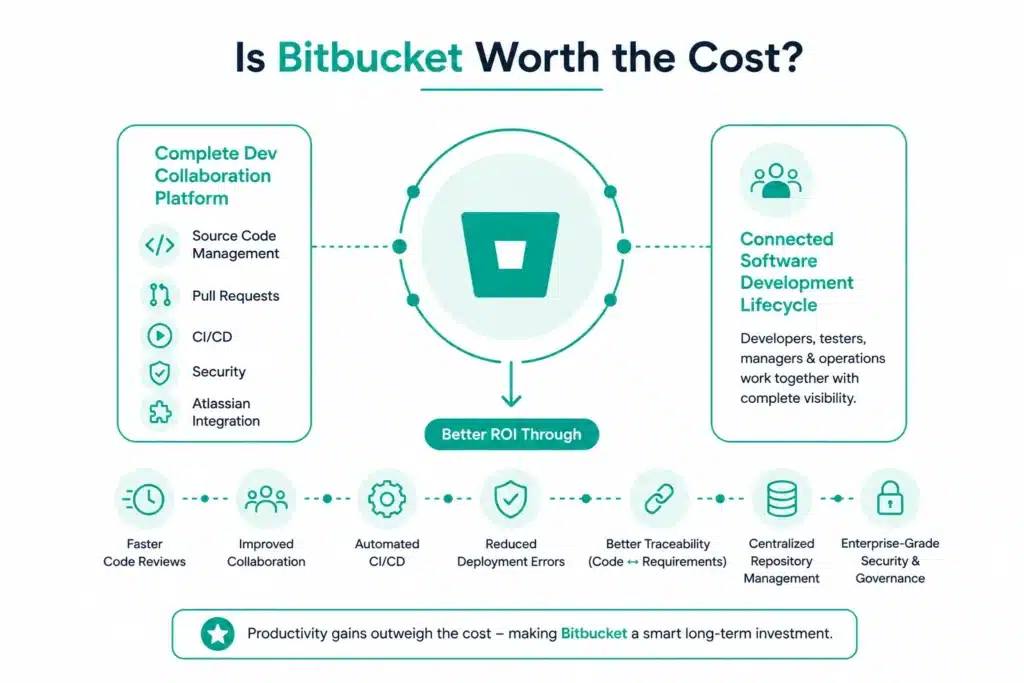
When evaluating a version control platform, pricing is only one part of the equation. The real value lies in how much time the platform saves, how effectively it supports collaboration, and whether it can scale with your team’s growth.
Bitbucket is more than a Git repository hosting service. It is a complete development collaboration platform that combines source code management, pull requests, CI/CD, security controls, and seamless integration with the Atlassian ecosystem.
For organizations already using Jira, Confluence, or other Atlassian products, Bitbucket delivers even greater value by creating a connected software development lifecycle. Developers, testers, project managers, and operations teams can work from a shared platform with complete visibility into code changes, project progress, and deployments.
Instead of evaluating Bitbucket based solely on subscription costs, organizations should also consider the return on investment (ROI) gained through:
- Faster code reviews
- Improved developer collaboration
- Automated CI/CD pipelines
- Reduced deployment errors
- Better traceability between code and requirements
- Centralized repository management
- Enterprise-grade security and governance
For many teams, these productivity improvements outweigh the monthly subscription cost, making Bitbucket a cost-effective investment over the long term.
Bitbucket vs GitHub vs GitLab
One of the most common questions development teams ask is whether Bitbucket is a better choice than GitHub or GitLab.
While all three platforms provide Git repository hosting and collaboration capabilities, each is designed with different priorities.
|
Feature |
Bitbucket |
GitHub |
GitLab |
|
Git Repository Hosting |
✔ |
✔ |
✔ |
|
Unlimited Private Repositories |
✔ |
✔ |
✔ |
|
Built-in CI/CD |
✔ (Bitbucket Pipelines) |
GitHub Actions |
GitLab CI/CD |
|
Native Jira Integration |
✔ Excellent |
Available via integrations |
Available via integrations |
|
Confluence Integration |
✔ Native |
Third-party |
Third-party |
|
Pull Requests & Code Reviews |
✔ |
✔ |
✔ |
|
Enterprise Governance |
✔ Premium & Enterprise |
✔ Enterprise |
✔ Ultimate |
|
Best For |
Atlassian users and DevOps teams |
Open-source projects and developer communities |
End-to-end DevSecOps platforms |
When Should You Choose Bitbucket?
Bitbucket is an excellent choice if your organization:
- Uses Jira Software for Agile project management
- Uses Confluence for documentation
- Wants built-in CI/CD with Bitbucket Pipelines
- Requires strong branch permissions and governance
- Needs enterprise-grade repository management
- Plans to scale development teams over time
Organizations already invested in the Atlassian ecosystem often experience the greatest value because Bitbucket integrates seamlessly with Jira issues, sprint planning, documentation, and release management.
If you’re building an integrated Atlassian environment, our guide on Best Tools for Jira Teams explores complementary tools that improve collaboration, development, and project delivery.
How to Choose the Right Bitbucket Plan
Selecting the right Bitbucket subscription depends on your team’s size, development practices, security requirements, and expected growth.
Here are some practical recommendations.
Choose the Free Plan if:
- You have up to five users.
- You’re learning Git or Bitbucket.
- You’re building personal or academic projects.
- Your CI/CD requirements are minimal.
- You’re validating an MVP before scaling.
The Free plan provides enough functionality for individuals and small development teams to begin collaborating without upfront costs.
Choose the Standard Plan if:
- Your development team is growing.
- You need more Bitbucket Pipelines build minutes.
- Multiple developers collaborate daily.
- You rely on Jira integration.
- You want improved code review capabilities.
- Your organization is implementing Agile or DevOps practices.
For most small and medium-sized software companies, the Standard plan offers the best balance between features and affordability.
Choose the Premium Plan if:
- Your organization manages sensitive source code.
- You require advanced governance and compliance.
- Multiple distributed teams collaborate globally.
- You need deployment permissions and IP allowlisting.
- Security and auditability are business priorities.
The Premium plan is particularly suitable for regulated industries such as banking, healthcare, telecommunications, aerospace, and government.
Choose Enterprise if:
- Thousands of developers use Bitbucket.
- You require enterprise support.
- Your organization has strict compliance obligations.
- Centralized administration is essential.
- You require enterprise-grade scalability and governance.
Enterprise deployments are typically implemented alongside broader DevOps transformation initiatives involving Jira Software, Confluence, Atlassian Guard, and other enterprise Atlassian products.
Common Mistakes When Choosing a Bitbucket Plan
Many organizations choose a subscription based solely on price instead of evaluating long-term requirements.
Some of the most common mistakes include:
Choosing the Free Plan for Rapidly Growing Teams
While the Free plan is generous, organizations experiencing rapid growth often outgrow its user and CI/CD limits quickly.
Planning ahead helps avoid unnecessary migration and administration later.
Ignoring CI/CD Usage
Teams often underestimate the number of Bitbucket Pipelines build minutes required for continuous integration.
Organizations with frequent commits, automated testing, and multiple deployment environments should evaluate their monthly pipeline usage before selecting a plan.
Overlooking Security Requirements
Security capabilities become increasingly important as organizations scale.
Features such as deployment permissions, required two-step verification, IP allowlisting, and advanced auditing may justify upgrading to Premium, particularly for businesses handling sensitive intellectual property or operating in regulated industries.
Focusing Only on Subscription Costs
The cheapest plan is not always the most cost-effective.
Organizations should also consider:
- Developer productivity
- Reduced deployment failures
- Automation savings
- Collaboration improvements
- Governance
- Reduced administrative overhead
A plan that supports efficient software delivery often delivers significantly greater business value than its subscription cost alone.
How MicroGenesis Helps Organizations Maximize Bitbucket
Selecting the right Bitbucket plan is only the first step. To fully realize the platform’s value, organizations need a well-planned implementation, seamless integrations, secure repository management, and optimized DevOps workflows.
As an Atlassian Platinum Solution Partner, MicroGenesis helps organizations design, implement, and optimize Bitbucket environments that support secure, scalable, and collaborative software development.
Our Bitbucket services include:
- Bitbucket licensing and subscription advisory
- Repository migration from GitHub, GitLab, Azure DevOps, and other platforms
- Bitbucket implementation and configuration
- Bitbucket Pipelines and CI/CD setup
- Jira and Confluence integration
- Repository security and access governance
- Branch strategy implementation
- Pull request and code review best practices
- DevOps consulting
- Developer onboarding and training
- Ongoing administration and optimization
Whether you’re migrating to Bitbucket, upgrading your existing subscription, or modernizing your DevOps toolchain, our experts help you select the right plan while ensuring your development environment remains secure, efficient, and future-ready.
Frequently Asked Questions
Is Bitbucket free?
Yes. Bitbucket offers a Free plan for teams of up to five users, including unlimited private repositories, pull requests, Jira integration, and a monthly allocation of Bitbucket Pipelines build minutes.
What is the difference between Bitbucket Standard and Premium?
The Standard plan provides additional build minutes, Git LFS storage, and collaboration features for growing teams. The Premium plan adds advanced security, deployment permissions, Smart Mirroring, IP allowlisting, required two-step verification, and governance capabilities for larger organizations.
Which Bitbucket plan is best for small businesses?
For most small and medium-sized businesses, the Standard plan offers the best balance of affordability, collaboration features, and CI/CD capacity. Teams can also begin with the Free plan and upgrade as they grow.
Does Bitbucket include CI/CD?
Yes. Bitbucket includes Bitbucket Pipelines, a built-in CI/CD service that automates building, testing, and deploying applications directly from your repositories.
Can Bitbucket integrate with Jira?
Yes. Bitbucket integrates natively with Jira, allowing teams to link commits, branches, pull requests, and deployments directly to Jira issues for complete traceability across the software development lifecycle.
Is Bitbucket better than GitHub?
It depends on your requirements. Bitbucket is particularly advantageous for organizations using Jira and Confluence because of its deep Atlassian integration, while GitHub is widely favored for open-source development and community collaboration.
Can I upgrade my Bitbucket plan later?
Yes. Organizations can upgrade from the Free plan to Standard, Premium, or Enterprise as their team size, security requirements, and development needs evolve.
Which industries commonly use Bitbucket?
Bitbucket is widely adopted across industries including software development, financial services, healthcare, telecommunications, manufacturing, automotive, government, and technology, particularly where secure source code management and collaborative DevOps practices are essential.
Conclusion
Bitbucket has established itself as one of the leading Git repository management platforms by combining secure source code hosting, built-in CI/CD, collaborative code reviews, and deep integration with the Atlassian ecosystem. Its flexible pricing structure allows organizations to start with a Free plan and seamlessly scale to Standard, Premium, or Enterprise as their development practices mature.
Choosing the right Bitbucket plan depends on more than just monthly pricing. Factors such as team size, CI/CD usage, security requirements, governance needs, and future growth should all influence your decision. While the Free plan is ideal for individuals and small teams, growing organizations often benefit from the additional collaboration capabilities of the Standard plan, whereas enterprises with strict compliance requirements gain significant value from the advanced security and administration features available in Premium and Enterprise.
For organizations already using Jira and Confluence, Bitbucket becomes an integral part of a connected DevOps ecosystem, enabling better traceability, faster collaboration, and improved software delivery.
As an Atlassian Platinum Solution Partner, MicroGenesis helps businesses evaluate licensing options, implement Bitbucket, integrate it with the Atlassian ecosystem, establish CI/CD pipelines, and optimize repository management. Whether you’re selecting your first Bitbucket subscription or scaling an enterprise DevOps environment, our experts can help you maximize the value of your investment while supporting long-term business growth.