
In complex engineering projects, managing requirements and testing separately can create gaps that are difficult to identify until late in development. Requirements may be documented in IBM DOORS, while test cases, execution results, and defects are maintained in separate platforms. When these systems do not communicate effectively, teams spend considerable time updating information manually and checking whether every requirement has been tested.
This becomes particularly challenging in automotive, aerospace, defence, and other safety-critical industries, where teams need clear evidence that requirements have been verified and validated.
Integrating IBM DOORS with test management tools helps establish stronger connections between requirements, test cases, execution results, and defects. It also improves visibility into changes, supports impact analysis, and makes it easier to maintain traceability throughout the engineering lifecycle.
In this guide, we explore common integration targets, connector-based and API-based integration approaches, and practical ways to keep requirement-test relationships synchronised.
Why Integrate IBM DOORS with Test Management Tools?
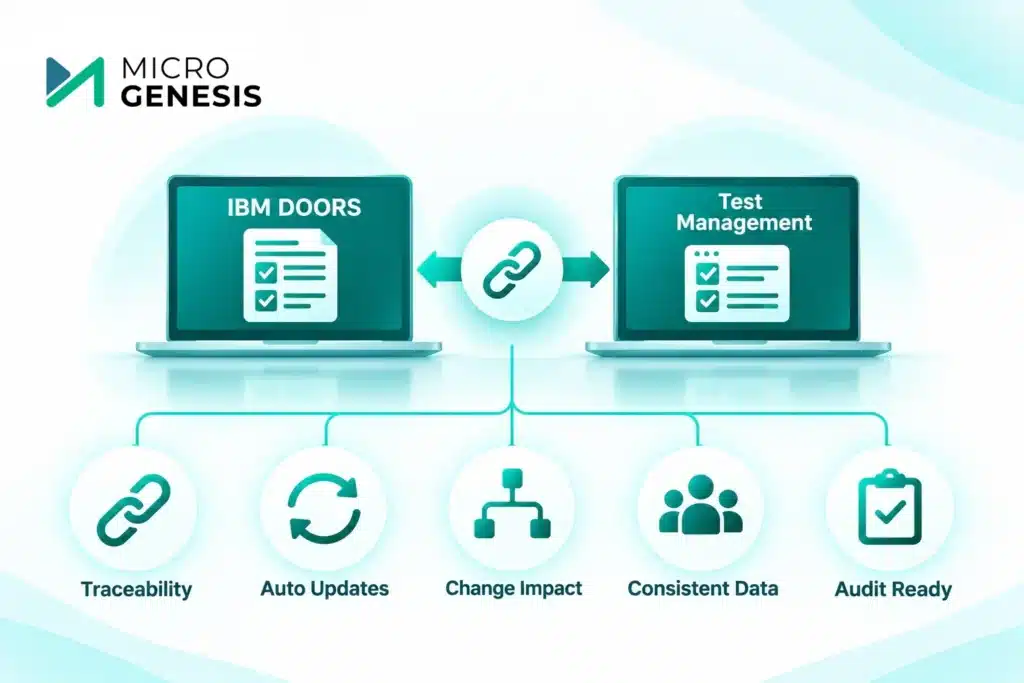
IBM DOORS is widely used for requirements management, particularly in complex engineering environments where requirements need to be structured, reviewed, baselined, and controlled.
However, requirements management is only one part of the engineering lifecycle. Teams also need to plan tests, execute them, record results, manage defects, and demonstrate that requirements have been adequately verified.
When requirements and testing activities are handled in disconnected systems, several problems can emerge:
Disconnected requirement and test records: Test engineers may maintain test cases separately without a reliable link to the original requirement.
Manual traceability updates: Teams spend time creating and updating links between requirements and test cases.
Limited change visibility: When a requirement changes, affected test cases may not be identified immediately.
Inconsistent project information: Different teams may work with outdated versions of requirements or test records.
Difficult compliance evidence collection: Engineering teams may struggle to demonstrate complete requirement-to-test coverage during assessments and audits.
A connected toolchain helps address these challenges by linking requirements with their corresponding verification activities.
For a broader understanding of how requirements are structured and maintained, see our guide to requirements management with IBM DOORS Next.
Common Integration Targets for IBM DOORS
The right integration depends on the engineering team’s existing toolchain, testing processes, and project requirements. Some organisations use IBM platforms across the lifecycle, while others connect IBM DOORS with third-party ALM and test management solutions.
1. IBM Engineering Test Management (ETM)
IBM Engineering Test Management (ETM), formerly known as Rational Quality Manager, supports test planning, test case management, test execution, and test reporting.
Connecting IBM DOORS with ETM can help teams establish relationships between requirements and test assets, depending on the products, versions, and integration capabilities in use.
For example, consider an automotive engineering team developing an electronic control unit (ECU). A requirement might specify that the system must detect a particular fault condition within a defined time.
The requirements team manages this requirement in DOORS, while the testing team creates test cases in ETM to verify the expected behaviour.
With an appropriate integration:
Requirements can be associated with relevant test cases.
Test execution results can be reviewed alongside requirement information.
Teams can identify requirements without corresponding verification activities.
Requirement changes can be assessed for their potential impact on testing.
This improves collaboration between requirements engineers, developers, and test engineers.
2. PTC Codebeamer
PTC Codebeamer is an ALM platform used in product and software engineering environments. It supports requirements management, risk management, test management, and traceability.
Some organisations use IBM DOORS for established requirements repositories while adopting Codebeamer for broader lifecycle management.
Depending on the supported integration approach, teams can connect relevant requirements and engineering information between the platforms.
For example, an organisation may continue managing approved requirements in DOORS while using Codebeamer to coordinate development and testing activities.
The important consideration is to define which system owns each type of information. Without clear ownership, synchronisation can introduce duplicate records or conflicting updates.
If your organisation is evaluating these platforms, our comparison of IBM DOORS and PTC Codebeamer for automotive requirements management provides further context.
3. Other Test Management and ALM Platforms
Some engineering organisations use specialised testing platforms or a combination of ALM tools across different teams.
Integration may be required to connect:
Requirements repositories with test management platforms.
Test cases with development tasks and defects.
Verification results with requirements and design records.
Engineering changes with affected test activities.
The integration method depends on the capabilities of the selected tools, available connectors, APIs, and the organisation’s data governance requirements.
For teams working across several engineering platforms, a well-planned ALM integration strategy helps maintain consistency and reduce disconnected workflows.
Connector-Based vs API-Based Integration
There are two common approaches to connecting IBM DOORS with test management tools: using available connectors or developing integrations through APIs.
The right choice depends on the platforms involved, integration requirements, supported product versions, and the level of customisation needed.
Connector-Based Integration
Connectors provide a predefined integration mechanism between supported tools. They can reduce the amount of custom development required and may offer established ways to exchange selected engineering information.
Depending on the connector, supported capabilities may include:
Synchronising selected requirement attributes.
Linking requirements with test cases.
Exchanging status information.
Maintaining relationships between records.
Supporting updates between connected systems.
Before implementation, teams should verify which products and versions are supported, which fields can be synchronised, and whether relationship updates are handled.
A connector should not be assumed to support every required workflow automatically.
API-Based Integration
API-based integration is useful when standard connectors do not meet the organisation’s requirements or when more control is needed over data exchange.
APIs allow systems to communicate through defined interfaces. An integration layer can retrieve information from one platform, map it to the required structure, and update another platform based on agreed rules.
For example, an API-based integration may be designed to:
Retrieve requirement information from IBM DOORS.
Identify the corresponding test records in the test management platform.
Compare requirement versions or selected attributes.
Update supported fields or relationships.
Record synchronisation errors for investigation.
API-based integration requires careful planning around authentication, permissions, data mapping, API versioning, retries, error handling, and ongoing maintenance.
Which Approach Should You Choose?
| Consideration | Connector-Based | API-Based |
|---|---|---|
| Implementation | Uses supported integration mechanisms | Requires API configuration or development |
| Customisation | Depends on connector capabilities | Can support tailored workflows |
| Data mapping | Usually follows predefined options | Can be designed around project needs |
| Maintenance | Depends on connector and vendor support | Requires ongoing integration management |
| Best suited for | Supported, relatively standard integration needs | Complex or specialised integration requirements |
The choice should be based on the actual integration requirements rather than assuming one approach is always better.
Keeping Requirement-Test Links in Sync
Establishing an initial connection between DOORS and a test management platform is only the first step. The more important challenge is maintaining accurate relationships as requirements, test cases, and project scope change.
Consider an automotive ECU project where a requirement initially specifies that a fault must be detected within 500 milliseconds. Later, engineering analysis changes the threshold to 300 milliseconds.
This is not simply a text update. The change may affect:
Existing test case conditions.
Expected test results.
Verification procedures.
Related design decisions.
Previously recorded test evidence.
If the test management platform continues using the old requirement value, the team may execute tests against outdated expectations.
To prevent this, organisations need clear synchronisation and change management practices.
1. Define a Single Source of Truth
Decide which platform owns each type of information.
For example:
IBM DOORS owns approved requirements.
The test management platform owns test cases and execution results.
The defect management platform owns defect records.
This prevents multiple systems from becoming competing sources of truth.
2. Maintain Unique Identifiers
Each requirement and test case should have a stable identifier.
These identifiers help the integration recognise existing records and update the correct relationships rather than creating duplicates.
Teams should also define how identifiers are handled when requirements are moved, revised, or migrated.
3. Establish Synchronisation Rules
Not every field needs to be synchronised between systems.
Define which attributes should be exchanged, which system controls each attribute, and how conflicting changes should be handled.
For example, requirement descriptions may be controlled by DOORS, while test execution status remains controlled by the test management platform.
4. Monitor Requirement Changes
A requirement change should trigger an impact review.
Teams need to identify related test cases and determine whether they require updates, re-execution, or additional verification.
This is particularly important in regulated engineering projects, where changes must be reviewed and supported by appropriate evidence.
Learn more about requirements traceability for ASPICE compliance and how traceability supports engineering process assessments.
5. Monitor Synchronisation Failures
Integration failures can occur because of network interruptions, permission changes, API limits, unsupported fields, or data validation issues.
A reliable integration process should include:
Error logging and monitoring.
Retry mechanisms for temporary failures.
Alerts for unresolved synchronisation issues.
Periodic reconciliation of important records.
A process for investigating missing or conflicting information.
These practices help teams maintain confidence in the information exchanged between systems.
How Requirements Traceability Supports Automotive and Safety-Critical Projects
Requirements traceability is especially important in automotive and other safety-critical engineering environments.
Teams must be able to understand how system and software requirements connect to design, implementation, testing, and verification evidence.
For example, an automotive software requirement may be linked to a system requirement, a software design element, one or more test cases, and the corresponding test execution results.
This creates a connected view of the engineering lifecycle.
However, traceability is not just about creating links. Teams must ensure that those links are accurate, maintained, and reviewed when requirements or designs change.
A structured approach to requirements management in automotive software development helps teams manage complexity across multiple engineering disciplines.
It is also important to understand the relationship between traceability and process expectations. Our articles on functional safety and ASPICE vs ISO 26262 explain the different roles these frameworks play in engineering and compliance activities.
For organisations managing requirements in embedded projects, requirements management for embedded projects provides additional context.
Common Integration Mistakes to Avoid
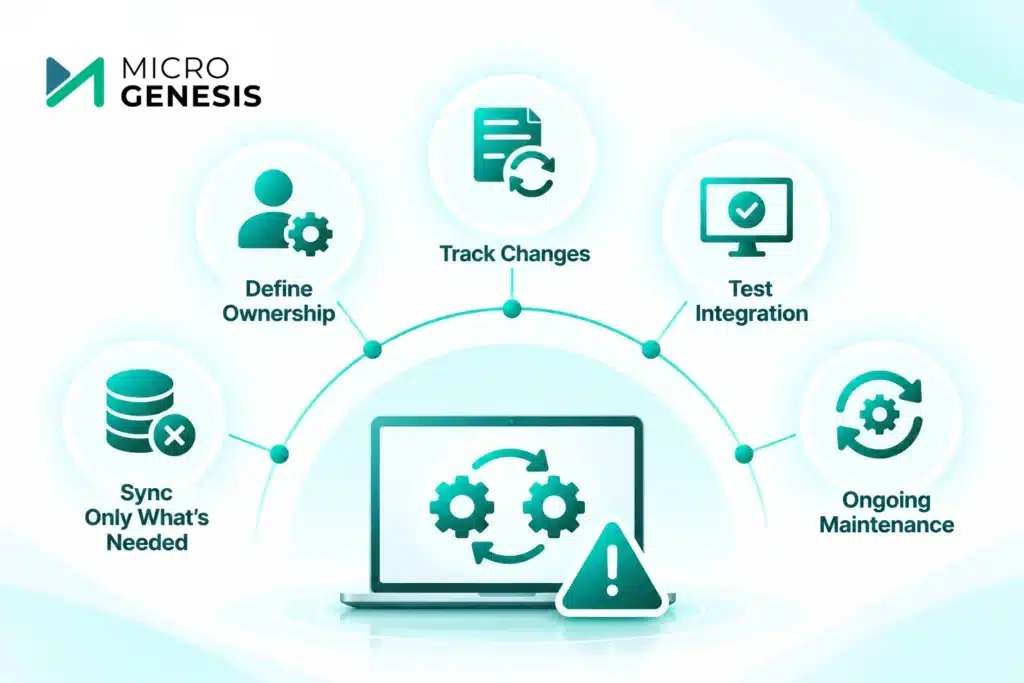
Even a technically successful integration can create problems if the underlying processes are not clearly defined.
Some common mistakes include:
1. Synchronising too much information
Exchanging every available field can create unnecessary complexity. Start with the information needed for the engineering workflow.
2. Not defining data ownership
If two platforms can independently update the same requirement or test attribute, conflicting information can appear. Define ownership before enabling synchronisation.
3. Ignoring requirement changes
An integration that only transfers initial records will not provide reliable lifecycle traceability. Change impact and relationship maintenance must also be addressed.
4. Skipping integration testing
Test the integration with realistic engineering scenarios, including record creation, updates, deletions where supported, failed synchronisation, and conflicting changes.
5. Treating integration as a one-time activity
Tools, APIs, project structures, and engineering processes evolve. Integrations need ongoing monitoring and maintenance.
For additional guidance, see our article on ALM tool implementation best practices.
How MicroGenesis Helps with IBM DOORS and Test Management Integration
Integrating IBM DOORS with test management tools requires more than establishing a technical connection. Organisations need to understand their existing engineering processes, data structures, traceability requirements, and toolchain dependencies.
MicroGenesis helps engineering organisations plan and implement ALM solutions that connect requirements, development, testing, and change management activities.
Our approach includes:
Toolchain assessment: Understanding the existing requirements, development, and testing platforms.
Integration planning: Identifying suitable connector-based or API-based integration approaches.
Requirements traceability: Establishing relationships between requirements, test cases, and verification records.
Workflow alignment: Defining data ownership, synchronisation rules, and change management processes.
Implementation support: Supporting ALM configuration, integration, and process improvements based on project requirements.
Our IBM Engineering Lifecycle Management services support organisations working with IBM engineering tools. We also provide broader ALM consulting and implementation services to help teams improve lifecycle visibility and engineering collaboration.
Final Thoughts
Integrating IBM DOORS with test management tools helps engineering teams connect requirements with the verification activities needed to demonstrate that those requirements have been addressed.
However, successful integration depends on more than moving data between platforms. Teams need clear data ownership, stable identifiers, reliable synchronisation rules, and a process for reviewing requirement changes and their impact on testing.
Whether an organisation uses IBM Engineering Test Management, PTC Codebeamer, or another supported testing platform, the objective remains the same: maintain accurate relationships between requirements, test cases, execution results, and engineering changes.
With the right integration strategy, organisations can reduce manual coordination, improve traceability, and build a more connected engineering lifecycle.