If you’re new to Jira or Agile project management, you’ve probably wondered: What is the difference between an Epic, Story, and Task in Jira? While these issue types are fundamental to organizing work, they are often misunderstood or used interchangeably. As a result, teams may experience cluttered backlogs, unclear ownership, inaccurate sprint planning, and limited visibility into project progress.
Understanding the Jira Epic vs Story vs Task hierarchy helps teams break down large initiatives into manageable pieces, improve collaboration, and maintain clear traceability from business objectives to day-to-day execution. Whether you’re building software, managing IT operations, or coordinating business projects, using the right issue type ensures that work is planned, tracked, and delivered efficiently.
Jira follows a structured issue hierarchy that enables organizations to organize work from high-level strategic goals to individual activities. When teams understand how each issue type fits into this hierarchy, they can prioritize work more effectively, improve reporting, and scale Agile practices across multiple teams.
In this guide, you’ll learn:
- What an Epic, Story, and Task mean in Jira
- The differences between each issue type
- The Jira issue hierarchy with examples
- When to use Epics, Stories, Tasks, and Sub-tasks
- Best practices for structuring Agile work in Jira
- Common mistakes teams should avoid
If you’re just getting started with Jira, it’s worth understanding the platform’s fundamentals before diving into issue types.
What Is the Jira Issue Hierarchy?
The Jira issue hierarchy provides a structured way to organize work from large strategic initiatives down to individual tasks. Rather than treating every piece of work as the same type of issue, Jira groups related work items into different levels based on their scope and purpose.
A standard Jira Agile Workflows and Boards looks like this:
Initiative (Advanced Roadmaps)
│
Epic
│
Story
│
Task
│
Sub-task
Each level represents a different degree of planning and execution:
- Initiative – A high-level business objective that may contain multiple Epics (available in Advanced Roadmaps).
- Epic – A large body of work that spans multiple sprints and consists of several Stories or Tasks.
- Story – A user-focused requirement or feature that delivers business value.
- Task – A technical, operational, or administrative activity required to complete a project.
- Sub-task – A smaller unit of work created to divide a Story or Task into manageable pieces.
This hierarchy enables Agile teams to maintain clear relationships between strategic goals and daily activities while improving sprint planning, backlog management, and reporting.
Why Understanding Jira Hierarchy Matters
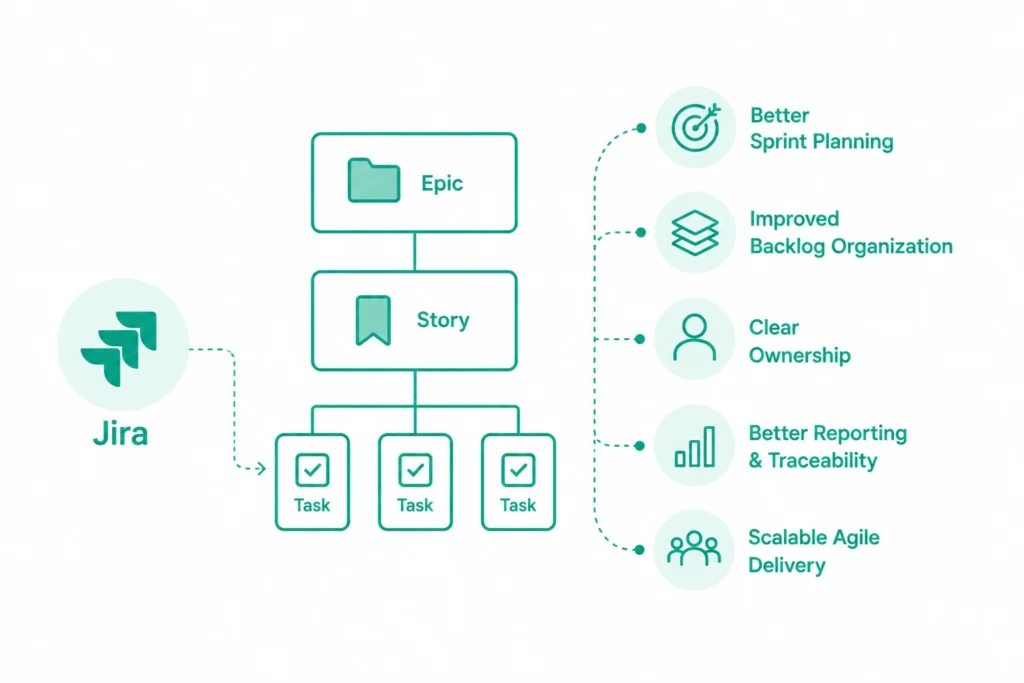
Many organizations adopt Jira to manage Agile projects, but they often struggle because Epics, Stories, and Tasks are not used consistently. Some teams create everything as a Task, while others use Epics for work that should actually be a Story. These inconsistencies make planning, reporting, and collaboration more difficult.
Using the correct issue hierarchy offers several benefits:
Better Sprint Planning
Breaking work into properly sized Stories and Tasks allows teams to estimate effort more accurately and deliver work consistently within sprint timelines.
Improved Backlog Organization
Well-structured Epics group related Stories together, making product backlogs easier to manage and prioritize.
Clear Ownership
Each issue type has a defined purpose, helping product managers, developers, QA engineers, and business stakeholders understand their responsibilities.
Better Reporting and Traceability
When Epics, Stories, and Tasks are linked correctly, Jira provides meaningful reports on sprint progress, velocity, and project status.
Scalable Agile Delivery
Organizations managing multiple teams can use the Jira hierarchy to coordinate large initiatives without losing visibility into individual work items.
As projects grow, maintaining a clean Jira structure becomes even more important. Periodically reviewing workflows, issue types, and unused fields helps prevent performance issues and keeps teams productive.
Related Reading: Enterprise Jira Cleanup Best Practices
What Is an Epic in Jira?
An Epic in Jira represents a large body of work that supports a broader business objective. It acts as a container for related Stories and Tasks, helping teams organize features, initiatives, or projects that cannot be completed within a single sprint.
Unlike Stories or Tasks, an Epic typically spans multiple iterations and may involve contributions from several teams. Product managers often use Epics to plan roadmap initiatives, while development teams break them down into smaller deliverables that can be completed incrementally.
Characteristics of an Epic
- Represents a major feature or business initiative
- Contains multiple Stories and Tasks
- Can span several sprints or releases
- Supports long-term roadmap planning
- Improves visibility across teams
Examples of Jira Epics
- Launch a New Customer Portal
- Implement Single Sign-On (SSO)
- Modernize the Payment System
- Migrate Applications to the Cloud
- Introduce AI-Powered Search
Each of these initiatives is too large to complete in one sprint. Instead, they are divided into multiple Stories and Tasks that can be planned, assigned, and delivered over time.
For organizations Best Practices for Roadmaps and Visual Views in Jira Product Discovery managing strategic product initiatives, Epics often align closely with product roadmaps and release planning.
When Should You Use an Epic?
Create an Epic when the work:
- Requires multiple sprints to complete
- Involves several user stories
- Aligns with a business objective or product roadmap
- Requires collaboration across multiple teams
- Needs progress tracking at a high level
Avoid creating an Epic for a single feature that can be completed within one sprint. In those cases, a Story is usually the better choice.
What Is a Story in Jira?
A Story in Jira (also known as a User Story) represents a specific feature, enhancement, or functionality that delivers value to an end user. Unlike an Epic, which captures a broader initiative, a Story focuses on a single requirement that can typically be completed within one sprint.
Stories help Agile teams understand what needs to be built, who benefits from it, and why it matters. They bridge the gap between business objectives and technical implementation by keeping development centered on user needs rather than individual technical tasks.
A well-written Story usually follows this format:
As a customer, I want to save my delivery address so that I can check out faster during future purchases.
This simple structure provides enough context for developers, testers, and product owners to understand the expected outcome.
Characteristics of a Jira Story
A Story should:
- Deliver value to an end user
- Be small enough to complete within a sprint
- Have clear acceptance criteria
- Be independently testable
- Be estimated by the development team
- Support a larger Epic or business initiative
Unlike Tasks, Stories always focus on user value rather than technical implementation.
Examples of Jira Stories
If the Epic is:
Epic: Launch Customer Self-Service Portal
The Stories might include:
- As a customer, I want to register for an account.
- As a customer, I want to reset my password.
- As a customer, I want to view my previous orders.
- As a customer, I want to update my profile information.
- As a customer, I want to download invoices.
Each Story delivers a measurable outcome and can be completed independently while contributing to the larger Epic.
Organizations using Jira Product Discovery often refine ideas into Stories before development begins, ensuring only validated features enter the delivery backlog.
Related Reading: Overcoming Common Challenges in Jira Product Discovery
When Should You Use a Story?
Create a Story when the work:
- Delivers value to a customer or user
- Represents a product feature or enhancement
- Can be completed within one sprint
- Has measurable acceptance criteria
- Belongs to a larger Epic
Avoid creating Stories for infrastructure work, server maintenance, software upgrades, or administrative activities. Those activities are usually better represented as Tasks.
What Is a Task in Jira?
A Task in Jira represents work that needs to be completed but does not necessarily provide direct value to an end user. Tasks are commonly used for technical, operational, maintenance, or administrative activities that support product delivery.
Unlike Stories, Tasks do not have to follow a user-story format and may exist independently or under an Epic, depending on how a team manages its projects.
Typical Tasks include backend development, infrastructure setup, data migration, documentation, security updates, and configuration work.
Characteristics of a Jira Task
Tasks typically:
- Focus on technical or operational work
- May not have a user-facing outcome
- Can exist independently
- Usually require only one team
- Support Stories or project objectives
- Can be completed within a few hours or days
Tasks are especially useful for engineering, DevOps, IT operations, and internal process improvements.
Examples of Jira Tasks
Examples include:
- Configure production server
- Upgrade database version
- Install SSL certificates
- Create API documentation
- Import customer data
- Configure CI/CD pipeline
- Set up monitoring dashboards
- Perform security audit
These activities are essential to project success but do not directly represent customer-facing functionality.
Organizations automating repetitive Tasks can significantly reduce manual effort and improve team productivity.
Story vs Task in Jira
One of the most common questions Agile teams ask is:
Story vs Task in Jira — what’s the difference?
Although both represent work items, they serve different purposes.
| Story | Task |
| User-focused | Technical or operational |
| Delivers business value | Supports project execution |
| Written from the user’s perspective | Describes technical work |
| Usually linked to an Epic | May exist independently |
| Includes acceptance criteria | Focuses on completion of work |
Example
Suppose your company is developing an employee portal.
Story
As an employee, I want to download my salary slips so that I can access them whenever needed.
Associated Tasks:
- Design database tables
- Develop API endpoints
- Build frontend interface
- Configure authentication
- Write automated tests
The Story defines what the user wants, while the Tasks explain how the team will build it.
Epic vs Story vs Task in Jira
Understanding the relationship between these issue types is essential for effective backlog management.
| Issue Type | Purpose | Scope | Duration |
| Epic | Business initiative | Large | Multiple sprints |
| Story | User requirement | Medium | One sprint |
| Task | Technical or operational activity | Small | Hours or days |
Example Hierarchy
Epic
Improve Online Shopping Experience
⬇
Stories
- User Registration
- Product Search
- Shopping Cart
- Checkout
- Order History
⬇
Tasks
For “Checkout” Story:
- Design payment API
- Configure payment gateway
- Develop checkout UI
- Write unit tests
- Perform QA testing
This hierarchy allows product managers to track strategic progress while development teams focus on execution.
Teams managing complex product portfolios often integrate Stories directly into delivery workflows using Jira Software and Jira Product Discovery for seamless planning and execution.
What Are Sub-tasks in Jira?
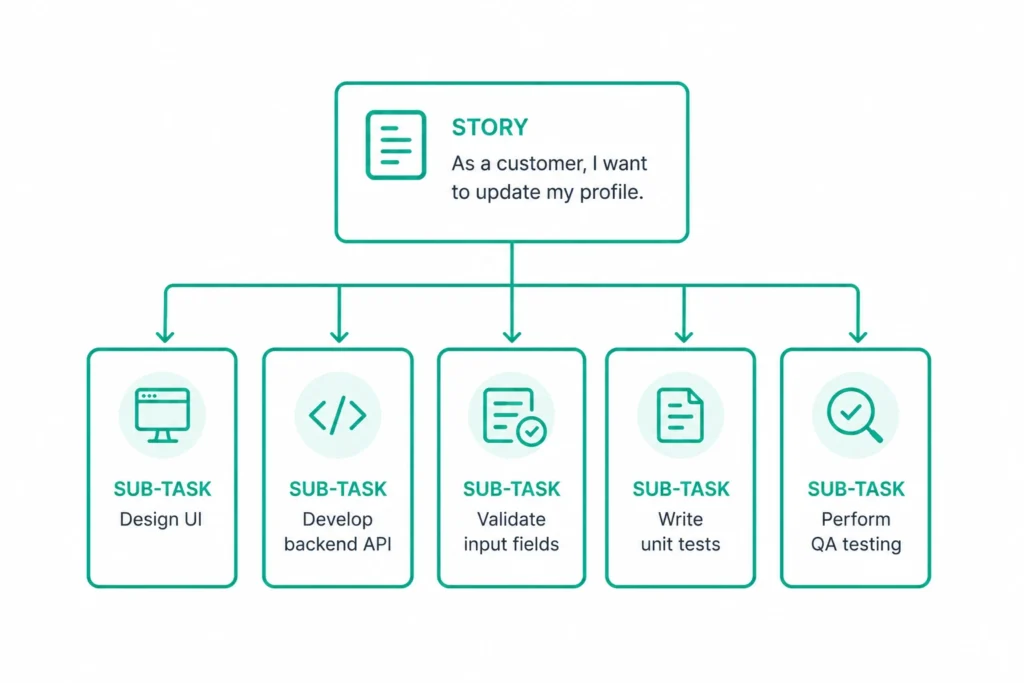
A Sub-task is the smallest unit of work in Jira. It breaks down a Story or Task into smaller, assignable activities.
Unlike Tasks, Sub-tasks cannot exist independently. They always belong to a parent Story or Task.
Example
Story
As a customer, I want to update my profile.
Sub-tasks:
- Design UI
- Develop backend API
- Validate input fields
- Write unit tests
- Perform QA testing
Sub-tasks improve collaboration by allowing multiple team members to work on different aspects of the same Story simultaneously.
However, avoid creating unnecessary Sub-tasks for very small pieces of work, as excessive hierarchy can make boards difficult to manage.
Best Practices for Using Epics, Stories, and Tasks in Jira
Using the correct Jira issue type is only the first step. To maximize the benefits of Agile project management, teams should follow consistent practices when creating and organizing Epics, Stories, Tasks, and Sub-tasks. A well-structured Jira project improves backlog management, sprint planning, reporting, and collaboration while reducing confusion across teams.
Below are some proven best practices that help organizations maintain a scalable and efficient Jira environment.
1. Create Outcome-Focused Epics
An Epic should represent a significant business objective rather than a list of technical activities. Product managers should define Epics around customer value, product capabilities, or strategic initiatives that require multiple Stories to complete.
Good Examples
- Improve Customer Onboarding
- Launch Mobile Banking Application
- Enhance Checkout Experience
Avoid
- Update Database
- Refactor Backend
- Fix Login API
The latter examples describe technical work and are better suited as Tasks or Stories.
Organizations managing long-term product roadmaps can use Epics alongside Jira Product Discovery to connect strategic planning with execution.
2. Write User-Centric Stories
Stories should always focus on delivering value to the end user rather than describing technical implementation.
A simple way to write effective Stories is by following the widely accepted user story format:
As a user
I want a specific capability
So that I can achieve a desired outcome.
For example:
As a customer, I want to save multiple delivery addresses so that I can complete future purchases more quickly.
Well-defined Stories improve communication between product owners, developers, and QA teams while ensuring everyone understands the intended outcome.
3. Keep Tasks Small and Actionable
Tasks should represent a single piece of technical or operational work that can be completed within a short timeframe.
Examples include:
- Configure authentication
- Deploy application to staging
- Create database indexes
- Update API documentation
- Configure monitoring alerts
Large Tasks often become difficult to estimate and monitor. If a Task grows too large, consider splitting it into multiple Tasks or converting it into one or more Stories.
4. Use Sub-tasks Only When Necessary
Sub-tasks help divide work among multiple contributors, but excessive use can make Jira boards unnecessarily complex.
Use Sub-tasks when:
- Development and testing are handled separately
- Multiple specialists work on the same Story
- Work needs finer progress tracking
Avoid creating Sub-tasks simply to represent every minor activity.
For example, instead of creating separate Sub-tasks like “Start Development” or “Continue Coding,” group related work into meaningful units.
5. Maintain a Clean Jira Hierarchy
A consistent hierarchy makes projects easier to understand and report on.
Recommended structure:
Initiative
↓
Epic
↓
Story
↓
Task
↓
Sub-task
Keeping the hierarchy simple improves sprint planning, reporting, and backlog management while reducing administrative overhead.
6. Link Related Issues Properly
Jira allows teams to establish relationships between issues using built-in link types such as:
- Blocks
- Is Blocked By
- Relates To
- Duplicates
- Clones
Proper issue linking helps teams understand dependencies, identify risks, and coordinate work across multiple projects.
Organizations managing cross-functional initiatives often benefit from integrating Jira with documentation, collaboration platforms and Jira with Confluence and Other Tools for Productivity.
7. Groom and Review the Backlog Regularly
A backlog filled with outdated Stories, duplicate Tasks, or unused Epics can slow planning and reduce team productivity.
Regular backlog grooming helps teams:
- Remove obsolete work items
- Merge duplicate issues
- Reprioritize upcoming work
- Improve sprint readiness
- Maintain accurate estimates
Enterprise Jira Cleanup Best Practices keeping the backlog clean also improves Jira performance, particularly for organizations managing thousands of issues.
Common Mistakes Teams Make with Jira Epics, Stories, and Tasks
Even experienced Agile teams sometimes misuse Jira issue types, leading to poor reporting, inaccurate sprint planning, and inefficient workflows.
Here are some of the most common mistakes—and how to avoid them.
| Common Mistake | Why It Causes Problems | Best Practice |
| Creating everything as a Task | Reduces visibility into user value | Use Stories for customer-facing features |
| Using an Epic for a one-day activity | Makes reporting inaccurate | Reserve Epics for large initiatives |
| Writing Stories without acceptance criteria | Leads to ambiguity | Define clear completion criteria |
| Creating oversized Stories | Difficult to estimate and complete | Break large Stories into smaller ones |
| Excessive Sub-tasks | Adds unnecessary complexity | Use only when multiple contributors are involved |
| Leaving completed Epics open | Clutters dashboards and reports | Close completed Epics promptly |
Tips for Managing Jira at Scale
As organizations grow, Jira projects often become more complex. Multiple teams, larger backlogs, and additional integrations require consistent governance to maintain performance and visibility.
Consider these practices when scaling Jira:
- Standardize issue types across teams.
- Create reusable workflow templates.
- Use automation to reduce repetitive manual work.
- Archive completed projects and Epics.
- Review custom fields regularly.
- Monitor workflow complexity.
- Use dashboards for portfolio-level reporting.
Organizations can further improve efficiency by Jira Service Management Automation, such as issue assignment, approvals, notifications, and status updates.
Why Businesses Choose MicroGenesis TechSoft for Jira Consulting
Successfully implementing Jira requires more than understanding issue types. Organizations also need well-designed workflows, governance, integrations, and user adoption strategies to maximize the platform’s value.
MicroGenesis TechSoft helps organizations optimize Jira for Agile software development, IT service management, and enterprise project management. With deep expertise in the Atlassian ecosystem, the company assists businesses in designing scalable Jira implementations that improve collaboration, streamline workflows, and enhance project visibility.
Its Jira consulting services include:
- Jira implementation and configuration
- Agile workflow design
- Jira Software consulting
- Jira Service Management implementation
- Custom Jira integrations
- Workflow automation
- Atlassian Cloud migration
- Marketplace app consulting
- Jira performance optimization
- User training and governance
Whether organizations are adopting Jira for the first time or optimizing an existing environment, MicroGenesis TechSoft helps align Jira with business goals and Agile best practices.
Related Reading: Why Companies Choose Atlassian Jira Software
Frequently Asked Questions (FAQs)
What is an Epic in Jira?
An Epic is a large body of work that groups related Stories and Tasks under a common business objective. Epics typically span multiple sprints and help teams organize strategic initiatives.
What is a Story in Jira?
A Story represents a user requirement or feature that delivers value to an end user. Stories are usually completed within a sprint and often belong to an Epic.
What is a Task in Jira?
A Task represents technical, operational, or administrative work that supports a project. Unlike Stories, Tasks do not necessarily provide direct customer value.
What is the difference between an Epic, Story, and Task in Jira?
The primary difference is scope:
- Epic: Large business initiative
- Story: User-facing feature or requirement
- Task: Technical or operational activity
Together, they create a structured hierarchy that helps Agile teams plan and deliver work efficiently.
Can a Task belong directly to an Epic?
Yes. Jira allows Tasks to be associated directly with an Epic. However, most Agile teams prefer to organize customer-facing work through Stories while using standalone Tasks for technical or operational activities.
Should every Story have Sub-tasks?
No. Sub-tasks should only be created when a Story needs to be divided into smaller activities assigned to different team members or specialized roles.
Quick Reference: Jira Epic vs Story vs Task
| Feature | Epic | Story | Task |
| Purpose | Large business initiative | User requirement | Technical or operational work |
| Duration | Multiple sprints | One sprint | Few hours to a few days |
| User Value | Indirect | Direct | Usually indirect |
| Contains Child Issues | Yes | Yes (Sub-tasks) | Yes (Sub-tasks) |
| Sprint Planning | Rarely | Yes | Yes |
| Example | Launch Customer Portal | User Login | Configure Authentication |
Jira Epic vs Story vs Task: Real-World Example
Consider an online banking application.
Epic
Improve Mobile Banking Experience
↓
Stories
- As a customer, I want biometric login.
- As a customer, I want instant fund transfers.
- As a customer, I want transaction notifications.
↓
Tasks (for Biometric Login Story)
- Design authentication flow
- Develop API
- Configure mobile SDK
- Implement UI
- Perform QA testing
- Deploy to staging
↓
Sub-tasks
- Write unit tests
- Update documentation
- Conduct security review
This hierarchy helps product owners track strategic initiatives while enabling developers to manage day-to-day execution efficiently.
Jira Hierarchy Diagram
Initiative
│
▼
Epic
│
▼
Story
│
▼
Task
│
▼
Sub-task
As organizations grow, additional hierarchy levels such as Initiatives (available in Jira Advanced Roadmaps) can be used to manage large programs that span multiple Epics.
Conclusion
Understanding the differences between Jira Epics, Stories, and Tasks is fundamental to building an effective Agile workflow. Each issue type serves a distinct purpose: Epics organize large business initiatives, Stories capture user-facing requirements, and Tasks track the technical or operational work needed to deliver those requirements.
Using the right hierarchy improves sprint planning, backlog organization, reporting, and collaboration while making it easier to scale Agile practices across teams. Combined with consistent governance, automation, and well-defined workflows, a structured Jira environment enables organizations to deliver projects more efficiently and with greater transparency.
For organizations looking to optimize Jira beyond issue hierarchy, partnering with experienced Atlassian experts can accelerate adoption and ensure the platform is configured to support long-term business objectives. MicroGenesis TechSoft provides end-to-end Jira consulting, implementation, workflow optimization, automation, and integration services to help organizations maximize the value of their Atlassian investment.