
Managing projects across multiple teams, deadlines, dependencies, and stakeholders can quickly become complex. Jira gives project managers and teams a structured way to plan, prioritize, track, and report work from a single platform.
Whether you’re new to Jira or looking to improve how your organization uses it, this guide explains how to use Jira for project management, from creating your first project to managing Agile workflows, tracking progress, and improving team productivity.
Need help setting up Jira for your organization?
Talk to Our Jira Experts
What Is Jira?
Jira is a project and work management platform from Atlassian that helps teams plan, track, manage, and report work. It supports Agile approaches such as Scrum and Kanban and can be customized for different teams and workflows.
Jira is used by more than 300,000 companies worldwide, including organizations across software, financial services, automotive, healthcare, government, and other industries.
For project management, Jira revolves around four basic concepts:
- Issue: A task, bug, story, or piece of work.
- Project: A collection of related work.
- Board: A visual representation of work and workflow.
- Workflow: The process an issue follows from start to completion.
What Is Jira Used For?
Jira is used to plan projects, manage tasks, track progress, prioritize work, manage dependencies, support Agile teams, and monitor delivery performance.
Common Jira use cases include:
- Project planning
- Task management
- Agile project management
- Sprint planning
- Backlog management
- Bug tracking
- Workflow management
- Project reporting
- Team collaboration
- Resource and dependency tracking
Jira can also be customized beyond software development, making it useful for business and cross-functional teams.
Looking to improve your existing Jira environment?
Explore Jira Consulting & Services
How to Use Jira for Project Management
Using Jira for project management typically involves five stages: configure the project, plan the work, set up the team, track execution, and review completion.
Step 1: Configure Your Jira Project
Start by selecting a suitable Jira project template based on your delivery methodology.
For example, a Scrum template can support sprint-based development, while a Kanban board can help teams manage continuous workflows.
Jira provides templates and customizable workflows so organizations can adapt project management processes to their requirements.
Best practice: Keep workflows simple initially. Add custom statuses, fields, and automation only when there is a clear business requirement.
Step 2: Create Your Project Plan
Before creating Jira issues, define the project’s objectives, deliverables, milestones, dependencies, and priorities.
Then translate the work into Jira issues such as:
- Epics
- Stories
- Tasks
- Bugs
- Subtasks
Add relevant descriptions, owners, priorities, attachments, deadlines, and dependencies to each issue.
For complex projects, use Jira roadmaps and timelines to visualize work across teams.
CTA: Need help designing Jira workflows and project structures?
Get Jira Implementation Support
Step 3: Set Up Your Team and Permissions
Not every stakeholder needs the same level of Jira access.
Set appropriate roles and permissions for:
- Project managers
- Product owners
- Developers
- QA teams
- Business stakeholders
- Administrators
This helps protect project information while ensuring the right people can create, update, review, and report work.
For growing organizations, establishing governance early can prevent unnecessary complexity later.
Related: Enterprise Jira Cleanup Best Practices
Step 4: Track Project Progress
Jira provides boards, dashboards, reports, timelines, and other views to help project managers understand delivery progress.
Track indicators such as:
- Work completed
- Work in progress
- Blocked issues
- Sprint progress
- Lead time
- Cycle time
- Workload
- Dependencies
Jira’s project management capabilities are designed to provide visibility into work and help teams identify bottlenecks.
Step 5: Complete and Review the Project
When project work is completed, review outstanding issues, unresolved dependencies, documentation, and project outcomes.
Project managers should also review delivery metrics and identify opportunities for process improvement.
For recurring projects, these insights can help teams improve future planning and execution.
How to Create an Issue in Jira
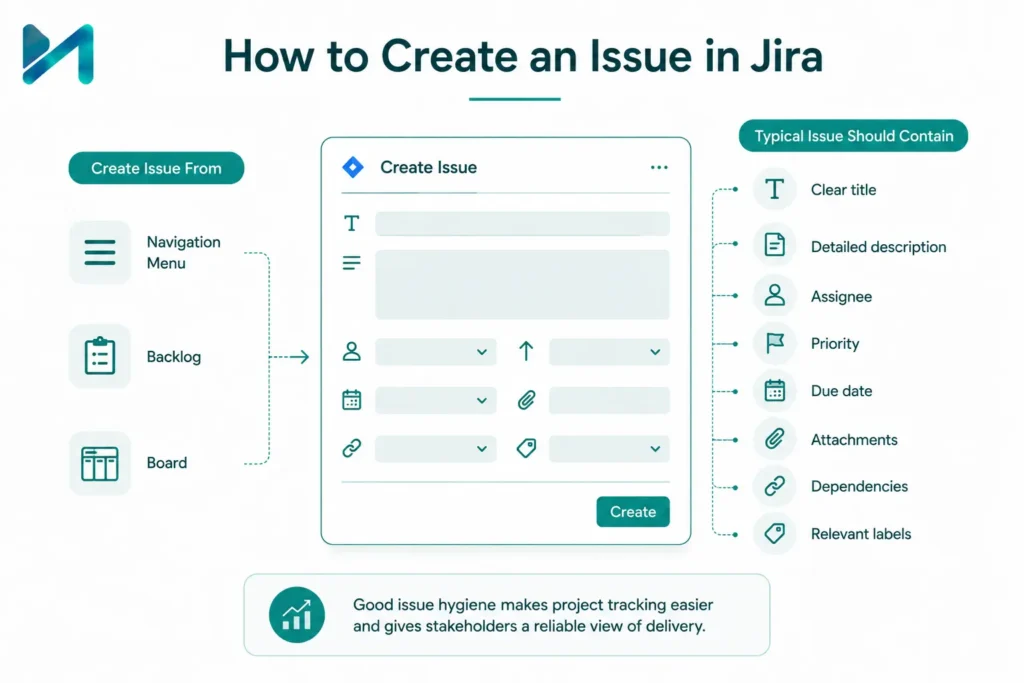
An issue represents an individual piece of work in Jira. Depending on your Jira configuration, you can create issues from the navigation menu, backlog, or directly from a board.
A typical issue should contain:
- Clear title
- Detailed description
- Assignee
- Priority
- Due date
- Attachments
- Dependencies
- Relevant labels
Good issue hygiene makes project tracking easier and gives stakeholders a reliable view of delivery.
Related: Jira Agile Workflows and Boards
How to Use Jira for Agile Project Management
Jira supports Agile methodologies including Scrum, Kanban, and hybrid approaches. Teams can use backlogs, boards, sprints, reports, roadmaps, and workflows to manage iterative delivery.
For Scrum teams, the typical Jira workflow is:
Product Backlog → Sprint Planning → Sprint → Review → Retrospective
For Kanban teams:
Backlog → To Do → In Progress → Review → Done
Jira also supports WIP limits, reporting, backlog management, and other Agile practices.
Learn more about Jira Agile Project Management
How to Use Jira for Sprint Planning
Sprint planning determines which work the team will complete during the next sprint.
A simple Jira sprint planning process is:
Review and prioritize the backlog.
Estimate available team capacity.
Select high-priority issues.
Add issues to the sprint.
Confirm sprint goals.
Start the sprint.
Monitor progress throughout execution.
Jira’s backlog and sprint capabilities help teams organize work and track delivery throughout an iteration.
How to Use Jira for Task Management
Jira can act as a centralized task management system by giving each task a defined owner, priority, status, and workflow.
To use Jira effectively:
- Break large deliverables into manageable issues.
- Assign clear ownership.
- Set priorities.
- Define dependencies.
- Keep statuses updated.
- Use automation for repetitive activities.
- Review blocked work regularly.
For larger organizations, standardizing these practices across teams can significantly improve visibility.
Is your Jira environment becoming difficult to manage?
Talk to Our Jira Service Management Experts
How to Use Jira Dashboards and Reports
Jira dashboards help project managers and executives monitor delivery without reviewing individual issues.
Useful information to display includes:
- Sprint progress
- Open issues
- Blocked work
- Workload
- Velocity
- Cycle time
- Project status
- Delivery trends
For leadership teams, dashboards should focus on business-relevant indicators rather than excessive technical detail.
How to Use Jira Effectively: 7 Best Practices
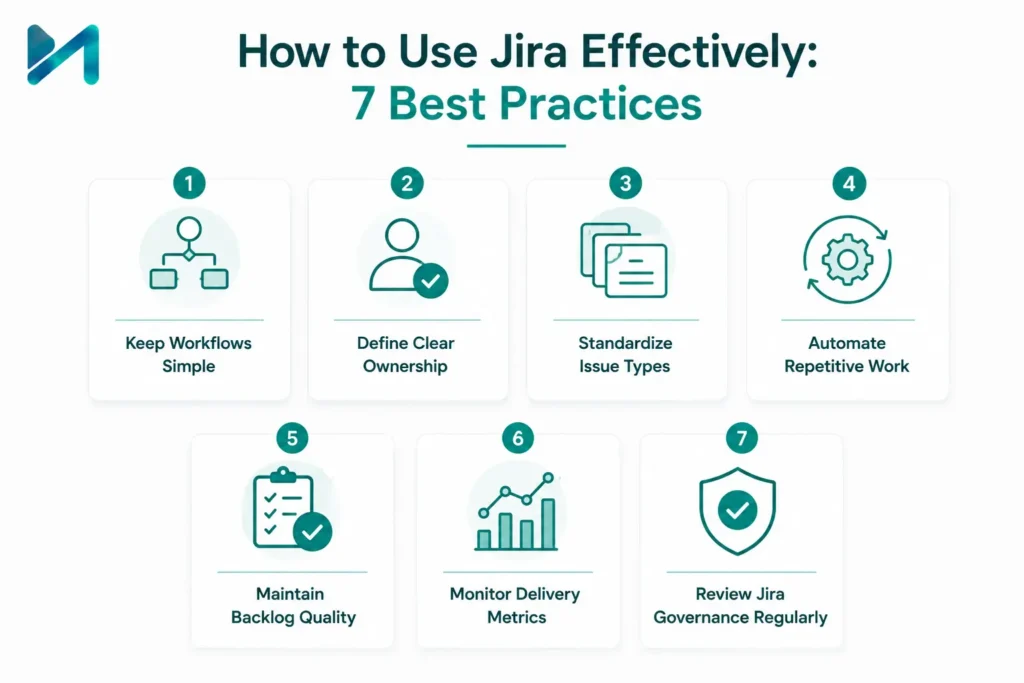
Effective Jira usage depends more on process discipline than simply configuring the tool.
Keep Workflows Simple
Avoid creating excessive statuses and approval stages unless they serve a genuine business need.
Define Clear Ownership
Every important issue should have a clear owner and priority.
Standardize Issue Types
Create consistent rules for when teams should use epics, stories, tasks, bugs, and subtasks.
Automate Repetitive Work
Use Jira automation to reduce manual updates, notifications, assignments, and transitions.
Maintain Backlog Quality
Regularly remove outdated, duplicate, or low-value issues.
Monitor Delivery Metrics
Use reports to identify delays, bottlenecks, and capacity issues.
Review Jira Governance Regularly
As organizations grow, unnecessary workflows, fields, projects, and permissions can make Jira harder to manage.
Related: Jira Performance Issues in Growing Teams
Common Jira Mistakes to Avoid
Organizations often struggle with Jira when the platform becomes overly customized or poorly governed.
Common mistakes include:
- Creating too many custom fields
- Using unnecessary workflows
- Poor backlog management
- Duplicate projects
- Inconsistent issue types
- Excessive permissions
- Manual processes that could be automated
- Dashboards overloaded with irrelevant metrics
A structured Jira governance strategy helps prevent these problems as teams and projects scale.
Jira for Project Managers
Project managers can use Jira to centralize planning, execution, reporting, and stakeholder visibility.
Instead of relying on spreadsheets, emails, and separate status reports, Jira can provide a shared view of project work, ownership, dependencies, and progress.
Atlassian’s project management resources specifically highlight Jira’s use for planning, tracking, reporting, workload management, and Agile delivery.
Related: How Growing Companies Can Implement Jira
Jira for Non-Technical Teams
Jira is not limited to software development teams. With the right configuration, organizations can use Jira for marketing, HR, operations, finance, project management, and other business workflows.
Teams can create customized workflows, issue types, dashboards, and permissions based on their operating model.
Related: Jira for Non-Technical Teams
When Should You Consider Jira Consulting?
Basic Jira configuration is relatively straightforward, but larger organizations may need professional guidance when managing multiple teams, complex workflows, integrations, governance, or Jira Service Management.
Consider Jira consulting when you need to:
- Standardize Jira across teams
- Redesign complex workflows
- Improve Jira performance
- Clean up an existing Jira environment
- Integrate Jira with other enterprise tools
- Implement Jira Service Management
- Establish Jira governance
- Improve reporting and automation
Explore MicroGenesis Jira Services
Why Choose MicroGenesis for Jira Services?
MicroGenesis helps organizations implement, optimize, integrate, and manage Atlassian solutions according to their business and operational requirements.
Our Jira expertise can help organizations with:
- Jira implementation
- Jira Service Management
- Workflow optimization
- Jira integrations
- Automation
- Governance
- Performance optimization
- Enterprise Jira consulting
For organizations in different locations, we also provide dedicated Jira services across India and US.
Jira Service Management Services · Jira Services in the US
Conclusion
Learning how to use Jira for project management starts with understanding projects, issues, boards, workflows, backlogs, and reports. Once these fundamentals are established, teams can use Jira to improve planning, collaboration, visibility, and Agile delivery.
For growing organizations, however, successful Jira adoption requires more than basic configuration. Governance, workflow design, automation, integrations, and ongoing optimization become increasingly important.
If your organization wants to implement Jira, optimize an existing Jira environment, or build a scalable project management framework, MicroGenesis can help.
Ready to unlock the full potential of Jira?
Speak with a Jira Expert
FAQs
What is Jira used for?
Jira is used for project planning, task management, Agile development, issue tracking, workflow management, reporting, and collaboration. It can be customized for software and non-technical teams.
How do I use Jira for project management?
Create a project, select a workflow or template, define issues and priorities, assign work, track progress through boards and reports, and review delivery metrics.
Is Jira good for beginners?
Yes. Jira provides templates, boards, backlogs, and guided workflows that make it possible for beginners to start managing projects without building everything from scratch.
How do I use Jira for Agile project management?
Choose Scrum, Kanban, or another suitable Agile approach, then use Jira boards, backlogs, sprints, reports, and workflows to plan and track work.
Can Jira be used outside software development?
Yes. Jira can support project and workflow management across business, marketing, operations, HR, and other teams with appropriately configured workflows.
How can I improve Jira usage in a growing organization?
Start with standardized workflows, clear ownership, governance, automation, backlog management, integrations, and meaningful reporting. Periodic Jira cleanup can also prevent unnecessary complexity.